
Remote Phone Control
Zalor Digital Tools In-app purchases
Help family with their phone. Every session is approved on that device.
- Rating
- 4.0
- 58 ratings
- Downloads
- 55.9K+
- on Google Play
- Price
- Free
- In-app purchases
- Updated
- Oct 21
- 2026 · v3.0.12
Screenshots


About Remote Phone Control
Remote Phone lets you see and control another Android phone in real time — and the person on that phone approves every single session on their own screen before it starts.
Perfect for helping a parent, partner or friend who is stuck on their phone, reaching your own second device, or giving quick tech support without being in the same room.
WHAT YOU CAN DO
• See the other phone's screen live
• Tap, swipe and scroll on it as if it were in your hand
• Walk someone through an app, a setting or a form — by doing it for them
• Connect to your own second phone or tablet from anywhere
HOW IT WORKS
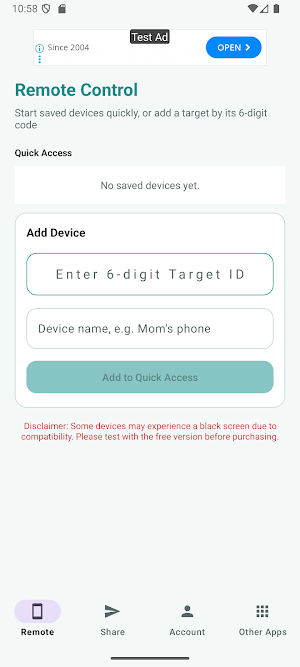
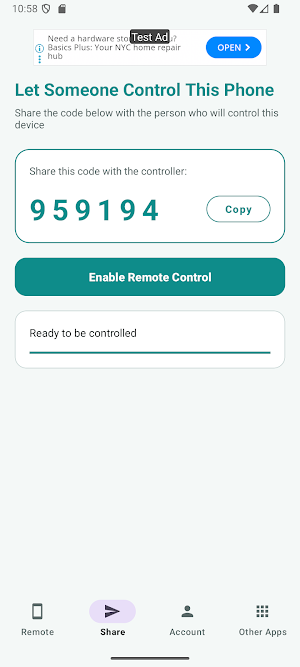
1. On the phone that needs help, open the Share tab. It shows a permanent 6-digit ID.
2. On your phone, open the Remote tab and enter that 6-digit ID.
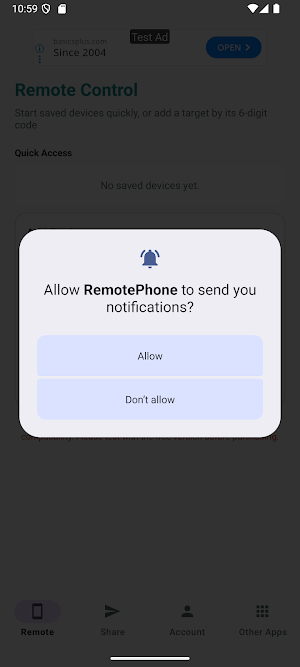
3. The other phone shows a request. When they tap Allow, the session starts.
Saved devices stay in your list, so the ID is only entered once.
CONSENT IS BUILT IN
There is no hidden or background mode. The other phone must accept every connection, Android shows a screen-sharing indicator for the whole session, and either side can end it instantly. Remote Phone cannot be used to watch a device without its owner knowing — that is a design decision, not a setting.
FREE AND PREMIUM
Free: 2 sessions per day, 10 minutes each, plus 1 extra session for watching a short ad.
Premium: unlimited sessions, no time limit. Billed monthly or yearly through Google Play, cancel anytime.
Sessions are only counted once a connection is established — failed attempts do not use your quota.
BEFORE YOU SUBSCRIBE
Screen sharing depends on your phone's video encoder, and a small number of devices show a black screen. Please test the free tier on both phones first.
ACCESSIBILITY SERVICE
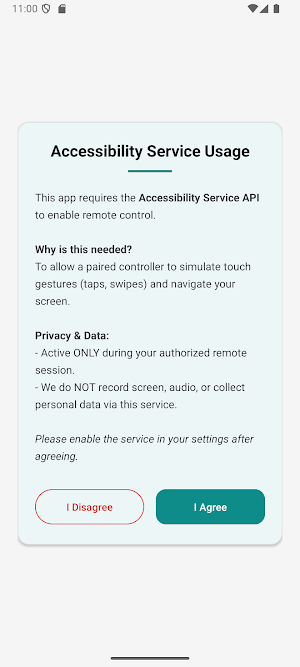
Remote Phone uses the Android Accessibility Service API only to perform remote touch gestures (tap, swipe, long press) while a session is running and the device owner has approved it.
It is not used to:
• Collect personal or sensitive data
• Monitor user activity outside an active remote session
• Bypass system security features
• Change system settings without user consent
Accessibility access is optional, is enabled by you, and can be disabled at any time in system settings.
PRIVACY
Remote Phone does not collect personal data unrelated to its core functionality. All sessions are started explicitly by the user and are never recorded.
Perfect for helping a parent, partner or friend who is stuck on their phone, reaching your own second device, or giving quick tech support without being in the same room.
WHAT YOU CAN DO
• See the other phone's screen live
• Tap, swipe and scroll on it as if it were in your hand
• Walk someone through an app, a setting or a form — by doing it for them
• Connect to your own second phone or tablet from anywhere
HOW IT WORKS
1. On the phone that needs help, open the Share tab. It shows a permanent 6-digit ID.
2. On your phone, open the Remote tab and enter that 6-digit ID.
3. The other phone shows a request. When they tap Allow, the session starts.
Saved devices stay in your list, so the ID is only entered once.
CONSENT IS BUILT IN
There is no hidden or background mode. The other phone must accept every connection, Android shows a screen-sharing indicator for the whole session, and either side can end it instantly. Remote Phone cannot be used to watch a device without its owner knowing — that is a design decision, not a setting.
FREE AND PREMIUM
Free: 2 sessions per day, 10 minutes each, plus 1 extra session for watching a short ad.
Premium: unlimited sessions, no time limit. Billed monthly or yearly through Google Play, cancel anytime.
Sessions are only counted once a connection is established — failed attempts do not use your quota.
BEFORE YOU SUBSCRIBE
Screen sharing depends on your phone's video encoder, and a small number of devices show a black screen. Please test the free tier on both phones first.
ACCESSIBILITY SERVICE
Remote Phone uses the Android Accessibility Service API only to perform remote touch gestures (tap, swipe, long press) while a session is running and the device owner has approved it.
It is not used to:
• Collect personal or sensitive data
• Monitor user activity outside an active remote session
• Bypass system security features
• Change system settings without user consent
Accessibility access is optional, is enabled by you, and can be disabled at any time in system settings.
PRIVACY
Remote Phone does not collect personal data unrelated to its core functionality. All sessions are started explicitly by the user and are never recorded.
What’s new
Version 3.0.12 · Updated October 21, 2026
Yearly price added.
Alternatives to Remote Phone Control
Looking for apps like Remote Phone Control? Here are 6 similar Android apps on Google Play. The highest rated is Hik-Partner Pro (Formerly HPC) (4.8/5), and all 6 are free to download.
-
Linksys 3.3
-
eufy 4.5
-
VicoHome: Smart Home Camera 4.5
-
Hik-Partner Pro (Formerly HPC) 4.8
-
Dzees Home 4.7
-
CoinIn – Coin Scan Identifier 4.5
| App | Rating | Price | Installs | Last updated | Compare |
|---|---|---|---|---|---|
| Remote Phone Control | 4.0 / 5 | Free | 50,000+ | Oct 21, 2026 | |
| Linksys | 3.3 / 5 | Free | 5,000,000+ | Nov 13, 2025 | Compare |
| eufy | 4.5 / 5 | Free | 5,000,000+ | Sep 21, 2026 | Compare |
| VicoHome: Smart Home Camera | 4.5 / 5 | Free | 1,000,000+ | Oct 23, 2026 | Compare |
| Hik-Partner Pro (Formerly HPC) | 4.8 / 5 | Free | 5,000,000+ | Oct 22, 2026 | Compare |
| Dzees Home | 4.7 / 5 | Free | 100,000+ | Dec 18, 2025 | Compare |
| CoinIn – Coin Scan Identifier | 4.5 / 5 | Free | 1,000,000+ | Oct 5, 2026 | Compare |
Similar apps on Google Play
- Linksys
- eufy
- VicoHome: Smart Home Camera
- Hik-Partner Pro (Formerly HPC)
- Dzees Home
- CoinIn – Coin Scan Identifier
- TAP Kiln Control Mobile
- Battery Transfer / Receiver
- Cinmoore
- ScreenStream
- Learn Ethical Hacking
- Remote Mouse
- Hubspace
- Wi-Fi Toolkit
- Mantis Laser Academy
- Mobile Hotel PMS by Hotel Sync
- Spatial Touch™ - Touchless
- F-Secure Mobile Security
- eloomi
- NETGEAR Orbi – WiFi System App
- Blink Home Monitor
- Klarstein
- Nest
- Home Security Camera WardenCam
- Parental Control - Kroha
- Clony: AI Voice & Face Cloning
- ASUS Router
- WiFi Mouse Pro
- SPYPOINT
- Universal Remote for Smart TV
- Home V
- Starlink
- Next Spaceflight
- DREO
- Rheem EcoNet
- DeskIn Remote Desktop
- FlexiRoam: eSIM & Data Plans
- Parental Control App- FamiSafe
- PDK Access by ProdataKey
- Quo (formerly OpenPhone)
- IP Camera Viewer
- Philips Hue
- AirDroid: File & Remote Access
- ZUMIMALL
- Barbell Medicine
- Parental Control - Kidslox
- CompanyCam
- RAYNET CRM
- Emaldo
- TeamViewer Remote Control
- Letterly: Write by Voice & AI
- CrookCatcher: Who Touched?
- GHome - GHome Smart
- CloudEdge
- Simpro Mobile
- Phone Clone Tool: Switch data
- Speedify: Bond Satellite + 5G
- Yubii Home
- Castro Premium - system info
- Solink
- Kahf Guard: Reels & Site Block
- Anti Spy Detector - Spyware
- OSAIO
- Pocket Prep IT & Cybersecurity
- Home Assistant
- Learn Ethical Hacking
- Reolink
- Smart Connect
- Parental Control App Blocker
- MyDyson™
- Illumine - Childcare App
- myPhonak
- Chipolo
- V380
- iRobot Home (Classic)
- Balance: salud hormonal
- App Lock: Fingerprint, Pattern
- Zoiper IAX SIP VOIP Softphone
- FAX Desk: Send Fax from Phone
- LoungeMe
- Hik-Connect - for End User
- Home + Control
- Homey — A better smart home
- Philips Lumea IPL
- iRISCO