

Expense Tracker - Log Expenses
Sinhala lanka Lifestyle
Log Expenses - Daily,Monthly,Yearly spending reports +Export PDF,excel-csv
- Downloads
- 8.9K+
- on Google Play
- Price
- Free
- No in-app purchases
- Updated
- May 6
- 2026 · v1.04
Screenshots


About Expense Tracker - Log Expenses
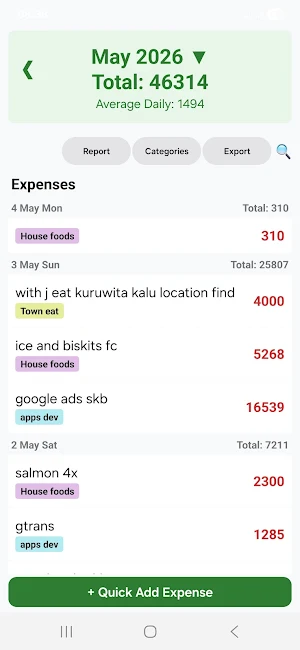
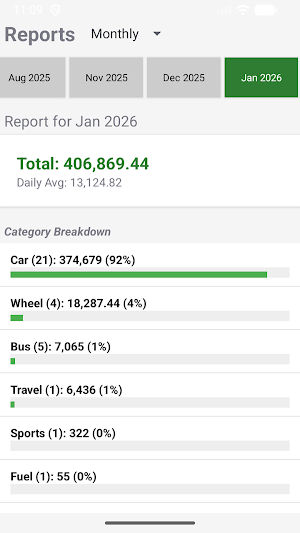
Add/log Daily expenses then View exactly where your money goes by daily monthly yearly reports and See spending by category (Food, Rent, Travel, etc.) 100% free app can Export PDF, csv(excel) reports, backups.
Take control of your finances with Expense Tracker – the simplest, most quick way to manage your money.
Expense Tracker by Jagath is designed for users who want a fast, clutter-free way to log daily spending without compromising their personal data. Unlike other finance apps, your data never leaves your device. No accounts, no cloud syncing, and no internet required.
WHY CHOOSE EXPENSE TRACKER?
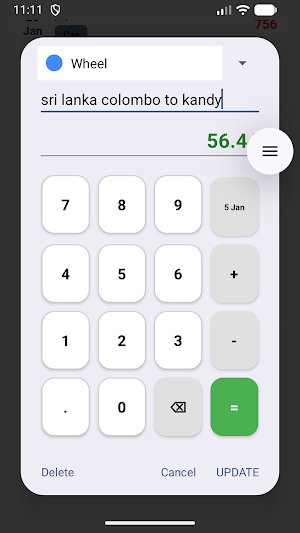
⚡ Lightning-Fast Logging Use the "Quick Add" feature to log expenses in seconds. Select a category, enter the amount using the built-in calculator, and you’re done!
📊 Detailed PDF & Excel Reports Need to review your spending or share it with an accountant? Generate professional PDF reports or export your data to Excel (.csv) with just one tap. Reports are neatly organized by month and year.
📂 Easy Backup & Restore Keep your data safe. Use the built-in backup tool to export your database to your preferred storage location. Moving to a new phone? Simply import your backup file and pick up right where you left off.
🔒 100% Private & Secure Your financial data is your business. All records are stored locally on your phone’s internal database. We have no access to your information, and the app operates entirely offline.
KEY FEATURES:
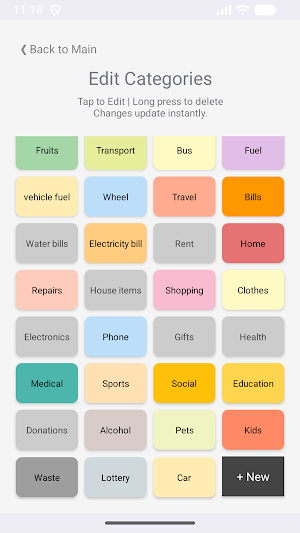
Custom Categories: Organize spending with color-coded categories that fit your lifestyle.
Built-in Calculator: Add up multiple items directly within the expense dialog.
Monthly Summaries: See your total spending and daily average at a glance.
Clean Interface: A modern, intuitive design with a fixed "Quick Add" button for easy access.
100% free & No Hidden Fees: Enjoy a seamless experience without annoying interruptions.
How it works:
Open the app and set up your active categories.
Tap the "+ Quick Add" button at the bottom of the screen.
Enter your expense amount and save.
Monitor your budget through the history list or generated reports.
Start tracking your path to financial freedom today with a tool that respects your privacy.
Take control of your finances with Expense Tracker – the simplest, most quick way to manage your money.
Expense Tracker by Jagath is designed for users who want a fast, clutter-free way to log daily spending without compromising their personal data. Unlike other finance apps, your data never leaves your device. No accounts, no cloud syncing, and no internet required.
WHY CHOOSE EXPENSE TRACKER?
⚡ Lightning-Fast Logging Use the "Quick Add" feature to log expenses in seconds. Select a category, enter the amount using the built-in calculator, and you’re done!
📊 Detailed PDF & Excel Reports Need to review your spending or share it with an accountant? Generate professional PDF reports or export your data to Excel (.csv) with just one tap. Reports are neatly organized by month and year.
📂 Easy Backup & Restore Keep your data safe. Use the built-in backup tool to export your database to your preferred storage location. Moving to a new phone? Simply import your backup file and pick up right where you left off.
🔒 100% Private & Secure Your financial data is your business. All records are stored locally on your phone’s internal database. We have no access to your information, and the app operates entirely offline.
KEY FEATURES:
Custom Categories: Organize spending with color-coded categories that fit your lifestyle.
Built-in Calculator: Add up multiple items directly within the expense dialog.
Monthly Summaries: See your total spending and daily average at a glance.
Clean Interface: A modern, intuitive design with a fixed "Quick Add" button for easy access.
100% free & No Hidden Fees: Enjoy a seamless experience without annoying interruptions.
How it works:
Open the app and set up your active categories.
Tap the "+ Quick Add" button at the bottom of the screen.
Enter your expense amount and save.
Monitor your budget through the history list or generated reports.
Start tracking your path to financial freedom today with a tool that respects your privacy.
Alternatives to Expense Tracker - Log Expenses
Looking for apps like Expense Tracker - Log Expenses? Here are 6 similar Android apps on Google Play. The highest rated is Money Manager: Expense Tracker (4.7/5), and all 6 are free to download.
-
Money Manager: Expense Tracker 4.7
-
inyad Mahaal: POS & Invoices 4.3
-
BEEP - Expiry Date Tracking 1.9
-
Payroll, Payslip & Timesheet 4.1
-
BillOut - Bill Organizer 4.6
-
Keepr: Simple Budget Planner 3.9
| App | Rating | Price | Installs | Last updated | Compare |
|---|---|---|---|---|---|
| Expense Tracker - Log Expenses | – | Free | 5,000+ | May 6, 2026 | |
| Money Manager: Expense Tracker | 4.7 / 5 | Free | 1,000,000+ | Oct 20, 2025 | Compare |
| inyad Mahaal: POS & Invoices | 4.3 / 5 | Free | 500,000+ | Nov 3, 2026 | Compare |
| BEEP - Expiry Date Tracking | 1.9 / 5 | Free | 500,000+ | Oct 6, 2026 | Compare |
| Payroll, Payslip & Timesheet | 4.1 / 5 | Free | 100,000+ | Oct 20, 2026 | Compare |
| BillOut - Bill Organizer | 4.6 / 5 | Free | 50,000+ | Jun 21, 2026 | Compare |
| Keepr: Simple Budget Planner | 3.9 / 5 | Free | 50,000+ | Sep 26, 2026 | Compare |
Similar apps on Google Play
- Money Manager: Expense Tracker
- inyad Mahaal: POS & Invoices
- BEEP - Expiry Date Tracking
- Payroll, Payslip & Timesheet
- BillOut - Bill Organizer
- Keepr: Simple Budget Planner
- MyMoney Pro - Expense & Budget
- Splitser - WieBetaaltWat
- DigiBudget: Expense Tracker
- MyMoney—Track Expense & Budget
- Daily Expense — My Budget
- Sesterce – Share Expenses
- Monefy - Budget & Expenses app
- Budgeting App - Spend Tracker
- Easy Invoice & Quotation Maker
- Pefi: Expense Tracker
- Finimize - Finance Insights
- Livestock Manager Farm Tracker
- yescan - PDF OCR Scanner
- Stock and Inventory Simple
- LoungeMe
- Daily Expenses 4
- Timely – Bookings & payments
- Paycom
- YNAB
- Money Flow. Budget Tracker.
- Memento Database
- LockTrip
- Balance: Couple Budget & Money
- Deputy: Employee Scheduling
- Spendable: AI Money Tracker
- Bill Payment Reminder, Budgets
- Beyond Budget - Budget Planner
- Trezor Suite
- Wallet: Budget Expense Tracker
- Settle Up – Group Expenses
- Kittysplit: Bills & cost split
- ZenHR - HR Software
- Budget App & Tracker: Spendee
- MyAccountability Plus
- CalcTape Calculator with Tape
- Splitwise
- Uni Invoice & Billing Manager
- Finadyx: Expense & Budget
- Exvaly: Currency Converter
- Setmore Appointment Scheduling
- Agendrix Employee Scheduling