
MultiSplitPro: No Limit Screen
Tools Contains ads
Multi Split Pro is Split Screen App, Multi Screen, Side by Side, Dual Screen
- Rating
- 4.6
- 17 ratings
- Downloads
- 406+
- on Google Play
- Price
- Free
- No in-app purchases
- Updated
- Sep 30
- 2026 · v2.0.0
Screenshots


About MultiSplitPro: No Limit Screen
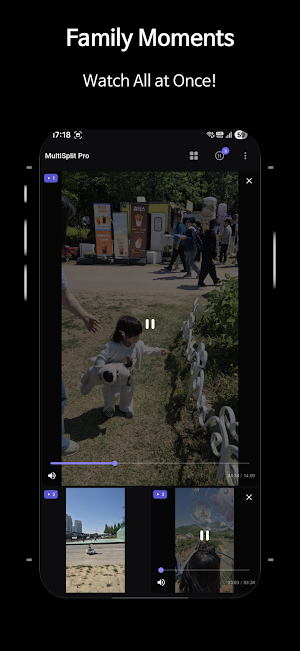
• MultiSplit Pro is the only video player you'll ever need for watching multiple videos simultaneously on a single screen. Whether you're monitoring security cameras, comparing gameplay footage, following tutorials while working, watching sports highlights, or just multitasking like a pro MultiSplit Pro puts you in full control of your screen.
• No more switching between apps. No more missing moments. Everything plays, exactly when you want it.
▶ Key Features
【 12 Unique Layout Types 】
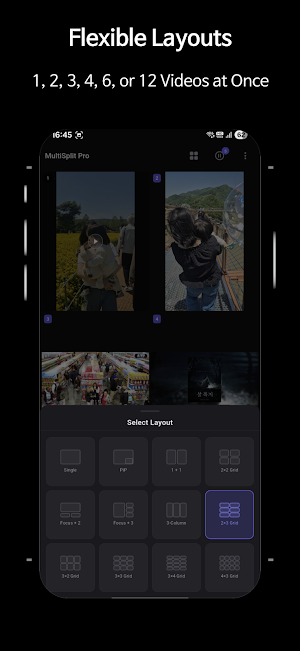
• Single, Side-by-Side, Picture-in-Picture, 2×2, Focus+2, Focus+3, 3-Column, 2×3, 3×2, 3×3, 3×4, 4×3
• Switch layouts instantly with one tap your videos stay loaded, nothing resets
• From casual two-panel splits to a massive 12-panel grid, every layout is purpose-built
【 Simultaneous Multi-Video Playback 】
• Play up to 2 videos simultaneously on one screen
• Each panel works independently play, pause, and seek separately
• Tap any paused panel to instantly add it to playback
• Playback limits may expand to 3, 4, or even more based on device performance
【 Flexible Video Sources 】
• Load videos from your device gallery with a single tap
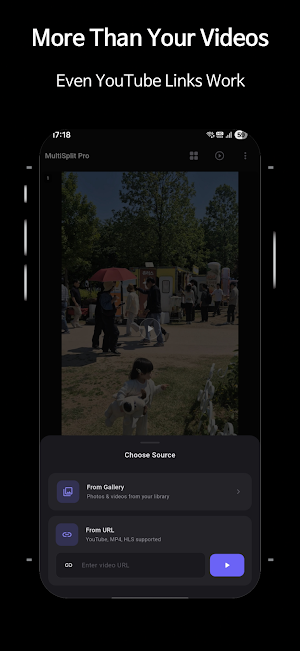
• Stream any video by pasting a direct URL no download needed
• Mix local files and streamed videos across different panels in the same session
【 Full Per-Panel Control 】
• Individual play / pause for each panel
• Seek to any point in the timeline per panel
• Mute or unmute each panel independently
• Three fit modes per panel: Contain, Cover, Fill
• Remove any panel's video without changing the layout
【 Smart Global Controls 】
• Play All, start all loaded panels simultaneously with one tap
• Pause All, freeze every playing panel instantly
• Mute All, silence everything in one tap
• Clear All, reset all panels and start fresh
【 Dark Mode First Design 】
• Built for dark environments dark mode is the default
• Clean, minimal UI that stays out of your way and keeps videos front and center
• Toggle to light mode anytime from Settings
【 Persistent Layout Memory 】
• Your last-used layout is remembered automatically
• Pick up exactly where you left off every time you open the app
【 Privacy & Security 】
• Zero data collection, no analytics, no tracking, no ads
• All video processing happens locally on your device
• No account or sign-in required, ever
• No video data is uploaded, transmitted, or stored externally
【 6 Language Support 】
• Fully localized in English, 한국어, 日本語, 中文, Español, Français
▶ Layout Gallery
📱 Single - Full-screen, distraction-free focus on one video
⧟ Side by Side — Two videos in equal halves, perfect for comparisons
⊡ PiP - One large main video with a floating overlay panel
⊞ 2×2 Grid - Four balanced panels, the classic quad split
◫ Focus + 2 - One dominant video on top, two smaller panels below
⊟ Focus + 3 - One large panel on the left, three stacked on the right
⊪ 3-Column - Three equal vertical strips, great for portrait content
⊠ 2×3 Grid - Six panels in a portrait-friendly arrangement
⊡ 3×2 Grid - Six panels optimized for landscape viewing
⣿ 3×3 Grid - Nine panels for maximum simultaneous overview
⣿ 3×4 Grid - Twelve panels, the ultimate split-screen experience
⣿ 4×3 Grid - Twelve panels in a wide landscape arrangement
▶ Perfect For
• Security and surveillance monitoring
• Gamers comparing speedruns, strategies, or replays side by side
• Educators and students following multiple tutorials simultaneously
• Content creators reviewing footage from multiple angles
• News and media consumers tracking multiple live streams
• Anyone who refuses to watch one thing at a time
▶ Connect With Us
• Instagram : https://www.instagram.com/corp.exciting2/
• TikTok : https://www.tiktok.com/@corp.exciting2
• YouTube : https://www.youtube.com/@excitingcorp
• Telegram : https://t.me/notice_exciting
【 Need Help? 】
• For support, feedback, or inquiries: [email protected]
What’s new
Version 2.0.0 · Updated September 30, 2026
🚀 MultiSplit Pro 2.0.0 - A Whole New Multi-Video Experience 🎬 A brand-new home experience • A cleaner, more premium interface with smoother animations. • Start adding videos and choosing layouts more intuitively than ever. ⚡ New Playback Capacity • Choose how many videos can play at the same time: 2×, 4×, 6×, or up to 12×. • Pick the right level for your device, from maximum stability to maximum multitasking. 2.0.0 is more than a redesign, It’s a new beginning for MultiSplit Pro.
User reviews

Good
Alternatives to MultiSplitPro: No Limit Screen
Looking for apps like MultiSplitPro: No Limit Screen? Here are 6 similar Android apps on Google Play. The highest rated is CoinPro - Coin Scan Identifier (4.5/5), and all 6 are free to download.
-
Llama AI 4.4
-
CoinPro - Coin Scan Identifier 4.5
-
LawAI - AI Lawyer & Legal Help 4.5
-
Rain Sound - Relaxing & Sleep
-
Wax ASMR - Squishy Stress Ball
-
SizeFit: Image PDF Compressor
| App | Rating | Price | Installs | Last updated | Compare |
|---|---|---|---|---|---|
| MultiSplitPro: No Limit Screen | 4.6 / 5 | Free | 100+ | Sep 30, 2026 | |
| Llama AI | 4.4 / 5 | Free | 10,000+ | Oct 2, 2026 | Compare |
| CoinPro - Coin Scan Identifier | 4.5 / 5 | Free | 100+ | Jun 18, 2026 | Compare |
| LawAI - AI Lawyer & Legal Help | 4.5 / 5 | Free | 1,000+ | Aug 31, 2026 | Compare |
| Rain Sound - Relaxing & Sleep | – | Free | 10+ | Jun 14, 2026 | Compare |
| Wax ASMR - Squishy Stress Ball | – | Free | 500+ | Sep 21, 2026 | Compare |
| SizeFit: Image PDF Compressor | – | Free | 10+ | – | Compare |