
SizeFit: Image PDF Compressor
Tools In-app purchases Contains ads
Compress photos under any KB or MB limit at the possible quality.
- Downloads
- 10+
- on Google Play
- Price
- Free
- In-app purchases
- Updated
- Aug 20
- 2026 · v1.0.0
Screenshots


About SizeFit: Image PDF Compressor
▶ What is SizeFit?
SizeFit is an on-device image and PDF compressor that reduces files to the size you need. Choose a preset or enter a custom target in KB or MB.
Use SizeFit for online forms, job applications, email attachments, website uploads, school documents, government portals, cloud storage, and services with file-size limits. No account is required.
▶ Compress to a Target Size
Stop guessing quality settings. Select the size you want:
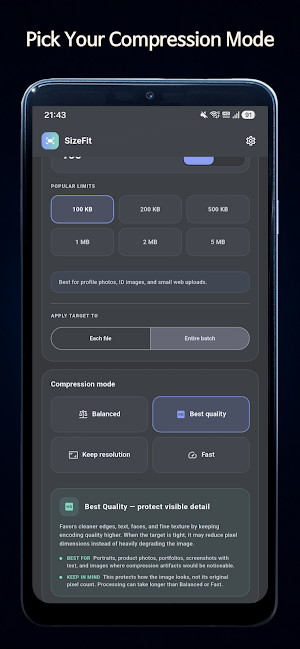
• 100 KB — profile photos, ID images, and small web uploads
• 200 KB — applications and online submissions
• 500 KB — email attachments and general uploads
• 1 MB — photos with more visible detail
• 2 MB — high-resolution photos and documents
• 5 MB — larger images and PDF limits
• Custom — enter any target in KB or MB
SizeFit adjusts quality and dimensions to find a practical balance. Results aim to get close to the target, but an exact size cannot be guaranteed for every file. Very small targets may require lower quality or resolution.
▶ Image Compressor
Import JPG, JPEG, PNG, or WebP images and export smaller JPG files.
• Reduce image file size
• Compare original and compressed sizes
• View the storage saved
• Preview before saving
• Save or share results
• Compress without uploading files to our server
Transparent images are exported with a white background because the output is JPG.
▶ PDF Compressor
Reduce PDF file size for sharing or submission. SizeFit processes pages locally and rebuilds an optimized PDF.
PDF pages may be converted into images. Selectable text, search, links, forms, annotations, layers, and interactive elements may not remain. Review important documents before sharing.
▶ Compression Controls
• Balanced — practical quality and size reduction
• Best Quality — prioritizes clearer output
• Keep Resolution — preserves dimensions when possible
• Fast — completes compression more quickly
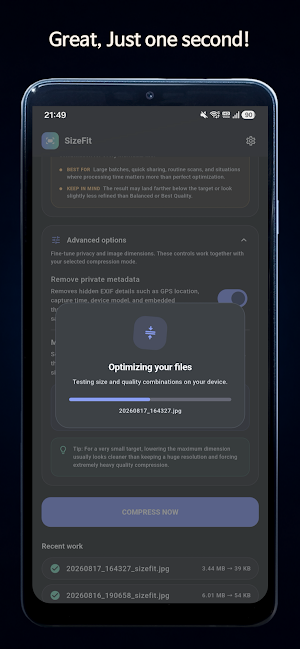
• Maximum Dimension — limits image width and height
• Remove Metadata — removes supported metadata
Controls may vary by file type and Pro access.
▶ Batch Compression
Compress multiple files in one workflow. Set a target for each file or a combined target for the entire batch. The combined target distributes the available size across selected files.
▶ Results
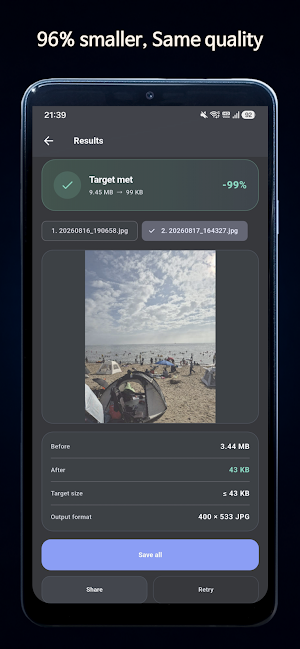
Review the original size, compressed size, amount saved, output status, and save or share options. Retry with another target for a different balance between quality and size.
▶ SizeFit Pro
Optional Pro access unlocks:
• Multi-file batch compression
• PDF compression
• Combined batch target size
• Best Quality, Keep Resolution, and Fast modes
• Maximum image dimension controls
• Metadata removal
• Ad-free use
Free features remain available without Pro. The purchase screen and Google Play checkout show the current product, price, billing terms, and benefits before payment.
▶ Purchases
Payment is charged to your Google Play account after confirmation. Subscriptions, if offered, renew automatically unless canceled. Manage or cancel them through Google Play. Deleting SizeFit does not cancel an active subscription. Eligible purchases can be restored. Refunds follow Google Play policies.
▶ Privacy
• Compression takes place on your device.
• Selected files are not uploaded to our server for compression.
• No account, sign-up, or login is required.
• Preferences and recent activity may be stored locally.
• Advertising and payment providers may process limited technical or purchase data under their policies.
Compression results vary by source file, selected target, and device resources. Keep the original when quality or document structure is important.
Fit the file. Keep what matters.
▶ Contact
• [email protected]
▶ Stay Connected
• Instagram: https://www.instagram.com/corp.exciting2/
• TikTok: https://www.tiktok.com/@corp.exciting2
• YouTube: https://www.youtube.com/@excitingcorp
• Telegram: https://t.me/notice_exciting
SizeFit is an on-device image and PDF compressor that reduces files to the size you need. Choose a preset or enter a custom target in KB or MB.
Use SizeFit for online forms, job applications, email attachments, website uploads, school documents, government portals, cloud storage, and services with file-size limits. No account is required.
▶ Compress to a Target Size
Stop guessing quality settings. Select the size you want:
• 100 KB — profile photos, ID images, and small web uploads
• 200 KB — applications and online submissions
• 500 KB — email attachments and general uploads
• 1 MB — photos with more visible detail
• 2 MB — high-resolution photos and documents
• 5 MB — larger images and PDF limits
• Custom — enter any target in KB or MB
SizeFit adjusts quality and dimensions to find a practical balance. Results aim to get close to the target, but an exact size cannot be guaranteed for every file. Very small targets may require lower quality or resolution.
▶ Image Compressor
Import JPG, JPEG, PNG, or WebP images and export smaller JPG files.
• Reduce image file size
• Compare original and compressed sizes
• View the storage saved
• Preview before saving
• Save or share results
• Compress without uploading files to our server
Transparent images are exported with a white background because the output is JPG.
▶ PDF Compressor
Reduce PDF file size for sharing or submission. SizeFit processes pages locally and rebuilds an optimized PDF.
PDF pages may be converted into images. Selectable text, search, links, forms, annotations, layers, and interactive elements may not remain. Review important documents before sharing.
▶ Compression Controls
• Balanced — practical quality and size reduction
• Best Quality — prioritizes clearer output
• Keep Resolution — preserves dimensions when possible
• Fast — completes compression more quickly
• Maximum Dimension — limits image width and height
• Remove Metadata — removes supported metadata
Controls may vary by file type and Pro access.
▶ Batch Compression
Compress multiple files in one workflow. Set a target for each file or a combined target for the entire batch. The combined target distributes the available size across selected files.
▶ Results
Review the original size, compressed size, amount saved, output status, and save or share options. Retry with another target for a different balance between quality and size.
▶ SizeFit Pro
Optional Pro access unlocks:
• Multi-file batch compression
• PDF compression
• Combined batch target size
• Best Quality, Keep Resolution, and Fast modes
• Maximum image dimension controls
• Metadata removal
• Ad-free use
Free features remain available without Pro. The purchase screen and Google Play checkout show the current product, price, billing terms, and benefits before payment.
▶ Purchases
Payment is charged to your Google Play account after confirmation. Subscriptions, if offered, renew automatically unless canceled. Manage or cancel them through Google Play. Deleting SizeFit does not cancel an active subscription. Eligible purchases can be restored. Refunds follow Google Play policies.
▶ Privacy
• Compression takes place on your device.
• Selected files are not uploaded to our server for compression.
• No account, sign-up, or login is required.
• Preferences and recent activity may be stored locally.
• Advertising and payment providers may process limited technical or purchase data under their policies.
Compression results vary by source file, selected target, and device resources. Keep the original when quality or document structure is important.
Fit the file. Keep what matters.
▶ Contact
• [email protected]
▶ Stay Connected
• Instagram: https://www.instagram.com/corp.exciting2/
• TikTok: https://www.tiktok.com/@corp.exciting2
• YouTube: https://www.youtube.com/@excitingcorp
• Telegram: https://t.me/notice_exciting
What’s new
Version 1.0.0 · Updated August 20, 2026
Welcome to SizeFit 1.0.0 🚀 📦 Target size compression • Compress photos and PDFs toward an exact KB or MB target. • Choose a preset or set your own custom size. 🔒 Private by design • All compression runs locally on your device, nothing is uploaded. ✨ Built for real-world limits • Fits online forms, email attachments, profile photos, and upload limits with ease.
Alternatives to SizeFit: Image PDF Compressor
Looking for apps like SizeFit: Image PDF Compressor? Here are 6 similar Android apps on Google Play. The highest rated is Genius Scan - PDF Scanner (4.9/5), and all 6 are free to download.
-
Plant Identifier & Care - Greg 3.9
-
pdfFiller Edit, fill, sign PDF 3.9
-
PDF Merge: Scan, Sign & Edit 3.8
-
vFlat Scan - PDF Scanner, OCR 4.6
-
Genius Scan - PDF Scanner 4.9
-
Smallpdf: Scanner & PDF Editor 4.5
| App | Rating | Price | Installs | Last updated | Compare |
|---|---|---|---|---|---|
| SizeFit: Image PDF Compressor | – | Free | 10+ | Aug 20, 2026 | |
| Plant Identifier & Care - Greg | 3.9 / 5 | Free | 500,000+ | Oct 23, 2026 | Compare |
| pdfFiller Edit, fill, sign PDF | 3.9 / 5 | Free | 5,000,000+ | Oct 22, 2026 | Compare |
| PDF Merge: Scan, Sign & Edit | 3.8 / 5 | Free | 5,000,000+ | Feb 2, 2026 | Compare |
| vFlat Scan - PDF Scanner, OCR | 4.6 / 5 | Free | 10,000,000+ | Sep 30, 2026 | Compare |
| Genius Scan - PDF Scanner | 4.9 / 5 | Free | 10,000,000+ | Oct 19, 2026 | Compare |
| Smallpdf: Scanner & PDF Editor | 4.5 / 5 | Free | 5,000,000+ | Oct 7, 2026 | Compare |
Similar apps on Google Play
- Plant Identifier & Care - Greg
- pdfFiller Edit, fill, sign PDF
- PDF Merge: Scan, Sign & Edit
- vFlat Scan - PDF Scanner, OCR
- Genius Scan - PDF Scanner
- Smallpdf: Scanner & PDF Editor
- Photo Scan App by Photomyne
- Mobile Scanner App - Scan PDF
- Mobi PDF・Editor・Scanner・Reader
- PDFelement-PDF Editor & Reader
- Tiny Scanner - PDF Scanner App
- CS PDF Reader - PDF Editor
- iLovePDF: PDF Editor & Scanner