
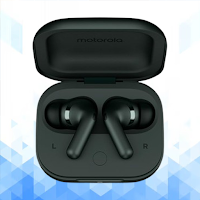
Motorola Moto Buds 2 Guide
Books & Reference Contains ads
Motorola Moto Buds 2 Guide: setup, app, pairing, fixes
- Downloads
- 2K+
- on Google Play
- Price
- Free
- No in-app purchases
- Updated
- Apr 15
- 2026 · v1.1.1
Screenshots
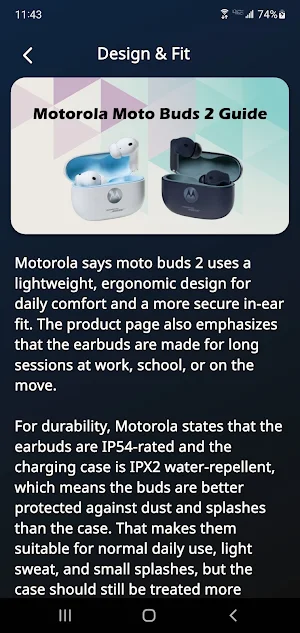
About Motorola Moto Buds 2 Guide
Motorola Moto Buds 2 Guide is a helpful reference for users who want a simpler way to understand their earbuds from first setup to everyday listening. It brings together the details people usually search for most, including pairing, app connection, noise control, sound settings, dual-device use, battery behavior, touch controls, and common troubleshooting. Motorola presents moto buds 2 as everyday wireless earbuds with dual drivers, Dynamic ANC, Bluetooth 6, and long battery life.
A big reason people look for help with moto buds 2 is sound and listening features. Motorola says the earbuds use dual drivers with an 11 mm dynamic driver and a 6 mm micro planar magnetic driver, along with Hi-Res audio streaming, Spatial Audio, and a lightweight ergonomic design. The product pages also highlight three microphones per earbud, which makes the guide useful for users who want one place to understand both music playback and calling basics.
The guide also gives clear attention to setup. Motorola support explains that for non-Android devices, users can place the earbuds in the open case and hold the function button for 2 seconds until the LED flashes blue, then select moto buds in Bluetooth settings. Motorola’s user guide also notes that the Moto Buds app is available for Android devices and can be used after pairing to manage more settings.
For daily use, the app helps explain features that matter most in real life. Motorola says moto buds 2 support Dual Connection, smart wear detection, Dynamic ANC, and water-repellent protection with IP54-rated earbuds and an IPX2 case. The Moto Buds app can show detailed battery levels, switch noise control modes, change sound settings, customize gestures, and enable Dual Connection for a second device.
Battery and comfort are another important part of the experience. Motorola lists up to 48 hours of battery life for moto buds 2, and the product page also emphasizes a snug, secure fit designed for long listening sessions. This makes the guide useful for users who want practical help with everyday charging habits, listening time expectations, and connection use across phone, tablet, or laptop.
Troubleshooting is where many users need quick answers, so this guide also focuses on reset and recovery steps. Motorola support says a factory reset can be done by placing both earbuds in the charging case and pressing and holding the function button for 12 seconds until the LED flashes white. The user guide also explains common touch actions such as play and pause, track controls, voice assistant access, and switching between noise control modes, which helps users solve setup confusion faster.
Motorola Moto Buds 2 Guide is suitable for users searching for Motorola Moto Buds 2 setup help, Moto Buds app guidance, ANC earbuds pairing, Dual Connection support, LHDC and Spatial Audio basics, touch control help, battery tips, reset instructions, and common FAQ answers in one place. It is written as an independent educational guide for faster learning and easier access to useful product information.
This application is for educational and informational purposes only. It does not connect to the earbuds, does not replace the official Moto Buds app or any official Motorola service, and does not provide official device control, firmware tools, account access, warranty service, or customer support. It is intended only to help users better understand setup, features, settings, and common troubleshooting related to Motorola Moto Buds 2.
Disclaimer:
Motorola Moto Buds 2 Guide is not an official application and is not affiliated with, endorsed by, authorized by, or sponsored by Motorola or any related brand owner. All product names, trademarks, and brand references are the property of their respective owners. This app was created only as an independent educational guide for reference and learning purposes.
A big reason people look for help with moto buds 2 is sound and listening features. Motorola says the earbuds use dual drivers with an 11 mm dynamic driver and a 6 mm micro planar magnetic driver, along with Hi-Res audio streaming, Spatial Audio, and a lightweight ergonomic design. The product pages also highlight three microphones per earbud, which makes the guide useful for users who want one place to understand both music playback and calling basics.
The guide also gives clear attention to setup. Motorola support explains that for non-Android devices, users can place the earbuds in the open case and hold the function button for 2 seconds until the LED flashes blue, then select moto buds in Bluetooth settings. Motorola’s user guide also notes that the Moto Buds app is available for Android devices and can be used after pairing to manage more settings.
For daily use, the app helps explain features that matter most in real life. Motorola says moto buds 2 support Dual Connection, smart wear detection, Dynamic ANC, and water-repellent protection with IP54-rated earbuds and an IPX2 case. The Moto Buds app can show detailed battery levels, switch noise control modes, change sound settings, customize gestures, and enable Dual Connection for a second device.
Battery and comfort are another important part of the experience. Motorola lists up to 48 hours of battery life for moto buds 2, and the product page also emphasizes a snug, secure fit designed for long listening sessions. This makes the guide useful for users who want practical help with everyday charging habits, listening time expectations, and connection use across phone, tablet, or laptop.
Troubleshooting is where many users need quick answers, so this guide also focuses on reset and recovery steps. Motorola support says a factory reset can be done by placing both earbuds in the charging case and pressing and holding the function button for 12 seconds until the LED flashes white. The user guide also explains common touch actions such as play and pause, track controls, voice assistant access, and switching between noise control modes, which helps users solve setup confusion faster.
Motorola Moto Buds 2 Guide is suitable for users searching for Motorola Moto Buds 2 setup help, Moto Buds app guidance, ANC earbuds pairing, Dual Connection support, LHDC and Spatial Audio basics, touch control help, battery tips, reset instructions, and common FAQ answers in one place. It is written as an independent educational guide for faster learning and easier access to useful product information.
This application is for educational and informational purposes only. It does not connect to the earbuds, does not replace the official Moto Buds app or any official Motorola service, and does not provide official device control, firmware tools, account access, warranty service, or customer support. It is intended only to help users better understand setup, features, settings, and common troubleshooting related to Motorola Moto Buds 2.
Disclaimer:
Motorola Moto Buds 2 Guide is not an official application and is not affiliated with, endorsed by, authorized by, or sponsored by Motorola or any related brand owner. All product names, trademarks, and brand references are the property of their respective owners. This app was created only as an independent educational guide for reference and learning purposes.
Alternatives to Motorola Moto Buds 2 Guide
Looking for apps like Motorola Moto Buds 2 Guide? Here are 6 similar Android apps on Google Play. All of them are free to download.
-
Fitbit Charge 6 Guide
-
WF-1000XM6 Guide
-
Motorola Moto Watch Guide
-
Motorola Moto Buds Loop Guide
-
Nothing Headphone (1) Guide
-
Huawei Watch D2 Guide
| App | Rating | Price | Installs | Last updated | Compare |
|---|---|---|---|---|---|
| Motorola Moto Buds 2 Guide | – | Free | 1,000+ | Apr 15, 2026 | |
| Fitbit Charge 6 Guide | – | Free | 100+ | Jun 8, 2025 | Compare |
| WF-1000XM6 Guide | – | Free | 100+ | Apr 15, 2026 | Compare |
| Motorola Moto Watch Guide | – | Free | 500+ | Apr 10, 2026 | Compare |
| Motorola Moto Buds Loop Guide | – | Free | 500+ | Apr 15, 2026 | Compare |
| Nothing Headphone (1) Guide | – | Free | 100+ | Apr 15, 2026 | Compare |
| Huawei Watch D2 Guide | – | Free | 500+ | Apr 14, 2026 | Compare |