
insphere Share
Productivity
Wireless Screen Sharing for Seamless Collaboration
- Downloads
- 484+
- on Google Play
- Price
- Free
- No in-app purchases
- Updated
- Aug 13
- 2026 · vv1.1.811
Screenshots


About insphere Share
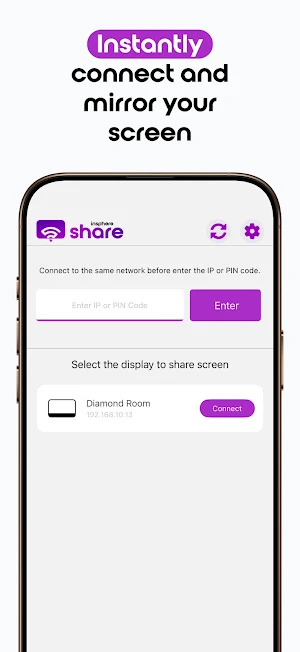
insphere Share is your ultimate wireless screen-sharing solution for classrooms, boardrooms, and collaborative spaces. Instantly mirror your screen to any interactive display or TV with no cables and no software installation required.
Whether you’re presenting from a phone, tablet, or laptop, insphere Share connects in just 3.5 seconds and supports up to 16 simultaneous device shares. Enjoy powerful tools like split-screen sharing, display grouping, and two-way collaboration from any device.
Enjoy hassle-free, plug-and-play screen sharing for presentations, collaboration, or teaching with no cables or installations required.
App Features
With insphere Share, you can:
- Stream any audio or video file to your TV.
- Use your smartphone as a remote control for your TV.
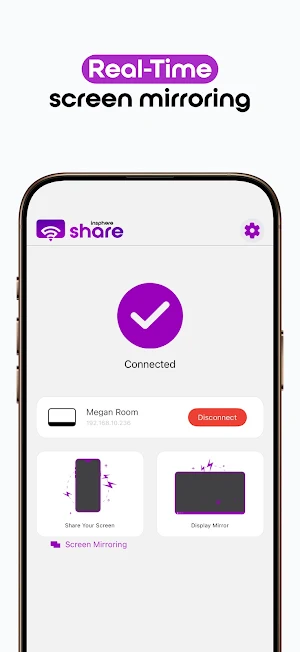
- Mirror the screen of your Android device to your TV.
- Mirror your TV screen to your smartphone and control the TV by touching your phone screen just like touching the TV itself.
Accessibility Service API Usage:
This application uses the Accessibility Service API solely for the “Reversed Device Control” feature.
insphere Share temporarily collects and transmits the content displayed on your device screen to the receiving device you select when using the “Mirroring” functionality. Combined with “Reversed Device Control” (which uses the Accessibility Service API), this allows you to view and control your device from the receiving display.
In meeting or teaching scenarios, this feature lets you operate your personal device from the larger shared display you are casting to, adding convenience and enhancing the interactive experience.
Note: This app is the client. The server app is ONLY available on TVs, projectors, or IFPDs with insphere Share Server or insphere Share Pro built-in.
Whether you’re presenting from a phone, tablet, or laptop, insphere Share connects in just 3.5 seconds and supports up to 16 simultaneous device shares. Enjoy powerful tools like split-screen sharing, display grouping, and two-way collaboration from any device.
Enjoy hassle-free, plug-and-play screen sharing for presentations, collaboration, or teaching with no cables or installations required.
App Features
With insphere Share, you can:
- Stream any audio or video file to your TV.
- Use your smartphone as a remote control for your TV.
- Mirror the screen of your Android device to your TV.
- Mirror your TV screen to your smartphone and control the TV by touching your phone screen just like touching the TV itself.
Accessibility Service API Usage:
This application uses the Accessibility Service API solely for the “Reversed Device Control” feature.
insphere Share temporarily collects and transmits the content displayed on your device screen to the receiving device you select when using the “Mirroring” functionality. Combined with “Reversed Device Control” (which uses the Accessibility Service API), this allows you to view and control your device from the receiving display.
In meeting or teaching scenarios, this feature lets you operate your personal device from the larger shared display you are casting to, adding convenience and enhancing the interactive experience.
Note: This app is the client. The server app is ONLY available on TVs, projectors, or IFPDs with insphere Share Server or insphere Share Pro built-in.
Alternatives to insphere Share
Looking for apps like insphere Share? Here are 6 similar Android apps on Google Play. The highest rated is ScreenStream (4.4/5), and all 6 are free to download.
-
RICOH Smart Device Connector 3.2
-
iLink 2.7
-
HerePrint 3.8
-
Transfer All Data - PhoneClone 4.2
-
ScreenStream 4.4
-
TeamViewer QuickSupport 4.3
| App | Rating | Price | Installs | Last updated | Compare |
|---|---|---|---|---|---|
| insphere Share | – | Free | 100+ | Aug 13, 2026 | |
| RICOH Smart Device Connector | 3.2 / 5 | Free | 1,000,000+ | Oct 21, 2026 | Compare |
| iLink | 2.7 / 5 | Free | 1,000,000+ | Oct 10, 2025 | Compare |
| HerePrint | 3.8 / 5 | Free | 100,000+ | Sep 24, 2026 | Compare |
| Transfer All Data - PhoneClone | 4.2 / 5 | Free | 10,000,000+ | Aug 29, 2026 | Compare |
| ScreenStream | 4.4 / 5 | Free | 5,000,000+ | – | Compare |
| TeamViewer QuickSupport | 4.3 / 5 | Free | 50,000,000+ | Oct 26, 2026 | Compare |
Compare insphere Share with the top alternatives: ratings, updates, ASO score and keyword gaps →
Similar apps on Google Play
- RICOH Smart Device Connector
- iLink
- HerePrint
- Transfer All Data - PhoneClone
- ScreenStream
- TeamViewer QuickSupport
- Kasa Smart
- Universal Remote for Smart TV
- AirMirror: Remote control
- iRISCO
- Home V
- CloudEdge
- V380
- Smart Transfer: File Sharing
- ZUMIMALL
- OSAIO
- iRobot Home (Classic)
- MyHyundai with Bluelink
- MERCUSYS
- Nest
- Home Assistant
- Data Transfer - MobileTrans
- DREO
- AirDroid: File & Remote Access
- ConnectLife
- Klarstein
- Home + Control
- XPENG
- spacedesk - USB Display for PC
- Plume Home
- Smart Connect
- Home Security Camera WardenCam
- Auto Agent
- Send Anywhere (File Transfer)
- Aer Lingus App
- Parental Control App- FamiSafe