
Zip Extractor — Unzip RAR 7Z
Tools In-app purchases Contains ads
Unzip ZIP, RAR, 7Z. Compress, preview, encrypt. Offline. No subscriptions.₹
- Downloads
- 754+
- on Google Play
- Price
- Free
- In-app purchases
- Updated
- Jun 1
- 2026 · v1.0.0
Screenshots


About Zip Extractor — Unzip RAR 7Z
Zip. Unzip. Done.
Open, create, and manage archive files right on your Android phone or tablet — fully offline, on-device. ZIP, RAR, 7Z, TAR, GZ, TAR.GZ, and BZ2, all in
one clean app.
No subscriptions. No ad pop-ups when you tap a file. No "grant full file access" demand on launch. Just a tidy archive tool that respects your storage and
your time.
WHAT YOU CAN DO
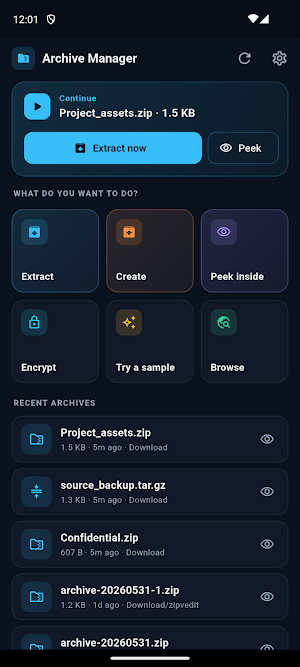
• Extract ZIP, RAR, 7Z, TAR, GZ, TAR.GZ, and BZ2 archives
• Create ZIP archives, with optional AES-256 password protection
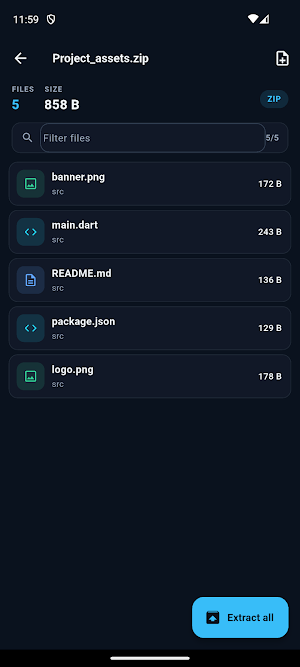
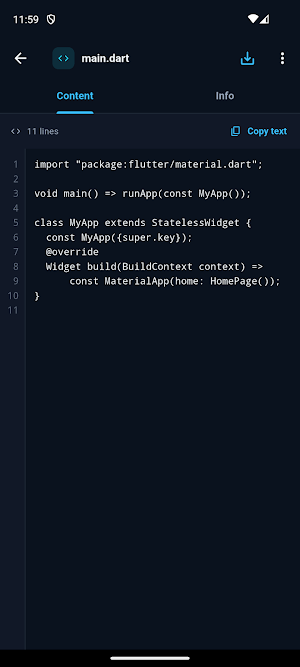
• Preview text, code, images, and PDFs inside an archive — before you extract anything
• Open password-protected ZIP files
• Open compound formats like .tar.gz and .tar.bz2
• Verify a download with built-in CRC32, MD5, and SHA checksums
• Compress with one-tap presets for email-friendly, message-friendly, smallest, or store-only output
• Share files or photos from anywhere into the app to bundle them up
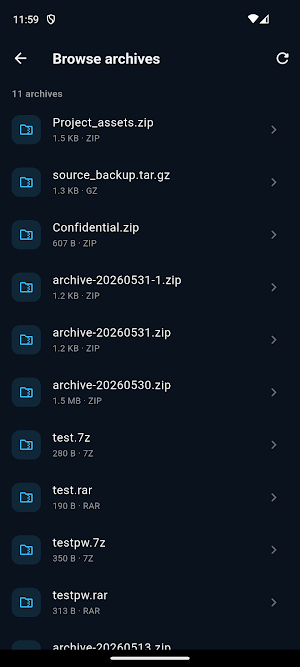
• Open any archive from Downloads, your SD card, or any file manager
EXTRACT RAR AND 7Z, NOT JUST ZIP
A lot of archive apps choke on .rar and .7z files. This one opens them. Tap a .zip, .rar, or .7z from your file manager of choice and it opens instantly,
with a one-tap Extract to the same folder. No extra menus, no hops.
AES-256 ENCRYPTION
Protect what you send. Create a password-locked ZIP secured with AES-256 encryption, so only the people with the password can open it. Password-protected
ZIP files you receive unlock with a clean password prompt.
PREVIEW INSIDE AN ARCHIVE
Open an archive and tap any file inside to preview it. Text and code render with syntax-aware highlighting, images show full-screen, PDFs open in a reader
pane. Nothing is written to disk until you choose to extract — so you can check what is inside a download before committing it to storage.
SHARE TO COMPRESS
Select files or photos anywhere on your device, open the share sheet, and send them straight here. The app opens with those files queued, ready to zip —
the everyday workflow for email and chat attachments.
COMPRESSION PRESETS
One-tap presets take the guesswork out of zipping:
• Email — keeps the archive small enough for common attachment limits
• Messaging — keeps it within typical messenger sharing limits
• Smallest — maximum compression for storage
• Store only — skip compression entirely, for already-compressed media
RESPECTS YOUR STORAGE
The app uses Android's modern document access — you pick the folders it can touch, and it never demands blanket access to every file on your device on
launch. Your archives, your rules.
FREE WITH OPTIONAL ONE-TIME PRO
The app is free to install and use. A one-time Pro upgrade unlocks AES-256 archive output, batch compress across multiple folders, and an ad-free
experience. One payment, forever — no subscription, no recurring charges.
WHO IT IS FOR
• Anyone who opens or sends ZIP files on their phone
• Students grabbing assignment bundles from email
• Developers pulling source archives on the go
• Photographers and designers emailing portfolio packs
• People clearing storage by compressing old folders
SUPPORTED FORMATS
Extract: ZIP, RAR, 7Z, TAR, GZ, TAR.GZ, BZ2
Create: ZIP (with optional AES-256 password)
Preview: text, source code, images, PDF
LANGUAGES
UI available in 15 languages: English, Spanish, Portuguese, French, German, Russian, Hindi, Bengali, Indonesian, Turkish, Urdu, Arabic, Chinese
(Simplified), Japanese, and Korean.
Open, create, and manage archive files right on your Android phone or tablet — fully offline, on-device. ZIP, RAR, 7Z, TAR, GZ, TAR.GZ, and BZ2, all in
one clean app.
No subscriptions. No ad pop-ups when you tap a file. No "grant full file access" demand on launch. Just a tidy archive tool that respects your storage and
your time.
WHAT YOU CAN DO
• Extract ZIP, RAR, 7Z, TAR, GZ, TAR.GZ, and BZ2 archives
• Create ZIP archives, with optional AES-256 password protection
• Preview text, code, images, and PDFs inside an archive — before you extract anything
• Open password-protected ZIP files
• Open compound formats like .tar.gz and .tar.bz2
• Verify a download with built-in CRC32, MD5, and SHA checksums
• Compress with one-tap presets for email-friendly, message-friendly, smallest, or store-only output
• Share files or photos from anywhere into the app to bundle them up
• Open any archive from Downloads, your SD card, or any file manager
EXTRACT RAR AND 7Z, NOT JUST ZIP
A lot of archive apps choke on .rar and .7z files. This one opens them. Tap a .zip, .rar, or .7z from your file manager of choice and it opens instantly,
with a one-tap Extract to the same folder. No extra menus, no hops.
AES-256 ENCRYPTION
Protect what you send. Create a password-locked ZIP secured with AES-256 encryption, so only the people with the password can open it. Password-protected
ZIP files you receive unlock with a clean password prompt.
PREVIEW INSIDE AN ARCHIVE
Open an archive and tap any file inside to preview it. Text and code render with syntax-aware highlighting, images show full-screen, PDFs open in a reader
pane. Nothing is written to disk until you choose to extract — so you can check what is inside a download before committing it to storage.
SHARE TO COMPRESS
Select files or photos anywhere on your device, open the share sheet, and send them straight here. The app opens with those files queued, ready to zip —
the everyday workflow for email and chat attachments.
COMPRESSION PRESETS
One-tap presets take the guesswork out of zipping:
• Email — keeps the archive small enough for common attachment limits
• Messaging — keeps it within typical messenger sharing limits
• Smallest — maximum compression for storage
• Store only — skip compression entirely, for already-compressed media
RESPECTS YOUR STORAGE
The app uses Android's modern document access — you pick the folders it can touch, and it never demands blanket access to every file on your device on
launch. Your archives, your rules.
FREE WITH OPTIONAL ONE-TIME PRO
The app is free to install and use. A one-time Pro upgrade unlocks AES-256 archive output, batch compress across multiple folders, and an ad-free
experience. One payment, forever — no subscription, no recurring charges.
WHO IT IS FOR
• Anyone who opens or sends ZIP files on their phone
• Students grabbing assignment bundles from email
• Developers pulling source archives on the go
• Photographers and designers emailing portfolio packs
• People clearing storage by compressing old folders
SUPPORTED FORMATS
Extract: ZIP, RAR, 7Z, TAR, GZ, TAR.GZ, BZ2
Create: ZIP (with optional AES-256 password)
Preview: text, source code, images, PDF
LANGUAGES
UI available in 15 languages: English, Spanish, Portuguese, French, German, Russian, Hindi, Bengali, Indonesian, Turkish, Urdu, Arabic, Chinese
(Simplified), Japanese, and Korean.
Alternatives to Zip Extractor — Unzip RAR 7Z
Looking for apps like Zip Extractor — Unzip RAR 7Z? Here are 6 similar Android apps on Google Play. The highest rated is HTML Viewer & Editor - Code (4.3/5), and all 6 are free to download.
-
SQL Editor & SQLite Viewer 4.2
-
HTML Viewer & Editor - Code 4.3
-
STL Maker & 3MF, G-code Viewer
-
HiringCensus Remote Job Alerts
-
Aspenote Offline Voice to Text
-
Localhost Web Server & PHP
| App | Rating | Price | Installs | Last updated | Compare |
|---|---|---|---|---|---|
| Zip Extractor — Unzip RAR 7Z | – | Free | 500+ | Jun 1, 2026 | |
| SQL Editor & SQLite Viewer | 4.2 / 5 | Free | 5,000+ | – | Compare |
| HTML Viewer & Editor - Code | 4.3 / 5 | Free | 10,000+ | Oct 20, 2026 | Compare |
| STL Maker & 3MF, G-code Viewer | – | Free | 100+ | Sep 19, 2026 | Compare |
| HiringCensus Remote Job Alerts | – | Free | 100+ | Sep 18, 2026 | Compare |
| Aspenote Offline Voice to Text | – | Free | 100+ | Aug 27, 2026 | Compare |
| Localhost Web Server & PHP | – | Free | 1,000+ | Sep 29, 2026 | Compare |