

CNC Deburr 3D Simulator G-Code
Tools In-app purchases Contains ads
CNC cross‑hole deburring XYZ, XCZ and XHZ G‑code generator
- Downloads
- 263+
- on Google Play
- Price
- Free
- In-app purchases
- Updated
- Jul 23
- 2026 · v2.5.2
Screenshots


About CNC Deburr 3D Simulator G-Code
Professional solution for cross-hole deburring – now with 100% offline 3D simulation!
Forget about the time-consuming calculations and potential errors of manual programming! The CNC Circle Deburr app is a professional tool specifically developed for CNC operators and programmers, generating perfect G-code for deburring cross-holes on cylindrical parts in a matter of seconds.
Why choose this app?
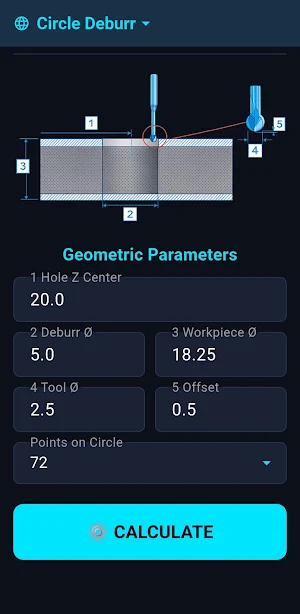
Using a complex mathematical algorithm, the app calculates the exact tool path at the intersection of the workpiece and hole diameters in seconds, ensuring perfectly even deburring along the entire edge.
Key Features:
NEW! 100% Offline 3D Simulation: Track the tool path and virtual workpiece live! It requires no internet connection, so it works instantly right at the machine in the workshop.
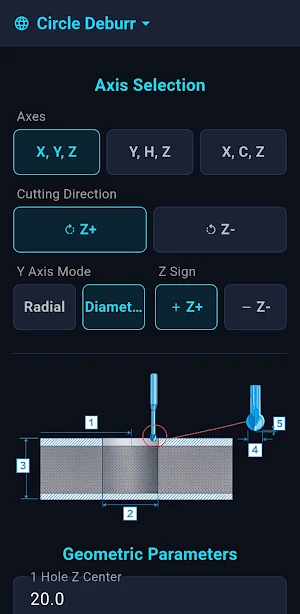
Multi-axis support: Generates programs for traditional 3-axis (XYZ) lathes with a Y-axis, as well as for C-axis (XCZ) and YHZ (G107) coordinate transformation machining.
Smart parameterization: Adjustable cutting direction (Z+ / Z-), diametral or radial Y-axis mode, customizable resolution (number of points on the circle), and precise tool offset/clearance.
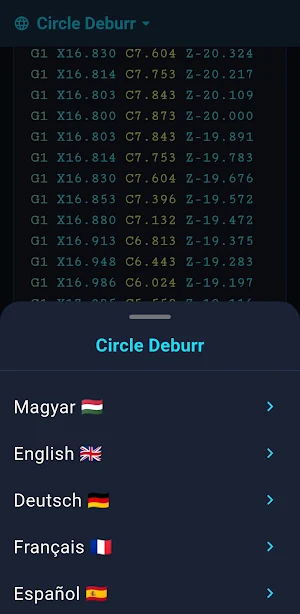
Instant results: Color-coded, easy-to-read G-code display that can be instantly copied to the clipboard with a single long press.
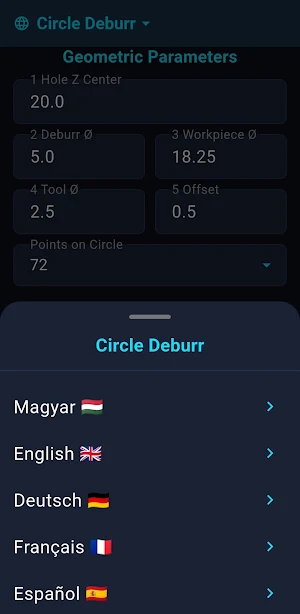
Global use: 16 supported languages (English, Hungarian, German, French, Spanish, Italian, Romanian, Croatian, Slovak, Polish, Turkish, Chinese, Hindi, Japanese, Arabic, Portuguese).
Trial Period and PRO Version Benefits:
After downloading the app, a 14-day full-featured trial period begins, during which you can generate programs for workpieces of any size without limitations (with ads displayed).
After the 14 days expire, the basic version allows calculations for workpiece diameters up to 10 mm. By purchasing the PRO version, you can:
Permanently unlock the size restriction (work with any diameter).
Completely and permanently remove all advertisements.
Support further industrial developments and updates.
Make your daily work more efficient, save time at the machine, and avoid scrap parts with pinpoint accurate tool paths!
Download it now and generate your next CNC program in seconds!
Forget about the time-consuming calculations and potential errors of manual programming! The CNC Circle Deburr app is a professional tool specifically developed for CNC operators and programmers, generating perfect G-code for deburring cross-holes on cylindrical parts in a matter of seconds.
Why choose this app?
Using a complex mathematical algorithm, the app calculates the exact tool path at the intersection of the workpiece and hole diameters in seconds, ensuring perfectly even deburring along the entire edge.
Key Features:
NEW! 100% Offline 3D Simulation: Track the tool path and virtual workpiece live! It requires no internet connection, so it works instantly right at the machine in the workshop.
Multi-axis support: Generates programs for traditional 3-axis (XYZ) lathes with a Y-axis, as well as for C-axis (XCZ) and YHZ (G107) coordinate transformation machining.
Smart parameterization: Adjustable cutting direction (Z+ / Z-), diametral or radial Y-axis mode, customizable resolution (number of points on the circle), and precise tool offset/clearance.
Instant results: Color-coded, easy-to-read G-code display that can be instantly copied to the clipboard with a single long press.
Global use: 16 supported languages (English, Hungarian, German, French, Spanish, Italian, Romanian, Croatian, Slovak, Polish, Turkish, Chinese, Hindi, Japanese, Arabic, Portuguese).
Trial Period and PRO Version Benefits:
After downloading the app, a 14-day full-featured trial period begins, during which you can generate programs for workpieces of any size without limitations (with ads displayed).
After the 14 days expire, the basic version allows calculations for workpiece diameters up to 10 mm. By purchasing the PRO version, you can:
Permanently unlock the size restriction (work with any diameter).
Completely and permanently remove all advertisements.
Support further industrial developments and updates.
Make your daily work more efficient, save time at the machine, and avoid scrap parts with pinpoint accurate tool paths!
Download it now and generate your next CNC program in seconds!
What’s new
Version 2.5.2 · Updated July 23, 2026
Welcome to CNC Circle Deburr V2.0! The biggest update is here: - 100% Offline 3D Simulation: Visualize the toolpath and the workpiece without an internet connection! Other features: - Precise G-code generation for XYZ, XCZ, and YHZ axes. - Support for 16 languages. - 14-day Free Trial: Enjoy full functionality before upgrading to PRO for workpieces over 10mm. Happy machining!
Alternatives to CNC Deburr 3D Simulator G-Code
Looking for apps like CNC Deburr 3D Simulator G-Code? Here are 6 similar Android apps on Google Play. All of them are free to download.
-
CNC Helper: G-Code Generator
-
CNC Cycle Time Calculator
-
CNC Material & Calculator
-
CNC G-Code Turning Simulator
-
CNC Drill G-Code Simulator
-
CNC Cost & Price Calc PRO
| App | Rating | Price | Installs | Last updated | Compare |
|---|---|---|---|---|---|
| CNC Deburr 3D Simulator G-Code | – | Free | 100+ | Jul 23, 2026 | |
| CNC Helper: G-Code Generator | – | Free | 100+ | Aug 14, 2026 | Compare |
| CNC Cycle Time Calculator | – | Free | 100+ | Aug 26, 2026 | Compare |
| CNC Material & Calculator | – | Free | 100+ | Jul 23, 2026 | Compare |
| CNC G-Code Turning Simulator | – | Free | 5,000+ | Sep 18, 2026 | Compare |
| CNC Drill G-Code Simulator | – | Free | 100+ | – | Compare |
| CNC Cost & Price Calc PRO | – | Free | 100+ | Aug 27, 2026 | Compare |