
DBMaster: SQL Client
Tools In-app purchases
SQL client for MySQL and SQL Server with queries, SSH, SSL, and ER diagrams.
- Downloads
- 40+
- on Google Play
- Price
- Free
- In-app purchases
- Updated
- Sep 21
- 2026 · v1.3.24
Screenshots


About DBMaster: SQL Client
DBMaster is a SQL client and database manager for Android. It enables developers, database administrators, and technology professionals to connect to MySQL and Microsoft SQL Server, run queries, and manage data from a phone or tablet.
Secure and reliable connections
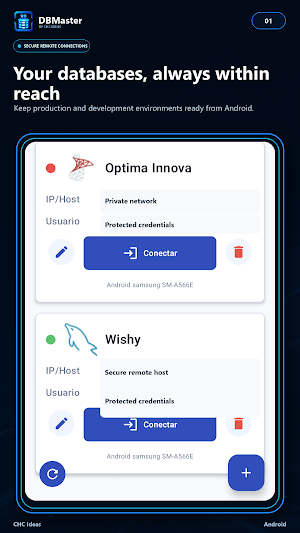
• Save and manage multiple connection profiles.
• Protect connection settings with Android Keystore-backed encryption.
• Keep saved connections separated for each app user.
• Use SSL and SSH tunneling with supported plans.
• Automatically attempt to restore interrupted database connections.
• Measure latency, stability, and real query performance.
Database exploration
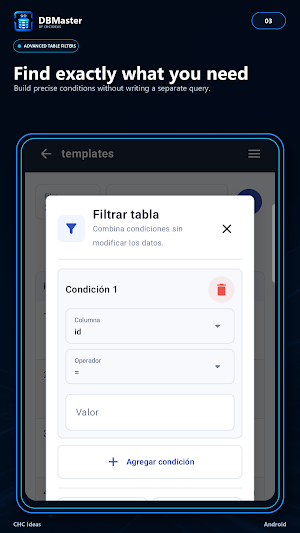
Browse databases, tables, views, stored procedures, and functions through organized, paginated lists. DBMaster preserves filters, pages, and scroll positions while navigating to avoid unnecessary reloads.
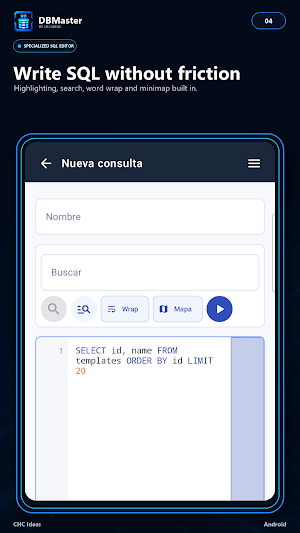
Specialized SQL editor
Write and execute SQL using an editor designed for touchscreens and physical keyboards.
• SQL syntax highlighting.
• Code folding.
• Word wrap.
• Search and replace.
• Minimap navigation.
• Saved queries and editable templates.
• Open SQL files from Android.
• View multiple result sets.
View and edit data
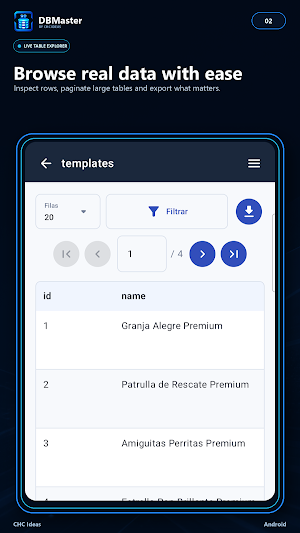
Review results in responsive, paginated tables. Keep headers visible, inspect cells, copy values, and edit records when supported by the table structure and the connected user's permissions.
Type-aware editing provides appropriate controls for supported values, including separate date and datetime pickers and foreign-key options when available.
Database structure design
Create tables with a visual designer and configure columns, data types, primary keys, auto-increment fields, indexes, and relationships. Advanced structural changes can be performed through the SQL editor when supported by the database engine and user permissions.
Interactive ER diagrams
Generate entity-relationship diagrams from the real database schema. View primary and foreign keys, inspect defined or suggested relationships, move tables, zoom through the structure, and export diagrams for documentation.
ER diagrams are visualization tools. Structural changes are made through the table designer or SQL editor.
Exports and files
Export supported tables, results, and other resources depending on the active plan. Exported files remain available in DBMaster so you can open them again or locate them through your preferred Android file manager.
DBMaster is especially useful for reviewing information, investigating incidents, validating stored procedures and functions, checking connection performance, or completing authorized administrative tasks when a computer is unavailable.
DBMaster is designed for databases you own or servers you are authorized to access. Database credentials are stored securely on the device and are not used for advertising purposes.
Some features depend on the active plan, database engine, server configuration, and connected user permissions. Schema and data operations require an active connection to the database server.
Secure and reliable connections
• Save and manage multiple connection profiles.
• Protect connection settings with Android Keystore-backed encryption.
• Keep saved connections separated for each app user.
• Use SSL and SSH tunneling with supported plans.
• Automatically attempt to restore interrupted database connections.
• Measure latency, stability, and real query performance.
Database exploration
Browse databases, tables, views, stored procedures, and functions through organized, paginated lists. DBMaster preserves filters, pages, and scroll positions while navigating to avoid unnecessary reloads.
Specialized SQL editor
Write and execute SQL using an editor designed for touchscreens and physical keyboards.
• SQL syntax highlighting.
• Code folding.
• Word wrap.
• Search and replace.
• Minimap navigation.
• Saved queries and editable templates.
• Open SQL files from Android.
• View multiple result sets.
View and edit data
Review results in responsive, paginated tables. Keep headers visible, inspect cells, copy values, and edit records when supported by the table structure and the connected user's permissions.
Type-aware editing provides appropriate controls for supported values, including separate date and datetime pickers and foreign-key options when available.
Database structure design
Create tables with a visual designer and configure columns, data types, primary keys, auto-increment fields, indexes, and relationships. Advanced structural changes can be performed through the SQL editor when supported by the database engine and user permissions.
Interactive ER diagrams
Generate entity-relationship diagrams from the real database schema. View primary and foreign keys, inspect defined or suggested relationships, move tables, zoom through the structure, and export diagrams for documentation.
ER diagrams are visualization tools. Structural changes are made through the table designer or SQL editor.
Exports and files
Export supported tables, results, and other resources depending on the active plan. Exported files remain available in DBMaster so you can open them again or locate them through your preferred Android file manager.
DBMaster is especially useful for reviewing information, investigating incidents, validating stored procedures and functions, checking connection performance, or completing authorized administrative tasks when a computer is unavailable.
DBMaster is designed for databases you own or servers you are authorized to access. Database credentials are stored securely on the device and are not used for advertising purposes.
Some features depend on the active plan, database engine, server configuration, and connected user permissions. Schema and data operations require an active connection to the database server.
What’s new
Version 1.3.24 · Updated September 21, 2026
• Simplified two-step verification by removing an email option that did not provide a reliable experience. • Access using authenticator app codes continues to work normally.
User reviews

Perfect for managing databases on the go! The SQL editor with syntax highlighting and ER diagrams are incredibly useful.

A very useful SQL client for database management. The interface is clean and straightforward, making it easy to work with databases and manage SQL tasks. Great tool for developers who need quick and convenient database access. 👍💻

Super app, nice and useful.
Alternatives to DBMaster: SQL Client
Looking for apps like DBMaster: SQL Client? Here is 1 similar Android app on Google Play.
| App | Rating | Price | Installs | Compare |
|---|---|---|---|---|
| DBMaster: SQL Client | – | Free | 10+ | |
| CodeMaster: Mobile Code Editor | – | Free | 10+ | Compare |