
CodeMaster: Mobile Code Editor
Tools In-app purchases Contains ads
Edit code and manage FTP, SFTP and SSH servers from Android.
- Downloads
- 10+
- on Google Play
- Price
- Free
- In-app purchases
- Updated
- Sep 13
- 2026 · v1.0.12
Screenshots


About CodeMaster: Mobile Code Editor
CodeMaster is a mobile code editor and server management tool for Android. It helps developers and server administrators edit local files, manage remote projects, and monitor FTP, SFTP, and SSH servers from anywhere.
EDIT CODE ANYWHERE
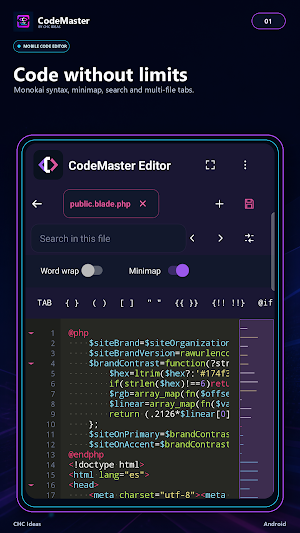
Open files stored on your device or work directly on remote projects. Use a code-focused editor with a monospace font, line numbers, word wrap, an interactive minimap, code folding, visible tabs and spaces, search and replace, multi-file tabs, and language-specific quick actions.
MONOKAI AND MULTI-LANGUAGE SUPPORT
Work with Monokai-inspired syntax highlighting for C, C++, C#, CSS, HTML, Java, JavaScript, JSON, Laravel Blade, LaTeX, Markdown, PHP, Plain Text, Python, R, Ruby, SQL, VB, XML, and YAML.
MANAGE REMOTE PROJECTS
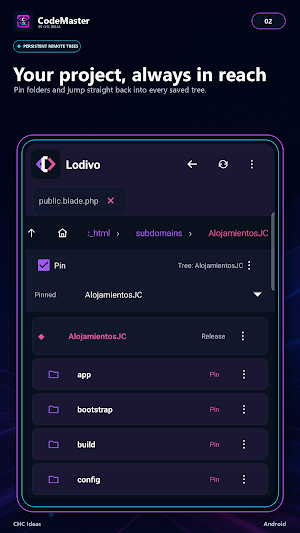
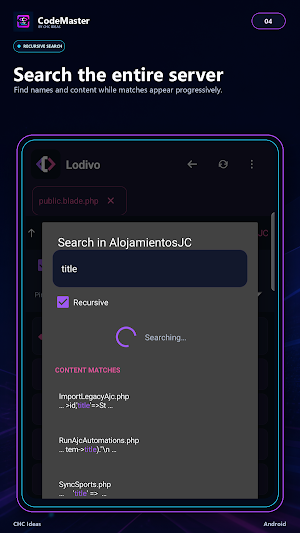
Configure FTP or SFTP connections with an initial directory and navigate using interactive breadcrumbs. Create files and folders directly on the server, search recursively by name or content, and pin multiple project trees for quick access to important locations.
Keep several files open—even from different connections—and move between them using independent tabs without losing their navigation context.
MONITOR YOUR SERVERS
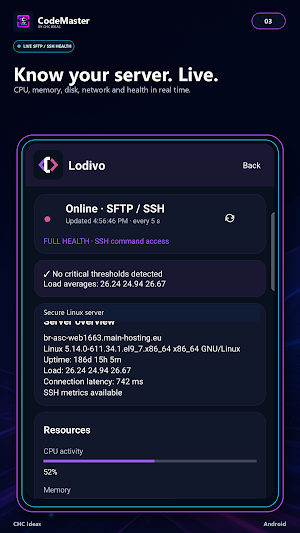
View basic information through FTP or access complete metrics through SFTP/SSH. Check server health, load, CPU, memory, disk, network, and processes with silent five-second updates whenever the server makes this information available.
A SIMPLER EXPERIENCE
CodeMaster includes an interactive walkthrough covering the application’s main features. You can restart it whenever needed from the help menu.
Sign in with your CHC Ideas credentials or use Google Sign-In. You can also enable two-step verification and optionally protect the app with your fingerprint, face, PIN, or device pattern.
CONTROL AND PRIVACY
Credentials, hosts, usernames, paths, and file contents are stored locally on your device. CodeMaster services retain only the account information, connection names, purchases, and subscriptions required to provide the service.
You can manage your security settings and request account deletion directly from the app.
FLEXIBLE PLANS
Start free with up to three connections. When you need more capacity, purchase permanent connection slots or choose a Pro or Studio plan for additional connections, an ad-free experience, and the advanced features included with each plan.
CodeMaster is designed for developers, server administrators, and anyone who needs to inspect, organize, or modify code without always relying on a computer.
EDIT CODE ANYWHERE
Open files stored on your device or work directly on remote projects. Use a code-focused editor with a monospace font, line numbers, word wrap, an interactive minimap, code folding, visible tabs and spaces, search and replace, multi-file tabs, and language-specific quick actions.
MONOKAI AND MULTI-LANGUAGE SUPPORT
Work with Monokai-inspired syntax highlighting for C, C++, C#, CSS, HTML, Java, JavaScript, JSON, Laravel Blade, LaTeX, Markdown, PHP, Plain Text, Python, R, Ruby, SQL, VB, XML, and YAML.
MANAGE REMOTE PROJECTS
Configure FTP or SFTP connections with an initial directory and navigate using interactive breadcrumbs. Create files and folders directly on the server, search recursively by name or content, and pin multiple project trees for quick access to important locations.
Keep several files open—even from different connections—and move between them using independent tabs without losing their navigation context.
MONITOR YOUR SERVERS
View basic information through FTP or access complete metrics through SFTP/SSH. Check server health, load, CPU, memory, disk, network, and processes with silent five-second updates whenever the server makes this information available.
A SIMPLER EXPERIENCE
CodeMaster includes an interactive walkthrough covering the application’s main features. You can restart it whenever needed from the help menu.
Sign in with your CHC Ideas credentials or use Google Sign-In. You can also enable two-step verification and optionally protect the app with your fingerprint, face, PIN, or device pattern.
CONTROL AND PRIVACY
Credentials, hosts, usernames, paths, and file contents are stored locally on your device. CodeMaster services retain only the account information, connection names, purchases, and subscriptions required to provide the service.
You can manage your security settings and request account deletion directly from the app.
FLEXIBLE PLANS
Start free with up to three connections. When you need more capacity, purchase permanent connection slots or choose a Pro or Studio plan for additional connections, an ad-free experience, and the advanced features included with each plan.
CodeMaster is designed for developers, server administrators, and anyone who needs to inspect, organize, or modify code without always relying on a computer.
What’s new
Version 1.0.12 · Updated September 13, 2026
• Added “Rate CodeMaster” to the menu for direct access to its Google Play listing. • Updated DBMaster’s visual identity in CHC Ideas DEV Apps.
User reviews

Although you did a great job, I don't really appreciate the idea of coding for mobile devices, in my personal opinion.
Alternatives to CodeMaster: Mobile Code Editor
Looking for apps like CodeMaster: Mobile Code Editor? Here is 1 similar Android app on Google Play.
| App | Rating | Price | Installs | Compare |
|---|---|---|---|---|
| CodeMaster: Mobile Code Editor | – | Free | 10+ | |
| DBMaster: SQL Client | – | Free | 10+ | Compare |