
Chronograph Complication
Tools Contains ads
Real chronograph subdials and seconds hand for compatible Wear OS watch faces.
- Downloads
- 149+
- on Google Play
- Price
- Free
- No in-app purchases
- Updated
- Aug 12
- 2026
Screenshots


About Chronograph Complication
** Important **
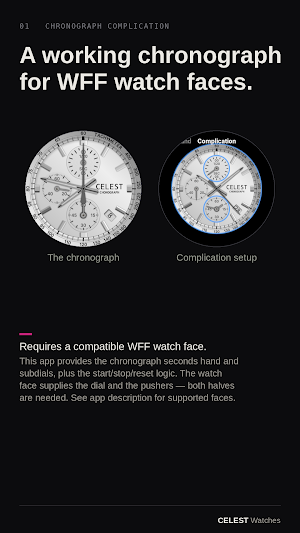
This is not a standalone app. Chronograph Complication provides the chronograph (stopwatch) subdial hands and seconds hand to compatible WFF (Watch Face Format) watch faces. You need both the watch face and this app installed. On a regular face it sits idle — the hands live here, the buttons live on the face, and both halves must be in place.
** What it does **
It turns a compatible watch face into a real, running mechanical-style chronograph — operated from the face, no app to open. Press the pushers and the hands sweep like the real thing: a seconds hand, a 1/20-second hand, and minute (or minute and hour) counters. It's anchored to real time, staying accurate through screen-off, reboot, even reinstalling the face.
** Compatible watch faces **
CELEST5664 Chronograph Watch
https://play.google.com/store/apps/details?id=com.watchfacestudio.celest5664
Feature walkthrough video:
https://www.instagram.com/p/DZYBzkSNGvi/
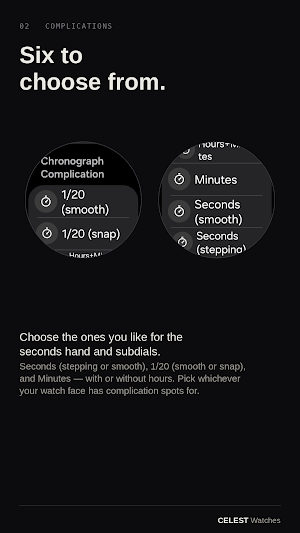
** Six complications to choose from **
Assign whichever ones your face has slots for:
- Seconds (stepping) — one second at a time
- Seconds (smooth) — continuous sweep
- 1/20 (smooth) — a full turn every second
- 1/20 (snap) — parks, then snaps to the reading and holds it
- Minutes — a 60-minute counter
- Hours+Minutes — concentric hour and minute counters
** IMPORTANT! **
You have to set up the complications in your watch's phone app, for example Galaxy Wearable:
https://www.instagram.com/p/DZYCLWCtKI0/
** How it works **
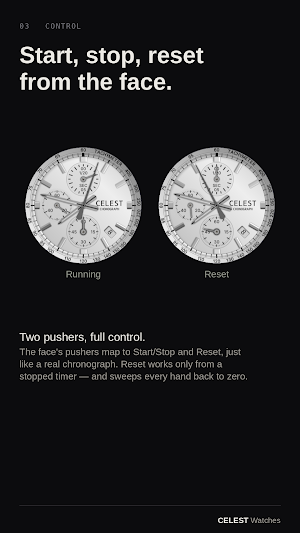
The face's two pushers map to Start/Stop and Reset, like a real chronograph:
- Start/Stop — begin, pause, resume a measurement
- Reset — only from a stopped chrono (ignored while running), sweeping every hand back to zero
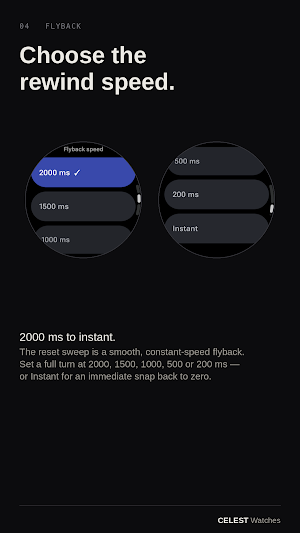
Reset is a smooth, constant-speed flyback; pick the speed: a full turn in 2000 ms (default), 1500, 1000, 500, 200 ms, or Instant.
** How to read an analog chronograph **
At rest, the big centre hand points to 12 — that's the stopwatch seconds, not the time of day. Ordinary timekeeping seconds run in their own small subdial (when the face has one), separate from the stopwatch.
Press start and the big hand sweeps; press again to stop and read it. Reset sweeps every hand clockwise back to 12.
Read elapsed time by adding up the dials: the 1/20-second subdial for the fraction of a second, the big centre hand for seconds (0–60), the Minutes subdial for whole minutes — and if it's Hours+Minutes, its inner hand for hours.
Example: Hours+Minutes reads 1:23, big hand on 45, 1/20 subdial on 10 → 1 h 23 min 45.50 s.
** Reading the tachymeter **
The scale around the outer rim is a tachymeter — a speed calculator, no math needed. Start as you pass the start point, stop after exactly one mile (or kilometre), and the big hand points to your average speed on the scale.
It's unit-agnostic — time a mile for mph, a kilometre for km/h. It reads any rate per hour for events under 60 seconds.
** Themes **
Pick a hand theme and every subdial updates together. The first is Type 01 Silver/Black, more on the way.
** Performance notes **
This app runs within Wear OS hardware limits. The smooth hands and flyback push frames as fast as the system allows; an occasional dropped frame is normal. Timekeeping is never affected — it's clock-anchored. While the screen is off, updates pause and catch up on wake.
** About CELEST Watches **
CELEST Watches is an independent studio designing premium watch faces and apps for Wear OS, Huawei, and Apple Watch via Facer. Chronograph Complication is one of a small line of utilities that pair with CELEST watch faces.
** Installation Help & Troubleshooting **
Pair this app with a supported watch face — it needs both halves to work.
Guide: https://celest-watches.com/installation-troubleshooting/
Browse more at https://celest-watches.com — follow @celestwatches on Instagram or sign up to our newsletter. Support: [email protected]
No ads, no subscription, no account required.
This is not a standalone app. Chronograph Complication provides the chronograph (stopwatch) subdial hands and seconds hand to compatible WFF (Watch Face Format) watch faces. You need both the watch face and this app installed. On a regular face it sits idle — the hands live here, the buttons live on the face, and both halves must be in place.
** What it does **
It turns a compatible watch face into a real, running mechanical-style chronograph — operated from the face, no app to open. Press the pushers and the hands sweep like the real thing: a seconds hand, a 1/20-second hand, and minute (or minute and hour) counters. It's anchored to real time, staying accurate through screen-off, reboot, even reinstalling the face.
** Compatible watch faces **
CELEST5664 Chronograph Watch
https://play.google.com/store/apps/details?id=com.watchfacestudio.celest5664
Feature walkthrough video:
https://www.instagram.com/p/DZYBzkSNGvi/
** Six complications to choose from **
Assign whichever ones your face has slots for:
- Seconds (stepping) — one second at a time
- Seconds (smooth) — continuous sweep
- 1/20 (smooth) — a full turn every second
- 1/20 (snap) — parks, then snaps to the reading and holds it
- Minutes — a 60-minute counter
- Hours+Minutes — concentric hour and minute counters
** IMPORTANT! **
You have to set up the complications in your watch's phone app, for example Galaxy Wearable:
https://www.instagram.com/p/DZYCLWCtKI0/
** How it works **
The face's two pushers map to Start/Stop and Reset, like a real chronograph:
- Start/Stop — begin, pause, resume a measurement
- Reset — only from a stopped chrono (ignored while running), sweeping every hand back to zero
Reset is a smooth, constant-speed flyback; pick the speed: a full turn in 2000 ms (default), 1500, 1000, 500, 200 ms, or Instant.
** How to read an analog chronograph **
At rest, the big centre hand points to 12 — that's the stopwatch seconds, not the time of day. Ordinary timekeeping seconds run in their own small subdial (when the face has one), separate from the stopwatch.
Press start and the big hand sweeps; press again to stop and read it. Reset sweeps every hand clockwise back to 12.
Read elapsed time by adding up the dials: the 1/20-second subdial for the fraction of a second, the big centre hand for seconds (0–60), the Minutes subdial for whole minutes — and if it's Hours+Minutes, its inner hand for hours.
Example: Hours+Minutes reads 1:23, big hand on 45, 1/20 subdial on 10 → 1 h 23 min 45.50 s.
** Reading the tachymeter **
The scale around the outer rim is a tachymeter — a speed calculator, no math needed. Start as you pass the start point, stop after exactly one mile (or kilometre), and the big hand points to your average speed on the scale.
It's unit-agnostic — time a mile for mph, a kilometre for km/h. It reads any rate per hour for events under 60 seconds.
** Themes **
Pick a hand theme and every subdial updates together. The first is Type 01 Silver/Black, more on the way.
** Performance notes **
This app runs within Wear OS hardware limits. The smooth hands and flyback push frames as fast as the system allows; an occasional dropped frame is normal. Timekeeping is never affected — it's clock-anchored. While the screen is off, updates pause and catch up on wake.
** About CELEST Watches **
CELEST Watches is an independent studio designing premium watch faces and apps for Wear OS, Huawei, and Apple Watch via Facer. Chronograph Complication is one of a small line of utilities that pair with CELEST watch faces.
** Installation Help & Troubleshooting **
Pair this app with a supported watch face — it needs both halves to work.
Guide: https://celest-watches.com/installation-troubleshooting/
Browse more at https://celest-watches.com — follow @celestwatches on Instagram or sign up to our newsletter. Support: [email protected]
No ads, no subscription, no account required.
What’s new
Updated August 12, 2026
Updated to target Android 16 (API 36).
Alternatives to Chronograph Complication
Looking for apps like Chronograph Complication? Here are 6 similar Android apps on Google Play. 1 of the 6 are free to download.
-
Health Tracker: Symptom Diary
-
CELEST5669 Artistic Watch
-
CELEST5667 Minimalist Watch
-
Blood Pressure Tracker
-
WearOS Faces
-
CELEST5666 Retro Digital Watch
| App | Rating | Price | Installs | Last updated | Compare |
|---|---|---|---|---|---|
| Chronograph Complication | – | Free | 100+ | Aug 12, 2026 | |
| Health Tracker: Symptom Diary | – | 0.99 USD | 5+ | Oct 25, 2026 | Compare |
| CELEST5669 Artistic Watch | – | 1.99 USD | 50+ | Aug 21, 2026 | Compare |
| CELEST5667 Minimalist Watch | – | 1.99 USD | 5+ | Aug 8, 2026 | Compare |
| Blood Pressure Tracker | – | 0.29 USD | 10+ | Oct 24, 2026 | Compare |
| WearOS Faces | – | Free | 100+ | – | Compare |
| CELEST5666 Retro Digital Watch | – | 1.99 USD | 50+ | Aug 5, 2026 | Compare |