
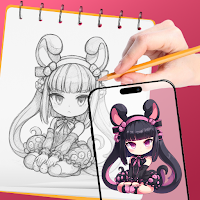
AR Drawing - Sketch & Trace
Art & Design In-app purchases Contains ads
Turn photos into AR Drawings - trace, draw & explore diverse templates easily
- Rating
- 4.5
- 7.2K ratings
- Downloads
- 1M+
- on Google Play
- Price
- Free
- In-app purchases
- Updated
- Sep 23
- 2026 · v1.8.1
Screenshots


About AR Drawing - Sketch & Trace
🎨AR Drawing – Sketch & Trace
Discover a whole new way to draw with AR Drawing, the innovative app that helps you sketch and trace easily using augmented reality (AR) technology
Whether you’re a complete beginner or an experienced artist, AR Drawing lets you learn to draw, practice your skills, and create stunning art with just your phone and a sheet of paper.
✨ Key Features
🎯 AR Drawing Mode – Trace Any Image Easily
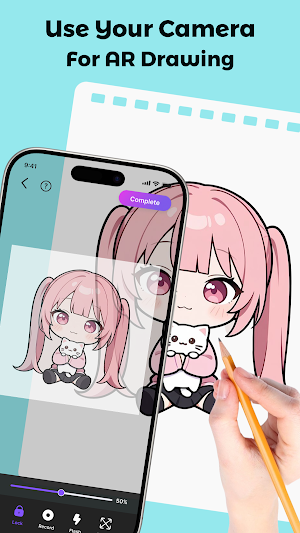
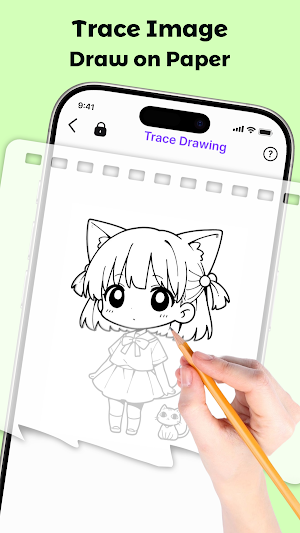
Set your phone on a stand, choose any photo you like, and AR Drawing will project it onto your paper so you can trace every line with precision
📸 Import or Capture Photos
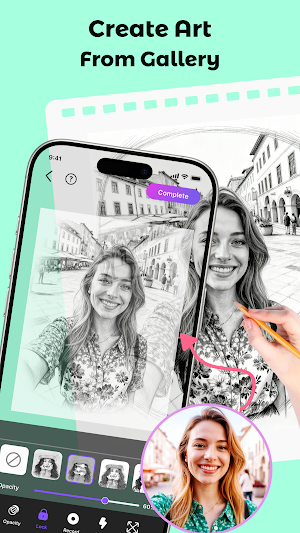
Pick an image from your gallery or take a new one, and instantly turn it into a traceable sketch. Draw portraits, animals, anime or anything else that inspires you.
💡 Adjustable Opacity for Perfect Tracing
Control the image transparency to match your comfort. Make it lighter or darker depending on how detailed you want your tracing guide to be.
🎬 Record Your Drawing Process
Capture videos to record your full AR drawing process, and share your creative journey on social media with just one tap
📚 Extensive Library of Templates
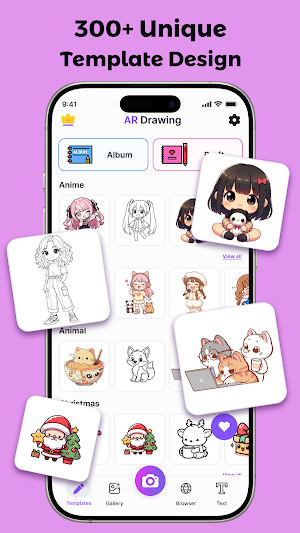
Explore hundreds of traceable templates — from Animal and Music to Cartoon, Anime, Food and more. There’s always something new to draw and improve your artistic skills.
💎 For Beginners & Pros Alike
AR Drawing is designed for everyone — kids, students, hobbyists, and professional artists. The intuitive AR interface makes learning and improving your drawing technique simple, fun, and inspiring.
🌍 Draw Anytime, Anywhere
All you need is your phone and a sheet of paper. Practice art anywhere — at home, outdoors, or on the go. AR Drawing brings your creativity to life, wherever you are.
💫 Why Choose AR Drawing?
Intuitive, beginner-friendly interface
Advanced and accurate AR technology
Hundreds of free drawing templates
Perfect for learning, practicing, or teaching art
Track your creative progress and improve over time
🚀 Start Drawing Today!
Download AR Drawing – Sketch & Trace now and experience the fun of creating art through AR.
Turn your favorite photos into beautiful sketches and unleash your inner artist!
👉 Disclaimers:
All copyrights reserved to their respective owners. If you notice that any content in our app violates copyrights then please inform us so that we remove that content.
Privacy Policy: https://www.maxlabs.hk/privacy-policy
Contact Us: [email protected]
Discover a whole new way to draw with AR Drawing, the innovative app that helps you sketch and trace easily using augmented reality (AR) technology
Whether you’re a complete beginner or an experienced artist, AR Drawing lets you learn to draw, practice your skills, and create stunning art with just your phone and a sheet of paper.
✨ Key Features
🎯 AR Drawing Mode – Trace Any Image Easily
Set your phone on a stand, choose any photo you like, and AR Drawing will project it onto your paper so you can trace every line with precision
📸 Import or Capture Photos
Pick an image from your gallery or take a new one, and instantly turn it into a traceable sketch. Draw portraits, animals, anime or anything else that inspires you.
💡 Adjustable Opacity for Perfect Tracing
Control the image transparency to match your comfort. Make it lighter or darker depending on how detailed you want your tracing guide to be.
🎬 Record Your Drawing Process
Capture videos to record your full AR drawing process, and share your creative journey on social media with just one tap
📚 Extensive Library of Templates
Explore hundreds of traceable templates — from Animal and Music to Cartoon, Anime, Food and more. There’s always something new to draw and improve your artistic skills.
💎 For Beginners & Pros Alike
AR Drawing is designed for everyone — kids, students, hobbyists, and professional artists. The intuitive AR interface makes learning and improving your drawing technique simple, fun, and inspiring.
🌍 Draw Anytime, Anywhere
All you need is your phone and a sheet of paper. Practice art anywhere — at home, outdoors, or on the go. AR Drawing brings your creativity to life, wherever you are.
💫 Why Choose AR Drawing?
Intuitive, beginner-friendly interface
Advanced and accurate AR technology
Hundreds of free drawing templates
Perfect for learning, practicing, or teaching art
Track your creative progress and improve over time
🚀 Start Drawing Today!
Download AR Drawing – Sketch & Trace now and experience the fun of creating art through AR.
Turn your favorite photos into beautiful sketches and unleash your inner artist!
👉 Disclaimers:
All copyrights reserved to their respective owners. If you notice that any content in our app violates copyrights then please inform us so that we remove that content.
Privacy Policy: https://www.maxlabs.hk/privacy-policy
Contact Us: [email protected]
What’s new
Version 1.8.1 · Updated September 23, 2026
Performance Improvements We've optimized the app for faster load times and smoother interactions to enhance your experience.
Alternatives to AR Drawing - Sketch & Trace
Looking for apps like AR Drawing - Sketch & Trace? Here are 6 similar Android apps on Google Play. The highest rated is Blend Photos - Photo Blender (4.7/5), and all 6 are free to download.
-
Blend Photos - Photo Blender 4.7
-
Pencil Sketch Photo Editor 4.3
-
True Mirror: Magnifying Mirror 4.3
-
Cartoon Photo Editor 4.3
-
Background Eraser 4.1
-
Cut & Paste Photo Editor 4.7
| App | Rating | Price | Installs | Last updated | Compare |
|---|---|---|---|---|---|
| AR Drawing - Sketch & Trace | 4.5 / 5 | Free | 1,000,000+ | Sep 23, 2026 | |
| Blend Photos - Photo Blender | 4.7 / 5 | Free | 10,000,000+ | Oct 21, 2026 | Compare |
| Pencil Sketch Photo Editor | 4.3 / 5 | Free | 10,000,000+ | Oct 27, 2026 | Compare |
| True Mirror: Magnifying Mirror | 4.3 / 5 | Free | 10,000+ | – | Compare |
| Cartoon Photo Editor | 4.3 / 5 | Free | 10,000,000+ | Oct 22, 2026 | Compare |
| Background Eraser | 4.1 / 5 | Free | 1,000,000+ | – | Compare |
| Cut & Paste Photo Editor | 4.7 / 5 | Free | 1,000,000+ | – | Compare |