Sketch Photo Maker & Sketch Camera
The best pencil sketch app to turn photos into Sketches and Drawings
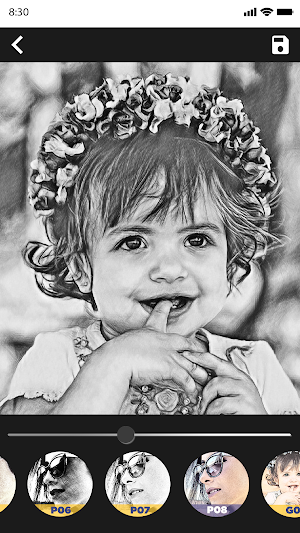
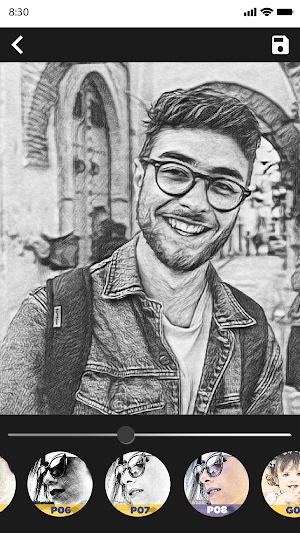
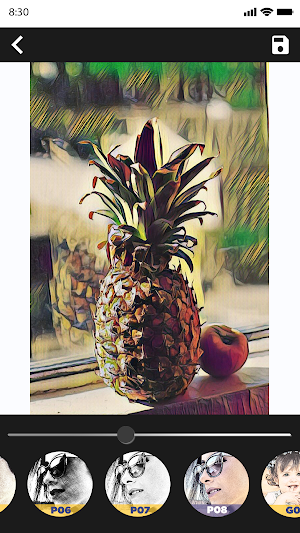
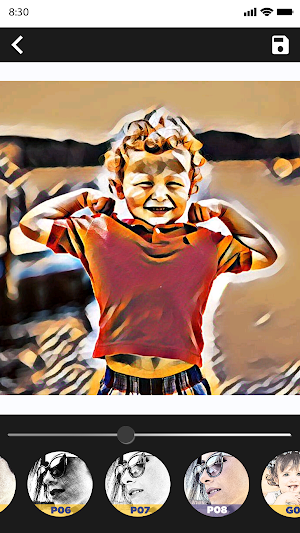
About Sketch Photo Maker & Sketch Camera
Sketch Photo Maker & Sketch Camera is designed for all trendy people and fans of true art! Use it to convert your photo into an unusual sketch which looks like one of spiffy Ben_Heine’s blending
Are you a fan of Ben_Heine’s blendings? Everybody on the Internet speaks about his artistic project called pencil vs camera (or pencil vs reality, drawing vs photography, etc). This sketch effect lets you design a picture in the Ben_Heine style without P.h.o.t.o.Shop or any artistic skills. Just upload your pic to our photo to sketch converter and let it do all the work!
3D Sketch Photo Maker: The ‘Pencil vs Camera’ effect looks good with landscapes and portrait photos. Be sure to check another artistic effect of this series called 'Photography in Drawing'.
2D Sketch Photo Maker: There are three styles included in the app: "Sketch", "Doodle" and "Hatch". "Sketch" style creates accurate results with smooth edges and curves, which is very good for human portrait photos. "Doodle" style is suitable for objects and nature views, since it presents stronger edges and curves. "Hatch" will work generally on any kind of photos, as it is a simple style which generates a cross-hatching texture on photos. Several photo frames are also included in the app so that you can easily apply them to your sketch results
Features of Sketch Camera Effects - 3D Sketch Maker
★ Crop photos.
★ Different effects (black strokes, white strokes, pastel, pencil sketch, color sketch, cartoon, stamp, halftone, hatching, ...)
★ Edge strength, and opacity adjustment
★ Contrast, brightness, saturation adjustment
★ Sketch of different types like!
★ Pencil sketch. Color sketch.
★ Hard pencil sketch. Red pencil sketch.
★ Water color sketch.
★ Green pencil sketch. And many others like this
★ Make 3D Sketch, mixes drawing and photography
★ Capture with Sketch camera
★ Pinch to zoom, tap screen to auto focus, switch between the back and front camera
★ Save photos in mobile gallery.
★ Share photos on social media easily.
How to Use this Sketch Photo Maker & Sketch Camera:
1. Select photo from Gallery or Camera.
2. Crop photos
3. Easily Start 2D, 3D Sketching.
3. Easily save your Sketch or Share them on social media.
Disclaimers
All copyrights reserved to their respective owners.
If you notice that any content in our app violates copyrights than please inform us so that we remove that content.
Privacy Policy: https://sites.google.com/view/cutewallpapersstudio
Contact Us: [email protected]
Sketch Photo Maker & Sketch Camera details
Sketch Photo Maker & Sketch Camera is a free Photography app for Android with 1,000,000+ installs on Google Play and a 4.6/5 average rating from 16,433 ratings. It was released on November 11, 2018 and last updated on May 5, 2020. It's developed by Cute Wallpapers Studio. It requires Android 4.4 or later. The app contains ads and offers in-app purchases.
- Category
- Photography
- Rating
- 4.6 / 5 (16,433 ratings)
- Installs
- 1,000,000+
- Price
- Free
- In-app purchases
- Yes
- Ads
- Contains ads
- Current version
- 2.24
- Size
- 12M
- Requires Android
- 4.4 and up
- Content rating
- Everyone
- Released
- November 11, 2018
- Last updated
- May 5, 2020
- Developer
- Cute Wallpapers Studio
What’s new in Sketch Photo Maker & Sketch Camera
1. Performance optimization. 2. Reducing app size. 3. More sketch effects.
Version 2.24 · Updated May 5, 2020
Similar Apps
Neon LED Keyboard: RGB & Emoji
Neon Led Keyboard is our new keyboard app for Android, created just...

Messenger - SMS Messages
LED Messenger - Color Messages, SMS & MMS app has a unique...

Deleted Photo Recovery
Are you looking for a Data recovery app for photos, videos, contacts,...
Calculator Lock - App Lock
Calculator Lock: Hide File, Photo Vault & App Lock is the best...

Logo Maker & Logo Creator
Logo Maker 2021 - Logo Designer & Logo Creator: Create Logos and...
PDF Scanner - Scanner App
- We ensure that we never collect personal data- PDF Cam Scanner...