

Milliamp: Battery Health
Tools
Battery health, drain tracking and heat monitoring. No ads. No fake boosting.
- Downloads
- 28+
- on Google Play
- Price
- Free
- No in-app purchases
- Updated
- Sep 5
- 2026 · v0.1.0
Screenshots
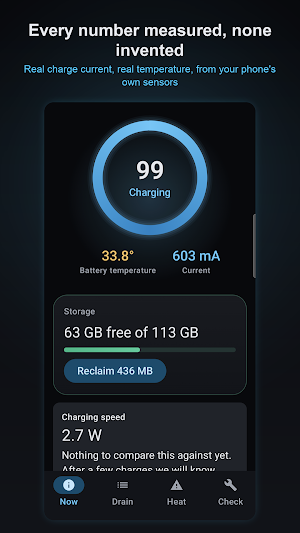
About Milliamp: Battery Health
Your phone's battery is a measuring instrument. Milliamp reads it properly.
Most "battery saver" apps cannot do what they claim. Android stopped letting apps see other apps' processes years ago, so the numbers they show are invented. Milliamp shows you only what your phone actually reports — and tells you plainly when it cannot measure something.
WHY IS MY BATTERY DRAINING SO FAST?
See which apps used your battery, ranked by real milliamp-hours rather than a guess. Tap any app to go straight to its battery settings — the place Android actually lets you restrict it.
Overnight drain is measured separately, and judged against your own history rather than an arbitrary threshold. If last night used 2.4x your normal, you will be told, because that is when a newly installed app has started misbehaving.
WHY IS MY PHONE GETTING HOT?
Milliamp records every moment Android limits your phone's performance to cool it down, along with what was on screen at the time. A 30-day heat map shows when it happened, and a ranking shows what your phone was doing.
You can also be warned when your phone charges above 40°C — heat ages a battery faster than anything else.
WHY DO MY APPS KEEP CLOSING IN THE BACKGROUND?
This is the most common real Android complaint in the world, and it is not your apps' fault. Samsung, Xiaomi, Oppo, Vivo, Huawei, Motorola, Tecno and Infinix all run their own battery managers that stop apps even when Android would not — and each hides the fix in a different place.
Milliamp detects which one your phone runs and takes you to the exact setting.
CHARGING
Get told when your battery reaches the level you choose — 80% by default, because charging past it is what ages a lithium cell fastest.
See real charging wattage, and be told honestly when your charger or cable is the bottleneck rather than your phone.
STORAGE AND MEMORY, HONESTLY
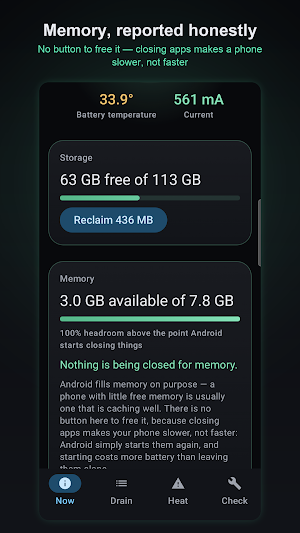
Storage below 15% free is the most common real cause of a phone feeling slow. Milliamp shows you the true figure and can ask Android to release cached data — then reports how much was actually freed, not how much it hoped for.
There is no "free RAM" button, and there never will be. Closing apps makes a phone slower, not faster: Android simply starts them again, and starting costs more battery than leaving them alone. Milliamp shows you real memory pressure instead — the moments your phone actually had to close something.
HARDWARE DIAGNOSTICS
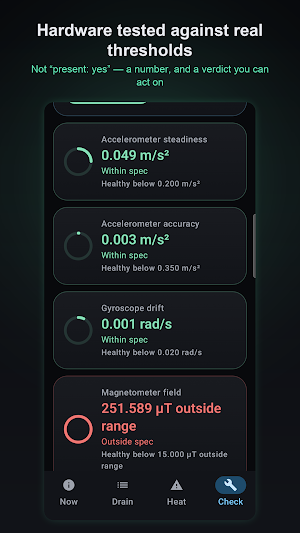
Test your accelerometer, gyroscope and magnetometer against real numeric thresholds — not "present: yes". Check your screen for dead pixels and burn-in, map your touchscreen for dead zones, and test your speaker and microphone with a tone sweep that objectively finds a blown speaker or a blocked mic.
BUILT TO BE TRUSTED
- No ads, ever
- Your measurements never leave your phone
- No account, no login, no advertising ID
- Open about what it cannot measure
Milliamp will never show you a number it did not measure.
Most "battery saver" apps cannot do what they claim. Android stopped letting apps see other apps' processes years ago, so the numbers they show are invented. Milliamp shows you only what your phone actually reports — and tells you plainly when it cannot measure something.
WHY IS MY BATTERY DRAINING SO FAST?
See which apps used your battery, ranked by real milliamp-hours rather than a guess. Tap any app to go straight to its battery settings — the place Android actually lets you restrict it.
Overnight drain is measured separately, and judged against your own history rather than an arbitrary threshold. If last night used 2.4x your normal, you will be told, because that is when a newly installed app has started misbehaving.
WHY IS MY PHONE GETTING HOT?
Milliamp records every moment Android limits your phone's performance to cool it down, along with what was on screen at the time. A 30-day heat map shows when it happened, and a ranking shows what your phone was doing.
You can also be warned when your phone charges above 40°C — heat ages a battery faster than anything else.
WHY DO MY APPS KEEP CLOSING IN THE BACKGROUND?
This is the most common real Android complaint in the world, and it is not your apps' fault. Samsung, Xiaomi, Oppo, Vivo, Huawei, Motorola, Tecno and Infinix all run their own battery managers that stop apps even when Android would not — and each hides the fix in a different place.
Milliamp detects which one your phone runs and takes you to the exact setting.
CHARGING
Get told when your battery reaches the level you choose — 80% by default, because charging past it is what ages a lithium cell fastest.
See real charging wattage, and be told honestly when your charger or cable is the bottleneck rather than your phone.
STORAGE AND MEMORY, HONESTLY
Storage below 15% free is the most common real cause of a phone feeling slow. Milliamp shows you the true figure and can ask Android to release cached data — then reports how much was actually freed, not how much it hoped for.
There is no "free RAM" button, and there never will be. Closing apps makes a phone slower, not faster: Android simply starts them again, and starting costs more battery than leaving them alone. Milliamp shows you real memory pressure instead — the moments your phone actually had to close something.
HARDWARE DIAGNOSTICS
Test your accelerometer, gyroscope and magnetometer against real numeric thresholds — not "present: yes". Check your screen for dead pixels and burn-in, map your touchscreen for dead zones, and test your speaker and microphone with a tone sweep that objectively finds a blown speaker or a blocked mic.
BUILT TO BE TRUSTED
- No ads, ever
- Your measurements never leave your phone
- No account, no login, no advertising ID
- Open about what it cannot measure
Milliamp will never show you a number it did not measure.
Alternatives to Milliamp: Battery Health
Looking for apps like Milliamp: Battery Health? Here are 3 similar Android apps on Google Play. All of them are free to download.

| App | Rating | Price | Installs | Last updated | Compare |
|---|---|---|---|---|---|
| Milliamp: Battery Health | – | Free | 10+ | Sep 5, 2026 | |
| SmartCoupon: Shop Offer Maker | – | Free | 10+ | Sep 5, 2026 | Compare |
| Foredge: PDF Reader & Signer | – | Free | 500+ | Oct 16, 2026 | Compare |
| Status Saver & Direct Chat | – | Free | 500+ | – | Compare |