

Cleanup - AI Storage Cleaner
TextSoft.Studio Tools Contains ads
Remove duplicates, clean phone storage, compress media, and enhance photos.
- Downloads
- 56.4K+
- on Google Play
- Price
- Free
- No in-app purchases
- Updated
- Sep 5
- 2026 · v3
Screenshots

About Cleanup - AI Storage Cleaner
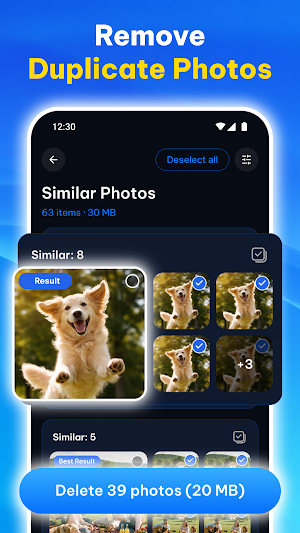
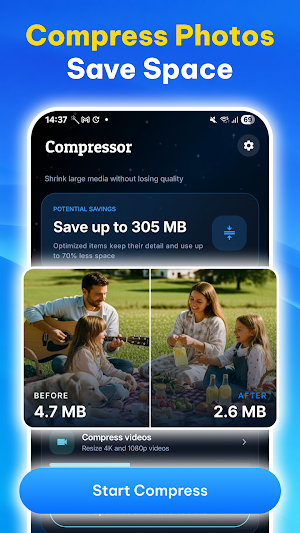
Keep your device organized and free up storage space with Cleanup - AI Storage Cleaner. Easily find duplicate photos, similar images, large videos, and other files that take up storage. Compress photos and videos, run a quick cleanup of your gallery with simple swipe gestures, manage installed apps, and enhance image quality using AI-powered tools.
📸 Smart Photo & Video Cleaner
- Find duplicate and similar photos with the duplicate cleaner
- Detect duplicate and similar videos with the duplicate cleaner
- View and organize screenshots
👆 Swipe to Clean
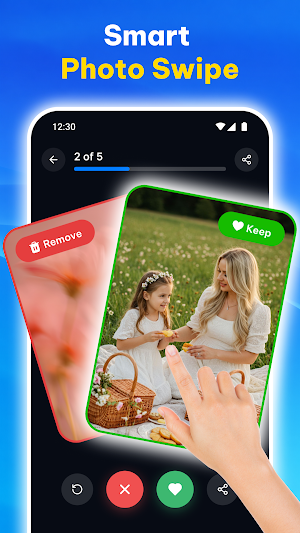
- Swipe left to remove unwanted photos
- Swipe right to keep important memories
- Quickly review large photo collections
- Make gallery cleanup simple and convenient
📉 Photo & Video Compression
- Compress photos with the storage cleaner to reduce storage usage
- Compress videos while preserving visual quality whenever possible
- Process multiple files in one cleanup operation
- Choose compression quality and output resolution
📱 App Manager
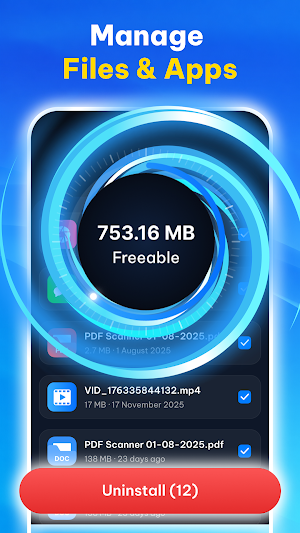
- Manage installed apps with the storage cleaner
- Sort apps by storage usage
- Identify apps that are used less frequently
- Uninstall process for selected apps
✨ AI Photo Enhancer
- Improve image quality with AI-powered enhancement
- Reduce noise and improve image clarity
- Compare original and enhanced results before saving
📅 Additional Tools
- File Manager
- Compress Media
- Duplicate Cleaner
- Storage Cleaner
- Calendar Cleaner
- Speed Internet Connect Test
Free up space with Cleanup - AI Storage Cleaner, the simple storage cleaner for your device.
Privacy & Permissions
Storage Permission
Storage access lets the storage cleaner scan your device, detect duplicate photos and videos via the duplicate cleaner, analyze large files, compress media, and review files stored on your device.
This permission is required for the app's core cleanup and storage management features.
App Usage Access
Usage access allows the App Manager to identify applications that are used less frequently and provide storage information to help you manage installed apps.
This permission is optional and can be enabled from your device settings.
Installed Apps Permission
The app requires access to display installed applications and allow users to start the Android uninstall process for selected apps.
Only the information required for these features is accessed.
Calendar Permission
Calendar access is required to detect outdated events, duplicate entries, and unwanted calendar spam.
Calendar information remains on your device and is used only for these features.
Disclaimer
Cleanup - AI Storage Cleaner scans files stored on your device, detects duplicate media, compresses supported photos and videos, and provides AI photo enhancement features. Users should review selected files before deletion, as deleted content may not be recoverable depending on device or system settings.
📸 Smart Photo & Video Cleaner
- Find duplicate and similar photos with the duplicate cleaner
- Detect duplicate and similar videos with the duplicate cleaner
- View and organize screenshots
👆 Swipe to Clean
- Swipe left to remove unwanted photos
- Swipe right to keep important memories
- Quickly review large photo collections
- Make gallery cleanup simple and convenient
📉 Photo & Video Compression
- Compress photos with the storage cleaner to reduce storage usage
- Compress videos while preserving visual quality whenever possible
- Process multiple files in one cleanup operation
- Choose compression quality and output resolution
📱 App Manager
- Manage installed apps with the storage cleaner
- Sort apps by storage usage
- Identify apps that are used less frequently
- Uninstall process for selected apps
✨ AI Photo Enhancer
- Improve image quality with AI-powered enhancement
- Reduce noise and improve image clarity
- Compare original and enhanced results before saving
📅 Additional Tools
- File Manager
- Compress Media
- Duplicate Cleaner
- Storage Cleaner
- Calendar Cleaner
- Speed Internet Connect Test
Free up space with Cleanup - AI Storage Cleaner, the simple storage cleaner for your device.
Privacy & Permissions
Storage Permission
Storage access lets the storage cleaner scan your device, detect duplicate photos and videos via the duplicate cleaner, analyze large files, compress media, and review files stored on your device.
This permission is required for the app's core cleanup and storage management features.
App Usage Access
Usage access allows the App Manager to identify applications that are used less frequently and provide storage information to help you manage installed apps.
This permission is optional and can be enabled from your device settings.
Installed Apps Permission
The app requires access to display installed applications and allow users to start the Android uninstall process for selected apps.
Only the information required for these features is accessed.
Calendar Permission
Calendar access is required to detect outdated events, duplicate entries, and unwanted calendar spam.
Calendar information remains on your device and is used only for these features.
Disclaimer
Cleanup - AI Storage Cleaner scans files stored on your device, detects duplicate media, compresses supported photos and videos, and provides AI photo enhancement features. Users should review selected files before deletion, as deleted content may not be recoverable depending on device or system settings.
Alternatives to Cleanup - AI Storage Cleaner
Looking for apps like Cleanup - AI Storage Cleaner? Here are 6 similar Android apps on Google Play. The highest rated is Castro Premium - system info (4.7/5), and 5 of the 6 are free to download.
-
Autosync - File Sync & Backup 4.6
-
Storage Analyzer & Disk Usage 4.2
-
Fortect Mobile Security 4.2
-
Castro Premium - system info 4.7
-
Quikshort: Shortcut Creator 4.1
-
Total Drive - Cloud Storage 3.5
| App | Rating | Price | Installs | Last updated | Compare |
|---|---|---|---|---|---|
| Cleanup - AI Storage Cleaner | – | Free | 50,000+ | Sep 5, 2026 | |
| Autosync - File Sync & Backup | 4.6 / 5 | Free | 100,000+ | Oct 14, 2026 | Compare |
| Storage Analyzer & Disk Usage | 4.2 / 5 | Free | 10,000,000+ | Oct 23, 2026 | Compare |
| Fortect Mobile Security | 4.2 / 5 | Free | 10,000+ | Aug 17, 2026 | Compare |
| Castro Premium - system info | 4.7 / 5 | 2.99 USD | 10,000+ | Oct 12, 2026 | Compare |
| Quikshort: Shortcut Creator | 4.1 / 5 | Free | 100,000+ | Sep 5, 2026 | Compare |
| Total Drive - Cloud Storage | 3.5 / 5 | Free | 500,000+ | Jul 27, 2026 | Compare |
Similar apps on Google Play
- Autosync - File Sync & Backup
- Storage Analyzer & Disk Usage
- Fortect Mobile Security
- Castro Premium - system info
- Quikshort: Shortcut Creator
- Total Drive - Cloud Storage
- HyperClean AI
- ASTRO File Manager & Cleaner
- MiraClean - File Manager
- 1Tap Cleaner (clear cache)
- Sleep Tracker - Sleep Cycle
- AVG Cleaner – Storage Cleaner
- MobiDrive Cloud Storage & Sync
- Norton Cleaner – Junk removal
- FITRIBE
- Sesame Search & Shortcuts
- Avast Cleanup – Phone Cleaner
- AIO Launcher