
WatchLog: YouTube Tracker
artigatou Health & Fitness In-app purchases Contains ads
YouTube tracker for digital wellbeing. Auto-track watch time & viewing habits.
- Downloads
- 1.1K+
- on Google Play
- Price
- Free
- In-app purchases
- Updated
- Sep 25
- 2026 · v1.5.1
Screenshots
About WatchLog: YouTube Tracker
WatchLog is your personal YouTube tracker for digital wellbeing. Ever wondered how much time you actually spend on YouTube? WatchLog automatically tracks your YouTube watch time and viewing habits — giving you the insights you need to take control of your screen time.
Set it up once and your YouTube watch history is recorded in the background. No manual input, no timers, no hassle. Just real data about your viewing habits.
YouTube Watch Time Tracker
WatchLog works as an automatic YouTube tracker by monitoring notifications. Every time you watch a YouTube video, WatchLog captures the video title, channel name, and exact watch duration. You get a complete picture of your YouTube screen time without lifting a finger.
- Auto-detects when you start and stop watching
- Records video title, channel, and duration
- Tracks actual play time (paused time is excluded)
- Works in the background — even with YouTube Premium
Digital Wellbeing Insights
Understanding your viewing habits is the first step toward healthier screen time. WatchLog gives you powerful statistics to see patterns in your YouTube usage:
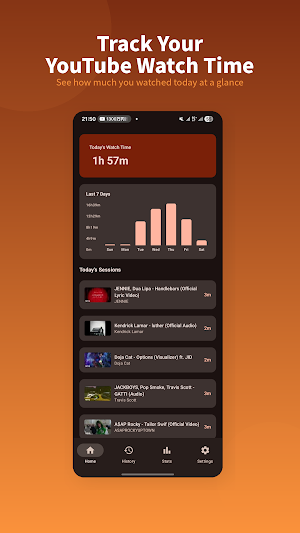
- Today's total watch time displayed front and center
- Comparison with yesterday's viewing to track your progress
- Number of videos watched each day
- Weekly bar chart showing your 7-day trend
Weekly & Monthly Stats
Dive deeper into your YouTube watch history with detailed statistics:
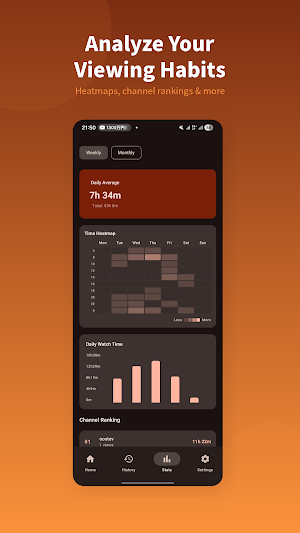
- Weekly and monthly heatmaps showing when you watch most
- Channel ranking with visual progress bars — see where your time goes
- Top 5 most-watched videos with thumbnails
- Daily average watch time to understand your habits
- Calendar heatmap to spot patterns across the month
Full Watch History
Browse your complete YouTube watch history by date. Every session shows the video title, channel name, start time, and duration. Tap any video to find it on YouTube. Swipe left to delete individual entries you don't want to keep.
How It Works
WatchLog uses Android's Notification Listener to detect YouTube playback notifications. When YouTube sends a notification about the video you're watching, WatchLog reads the title and channel name from it. When the notification disappears (you stop watching), WatchLog saves the session with the total watch time. All tracking happens locally on your device — your YouTube watch history never leaves your phone.
Note: YouTube Shorts do not generate playback notifications, so they cannot be tracked.
Privacy & Permissions
WatchLog requires "Notification Access" permission to read YouTube playback notifications. This is the only way to track your YouTube time without requiring your Google account or any login.
Your privacy matters:
- All data is stored 100% locally on your device
- No data is ever sent to external servers
- No account or sign-in required
- No personal information collected
- You can delete all data at any time from Settings
Pro Version (One-Time Purchase)
Remove all ads with a single purchase. No subscriptions, no recurring fees — the ad-free experience is yours forever.
Getting Started
1. Install WatchLog and open the app
2. Follow the onboarding to grant Notification Access
3. Start watching YouTube — WatchLog records automatically
4. Check your stats anytime to understand your viewing habits
Take the first step toward better digital wellbeing. Download WatchLog and discover how you really spend your time on YouTube.
Set it up once and your YouTube watch history is recorded in the background. No manual input, no timers, no hassle. Just real data about your viewing habits.
YouTube Watch Time Tracker
WatchLog works as an automatic YouTube tracker by monitoring notifications. Every time you watch a YouTube video, WatchLog captures the video title, channel name, and exact watch duration. You get a complete picture of your YouTube screen time without lifting a finger.
- Auto-detects when you start and stop watching
- Records video title, channel, and duration
- Tracks actual play time (paused time is excluded)
- Works in the background — even with YouTube Premium
Digital Wellbeing Insights
Understanding your viewing habits is the first step toward healthier screen time. WatchLog gives you powerful statistics to see patterns in your YouTube usage:
- Today's total watch time displayed front and center
- Comparison with yesterday's viewing to track your progress
- Number of videos watched each day
- Weekly bar chart showing your 7-day trend
Weekly & Monthly Stats
Dive deeper into your YouTube watch history with detailed statistics:
- Weekly and monthly heatmaps showing when you watch most
- Channel ranking with visual progress bars — see where your time goes
- Top 5 most-watched videos with thumbnails
- Daily average watch time to understand your habits
- Calendar heatmap to spot patterns across the month
Full Watch History
Browse your complete YouTube watch history by date. Every session shows the video title, channel name, start time, and duration. Tap any video to find it on YouTube. Swipe left to delete individual entries you don't want to keep.
How It Works
WatchLog uses Android's Notification Listener to detect YouTube playback notifications. When YouTube sends a notification about the video you're watching, WatchLog reads the title and channel name from it. When the notification disappears (you stop watching), WatchLog saves the session with the total watch time. All tracking happens locally on your device — your YouTube watch history never leaves your phone.
Note: YouTube Shorts do not generate playback notifications, so they cannot be tracked.
Privacy & Permissions
WatchLog requires "Notification Access" permission to read YouTube playback notifications. This is the only way to track your YouTube time without requiring your Google account or any login.
Your privacy matters:
- All data is stored 100% locally on your device
- No data is ever sent to external servers
- No account or sign-in required
- No personal information collected
- You can delete all data at any time from Settings
Pro Version (One-Time Purchase)
Remove all ads with a single purchase. No subscriptions, no recurring fees — the ad-free experience is yours forever.
Getting Started
1. Install WatchLog and open the app
2. Follow the onboarding to grant Notification Access
3. Start watching YouTube — WatchLog records automatically
4. Check your stats anytime to understand your viewing habits
Take the first step toward better digital wellbeing. Download WatchLog and discover how you really spend your time on YouTube.
User reviews

just waiting for a new update it's been so long , apart for that perfect 👏 great job dev

Really useful app! I didn’t realize how much time I was spending on YouTube until I started using this. The daily stats and weekly overview are super clear, and the heatmap is a great feature to understand usage patterns. App runs smoothly in the background without any hassle. Clean UI and easy to use. Would love to...
Alternatives to WatchLog: YouTube Tracker
Looking for apps like WatchLog: YouTube Tracker? Here are 6 similar Android apps on Google Play. All of them are free to download.
-
ForceOpen - App Redirect Tool
-
MENDOU — Friction App Blocker
-
QR Widget: QR Code Widget
-
Notikeeper
-
Vizfy - Visualize Your Music
-
DotCityClock: Pixel Clock App
| App | Rating | Price | Installs | Last updated | Compare |
|---|---|---|---|---|---|
| WatchLog: YouTube Tracker | – | Free | 1,000+ | Sep 25, 2026 | |
| ForceOpen - App Redirect Tool | – | Free | 10+ | – | Compare |
| MENDOU — Friction App Blocker | – | Free | 10+ | Jul 25, 2026 | Compare |
| QR Widget: QR Code Widget | – | Free | 500+ | Sep 25, 2026 | Compare |
| Notikeeper | – | Free | 50+ | Mar 21, 2026 | Compare |
| Vizfy - Visualize Your Music | – | Free | 100+ | – | Compare |
| DotCityClock: Pixel Clock App | – | Free | 100+ | – | Compare |
Similar apps on Google Play
- ForceOpen - App Redirect Tool
- MENDOU — Friction App Blocker
- QR Widget: QR Code Widget
- Notikeeper
- Vizfy - Visualize Your Music
- DotCityClock: Pixel Clock App
- LinkRemind
- AppClock: Screen Time Tracker
- SubMinder
- ProgressDot: Project Tracker
- SkipBook - Tracking Save Money
- QR/URL AI Scanner
- OneMotion Lancher
- KALCO: 24 Game Number Puzzle
- TimeAware Dumb Phone Launcher