OneMotion Lancher
Access all apps fast with 2-axis swipe gestures. Simple, intuitive launcher.
About OneMotion Lancher
OneMotion Launcher - Fast Access to All Apps with 2-Axis Swipe
🚀 Revolutionary 2-Axis Gesture Navigation
OneMotion Launcher is an innovative Android launcher that lets you launch apps quickly and simply with a
unique 2-axis swipe operation. Intuitive gestures combining vertical and horizontal movements give you fast
access to any app.
✨ Key Features
📱 2-Axis Swipe Operation
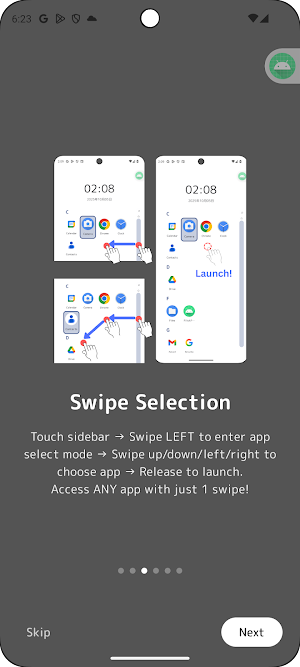
Touch the sidebar and swipe left to enter app selection mode. Swipe up/down to select a row, swipe left/right
to select a column. Release to launch. With practice, you can launch any app in seconds.
🎯 Simple 3-Step Operation
1. Swipe left on sidebar → Enter app selection mode
2. Swipe up/down/left/right → Select app (4-column grid display)
3. Release finger → Launch!
All apps are displayed in an organized grid, so you can quickly select without confusion.
🔍 Fast Search Function
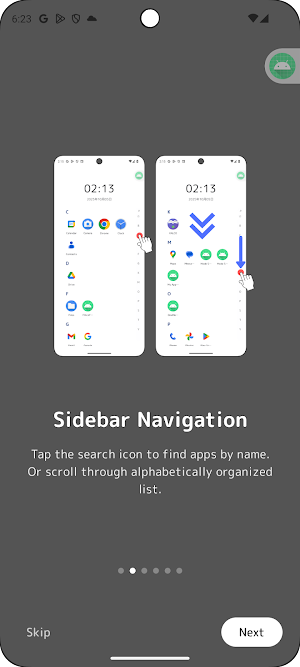
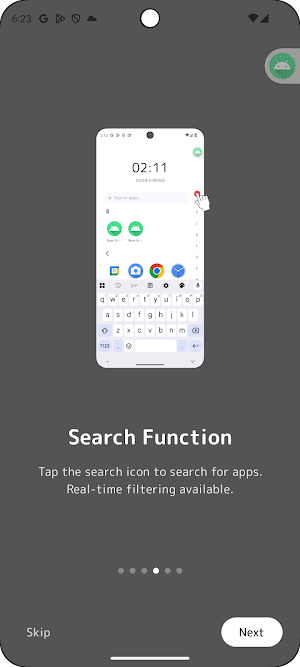
When you're not used to 2-axis operation yet, or when looking for a specific app, the search function is
convenient. Tap the search icon for real-time app search by name. Or quickly find apps from the alphabetically
organized list.
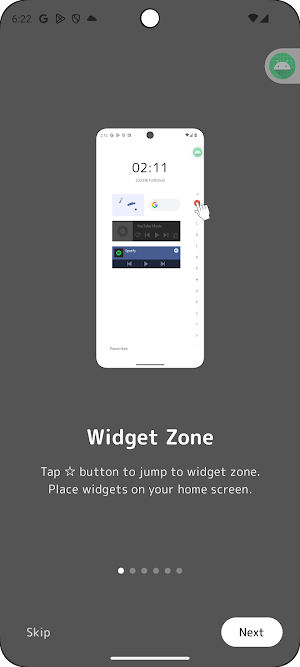
🎨 Widget Support
Place your favorite widgets on the home screen. Check time, weather, calendar, and more at a glance. Access
widget edit mode from the ☆ button.
🌍 7 Languages Supported
Available in Japanese, English, Chinese, Korean, Spanish, German, and French. Automatically detects system
language, and can be changed in settings.
🎯 Perfect For
• Those seeking a new operating experience
• Users who want smart app launching with gestures
• Those looking for a simple and efficient launcher
• Privacy-conscious users who want no ads or tracking
• Fans of minimal design
🔒 Privacy First
OneMotion Launcher is designed with privacy as the top priority:
✓ No Data Collection - We collect no personal information
✓ No Ads - No advertisements whatsoever
✓ No Tracking - No analytics or tracking services used
✓ Offline Operation - No internet connection required
✓ Open Source - Source code is publicly available for transparency
All data is stored only on your device and never transmitted externally.
💡 How to Use
【2-Axis Swipe Mode】
1. Set OneMotion as default launcher
2. Touch the left or right sidebar
3. Swipe left to enter app selection mode (4-column grid)
4. Swipe up/down to select row, left/right to select column
5. Release to launch!
【Search Mode】
1. Double-tap the sidebar
2. App list appears
3. Filter with search bar or scroll
4. Tap to launch!
A detailed tutorial is shown on first launch. You can review it anytime from settings.
🎨 Customization
• System Wallpaper Support - Your favorite wallpaper shows through
• Widget Placement - Customize your home screen freely
• Multi-language Support - Switch to your preferred language
• Haptic Feedback - Vibration during swipes enhances operation feel
🔧 Required Permissions
• Query All Packages - To display installed apps
• Vibrate - For touch feedback
• Bind AppWidget - To place widgets on home screen
• Set Alarm - For quick access to clock app
All permissions request only the minimum necessary for functionality.
📞 Support
If you have any questions or feedback, feel free to contact us:
[email protected]
Privacy Policy:
https://sites.google.com/view/pricacyporicyoml
🌟 Download Now
Try the new 2-axis swipe launcher experience today.
OneMotion Launcher will change the way you use your smartphone.
Launcher
2AxisSwipe
Gesture
Simple
Privacy

