
ForceOpen - App Redirect Tool
artigatou Tools In-app purchases
Open a distracting app, get redirected to a productive one automatically.
- Downloads
- 10+
- on Google Play
- Price
- Free
- In-app purchases
- Updated
- Jul 19
- 2026 · v1.2
Screenshots
About ForceOpen - App Redirect Tool
Open a distracting app, get redirected to a productive one — automatically.
ForceOpen is a digital wellbeing app that helps you break the habit of mindlessly scrolling through social media and video apps.
How It Works
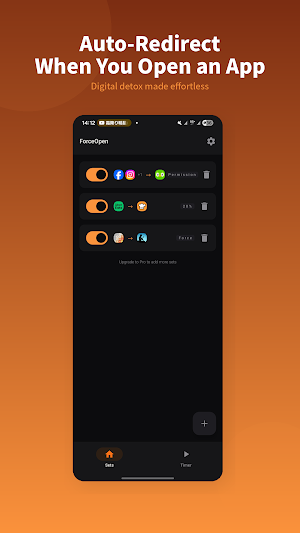
When you open a blocked app, ForceOpen automatically launches a redirect app of your choice. Open Twitter and your reading app launches. Open YouTube and your study app opens. Simple as that.
3 Block Modes
Flexible Set Management
Group blocked apps and redirect targets into sets. Create different configurations for work, study, or bedtime.
Timer
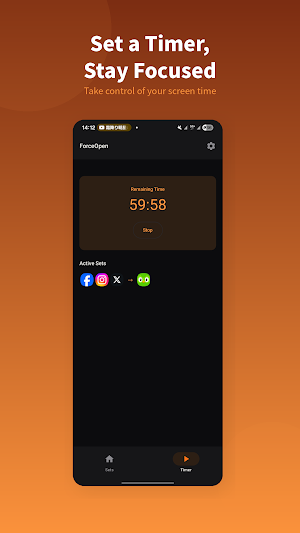
Block apps temporarily — "Block for 2 hours starting now." Select which sets to activate with the timer.
Key Features
Free vs Pro
Free: up to 3 blocked and 3 redirect apps per set. Pro (one-time purchase): unlimited apps and customizable pass-through rate.
Note: This app uses Accessibility Service to detect foreground app changes. No personal data is collected or transmitted.
ForceOpen is a digital wellbeing app that helps you break the habit of mindlessly scrolling through social media and video apps.
How It Works
When you open a blocked app, ForceOpen automatically launches a redirect app of your choice. Open Twitter and your reading app launches. Open YouTube and your study app opens. Simple as that.
3 Block Modes
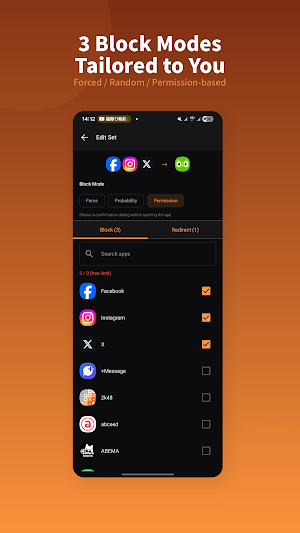
- Force Mode — Always redirects. No exceptions. For when willpower isn't enough.
- Probability Mode — Set a pass-through rate so you can occasionally use the app.
- Permission Mode — Shows a confirmation dialog: "Do you really want to open this?" A 10-second countdown helps you think twice.
Flexible Set Management
Group blocked apps and redirect targets into sets. Create different configurations for work, study, or bedtime.
Timer
Block apps temporarily — "Block for 2 hours starting now." Select which sets to activate with the timer.
Key Features
- Automatic app redirection
- 3 block modes (Force, Probability, Permission)
- Multiple sets with per-set ON/OFF toggle
- Timer for temporary blocking
- Per-set pass-through rate (Pro)
Free vs Pro
Free: up to 3 blocked and 3 redirect apps per set. Pro (one-time purchase): unlimited apps and customizable pass-through rate.
Note: This app uses Accessibility Service to detect foreground app changes. No personal data is collected or transmitted.
Alternatives to ForceOpen - App Redirect Tool
Looking for apps like ForceOpen - App Redirect Tool? Here are 6 similar Android apps on Google Play. All of them are free to download.
-
MENDOU — Friction App Blocker
-
QR Widget: QR Code Widget
-
WatchLog: YouTube Tracker
-
Notikeeper
-
Vizfy - Visualize Your Music
-
DotCityClock: Pixel Clock App
| App | Rating | Price | Installs | Last updated | Compare |
|---|---|---|---|---|---|
| ForceOpen - App Redirect Tool | – | Free | 10+ | Jul 19, 2026 | |
| MENDOU — Friction App Blocker | – | Free | 10+ | Jul 25, 2026 | Compare |
| QR Widget: QR Code Widget | – | Free | 500+ | Sep 25, 2026 | Compare |
| WatchLog: YouTube Tracker | – | Free | 1,000+ | Sep 25, 2026 | Compare |
| Notikeeper | – | Free | 50+ | Mar 21, 2026 | Compare |
| Vizfy - Visualize Your Music | – | Free | 100+ | – | Compare |
| DotCityClock: Pixel Clock App | – | Free | 100+ | – | Compare |
Similar apps on Google Play
- MENDOU — Friction App Blocker
- QR Widget: QR Code Widget
- WatchLog: YouTube Tracker
- Notikeeper
- Vizfy - Visualize Your Music
- DotCityClock: Pixel Clock App
- LinkRemind
- AppClock: Screen Time Tracker
- SubMinder
- ProgressDot: Project Tracker
- SkipBook - Tracking Save Money
- QR/URL AI Scanner
- OneMotion Lancher
- KALCO: 24 Game Number Puzzle
- TimeAware Dumb Phone Launcher