
Scan Trove: PDF Scanner
Productivity In-app purchases
Scan, edit, OCR, organize, print, and share PDFs without ads or watermarks.
- Downloads
- 26+
- on Google Play
- Price
- Free
- In-app purchases
- Updated
- Oct 21
- 2026 · v7.2.3
Screenshots

About Scan Trove: PDF Scanner
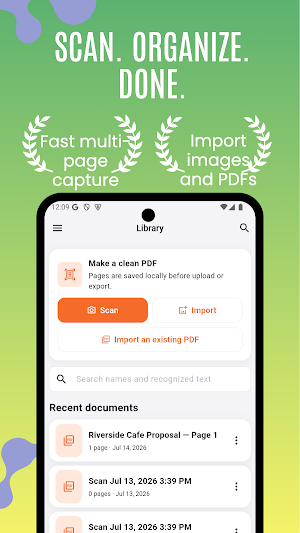
Turn paper, photos, and existing PDFs into a clean document library you can use on mobile and the web.
RELIABLE DOCUMENT CAPTURE
• Scan multiple pages with automatic edge detection and perspective correction
• Import photos or an existing PDF
• Add, reorder, rotate, duplicate, extract, merge, or delete pages
• Keep accepted pages in app-private storage before cloud work begins
EDIT WITHOUT LOSING THE ORIGINAL
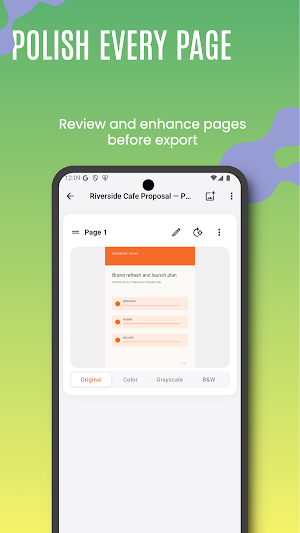
• Apply color, grayscale, and black-and-white filters
• Crop and adjust brightness, contrast, saturation, and warmth
• Add ink, highlights, shapes, text, signatures, redaction, blur, watermarks, and footers
• Revert edits because the original page remains unchanged
OCR AND CONVERSION
• Recognize text on your device with Google ML Kit
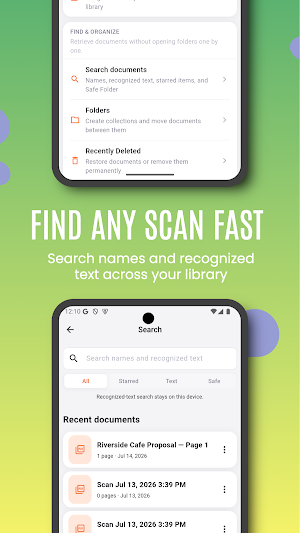
• Search document names and recognized text
• View and copy recognized text
• Export OCR text as TXT or a straightforward DOCX file
PDF TOOLS THAT STAY USEFUL
• Export unwatermarked PDFs on the Free plan
• Choose Auto, A4, or Letter page size
• Choose Original, Balanced, or Small output quality
• Add page numbers and recognized Latin text to searchable PDFs
• Print through the system print sheet or share through installed apps
PRIVATE, ORGANIZED, AND AD-FREE
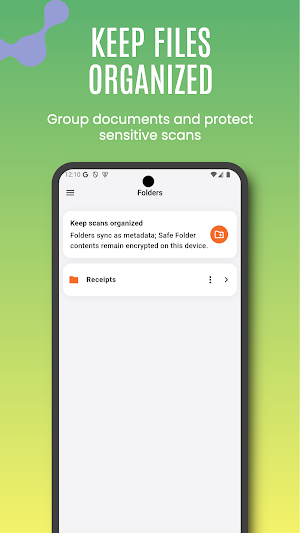
• Use folders, favorites, recent documents, search, and Trash
• Protect app access with a PIN or biometrics
• Sync eligible normal documents to your private account and web library
• No ads and no document-content advertising
SIMPLE PLANS
Free includes unlimited local scans, useful editing, unwatermarked basic PDF export, up to 30 pages per document, and a bounded cloud allowance.
Premium raises document and cloud limits, supports up to 300 pages per document, and provides one eligible entitlement across iOS, Android, and web. Monthly and annual options are shown before purchase and may vary by region.
Scan Trove requires Google or Apple sign-in.
RELIABLE DOCUMENT CAPTURE
• Scan multiple pages with automatic edge detection and perspective correction
• Import photos or an existing PDF
• Add, reorder, rotate, duplicate, extract, merge, or delete pages
• Keep accepted pages in app-private storage before cloud work begins
EDIT WITHOUT LOSING THE ORIGINAL
• Apply color, grayscale, and black-and-white filters
• Crop and adjust brightness, contrast, saturation, and warmth
• Add ink, highlights, shapes, text, signatures, redaction, blur, watermarks, and footers
• Revert edits because the original page remains unchanged
OCR AND CONVERSION
• Recognize text on your device with Google ML Kit
• Search document names and recognized text
• View and copy recognized text
• Export OCR text as TXT or a straightforward DOCX file
PDF TOOLS THAT STAY USEFUL
• Export unwatermarked PDFs on the Free plan
• Choose Auto, A4, or Letter page size
• Choose Original, Balanced, or Small output quality
• Add page numbers and recognized Latin text to searchable PDFs
• Print through the system print sheet or share through installed apps
PRIVATE, ORGANIZED, AND AD-FREE
• Use folders, favorites, recent documents, search, and Trash
• Protect app access with a PIN or biometrics
• Sync eligible normal documents to your private account and web library
• No ads and no document-content advertising
SIMPLE PLANS
Free includes unlimited local scans, useful editing, unwatermarked basic PDF export, up to 30 pages per document, and a bounded cloud allowance.
Premium raises document and cloud limits, supports up to 300 pages per document, and provides one eligible entitlement across iOS, Android, and web. Monthly and annual options are shown before purchase and may vary by region.
Scan Trove requires Google or Apple sign-in.
What’s new
Version 7.2.3 · Updated October 21, 2026
Bug fixes and performance improvements.
Alternatives to Scan Trove: PDF Scanner
Looking for apps like Scan Trove: PDF Scanner? Here are 6 similar Android apps on Google Play. The highest rated is Stock Master: Investing Stocks (4.4/5), and all 6 are free to download.
-
Stock Master: Investing Stocks 4.4
-
Mile: Mileage Tracker & Log
-
What's My IP: Address & Map
-
Financial Calculator: Planner
-
Currency Converter: Forex Rate
-
Mortgage Calculator: Loan Mate
| App | Rating | Price | Installs | Last updated | Compare |
|---|---|---|---|---|---|
| Scan Trove: PDF Scanner | – | Free | 10+ | Oct 21, 2026 | |
| Stock Master: Investing Stocks | 4.4 / 5 | Free | 100,000+ | – | Compare |
| Mile: Mileage Tracker & Log | – | Free | 1,000+ | Oct 4, 2026 | Compare |
| What's My IP: Address & Map | – | Free | 500+ | Oct 21, 2026 | Compare |
| Financial Calculator: Planner | – | Free | 10+ | – | Compare |
| Currency Converter: Forex Rate | – | Free | 10+ | Oct 2, 2026 | Compare |
| Mortgage Calculator: Loan Mate | – | Free | 10+ | Oct 2, 2026 | Compare |