

AI Agents At Work: You can Go!
Tools In-app purchases
Monitor and control Claude, Codex, Gemini, Grok AI, Ollama agents from a phone.
- Downloads
- 43+
- on Google Play
- Price
- Free
- In-app purchases
- Updated
- Oct 23
- 2026 · v2.11
Screenshots
About AI Agents At Work: You can Go!
Your AI agents are working. You don't have to watch.
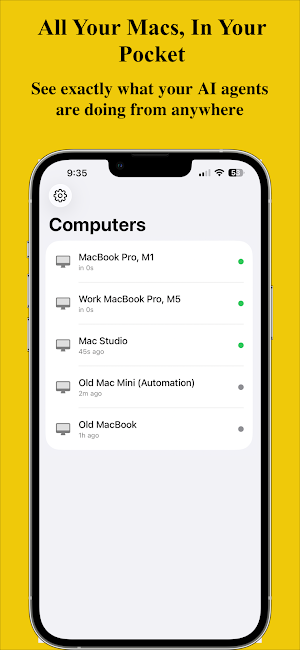
Agents At Work is the mobile companion for developers running Claude, Codex, Gemini, Grok CLI, Ollama (chat or agentic) on their Mac. Get instant push notifications when your agent needs approval, finishes a task, or hits an error, and respond from anywhere, without touching your Mac.
WHY NOT JUST USE SOMETHING ELSE?
- Claude.ai mobile lets you dispatch tasks to Claude while your Mac is awake: good for simple jobs. But it only controls Claude, offers limited real-time visibility, simpler permission prompts, and no rich conversation feed. No Codex, Grok, or Gemini support.
- Generic push tools (Pushover, ntfy, etc.) only send notifications with zero context or ability to reply/approve.
- OpenClaw provides remote control via Telegram for quick commands, but it requires complex setup and lacks a dedicated rich conversation UI with full context.
Agents At Work is different.
WHAT YOU GET
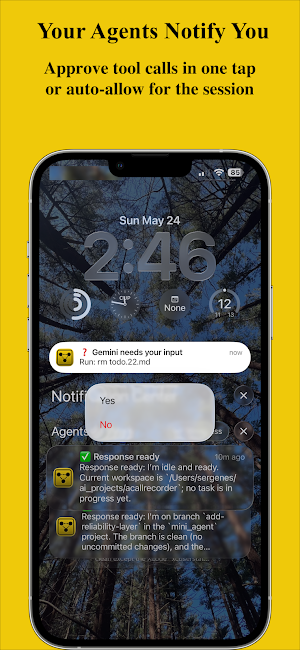
Push Notifications: Your phone buzzes the moment your agent needs input or completes work. Rich notifications show what happened so you can act without opening the app.
Permission Prompt Approvals: When your agent asks to run a command, edit a file, or use a tool, the prompt lands on your phone. Tap Yes, No, or "Yes for this session"; your agent continues instantly.
Auto-Approve Mode: Enable auto-approve with one tap for trusted operations. Your agent runs without interruption; you stay in the loop without lifting a finger.
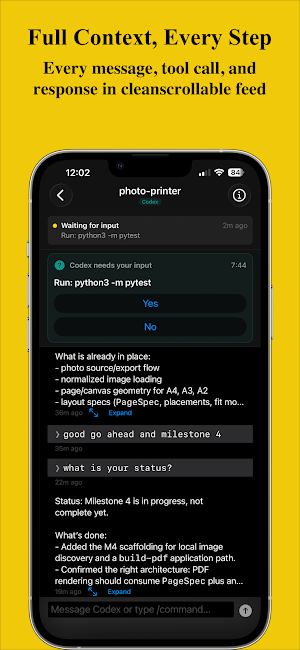
Conversation Thread View: Every message, every tool call, every response in a clean scrollable feed. Tap to expand long output. Exactly what's on your Mac screen, in real time.
Remote Messaging: Send follow-up instructions from your phone. Type from anywhere; your agent receives it instantly.
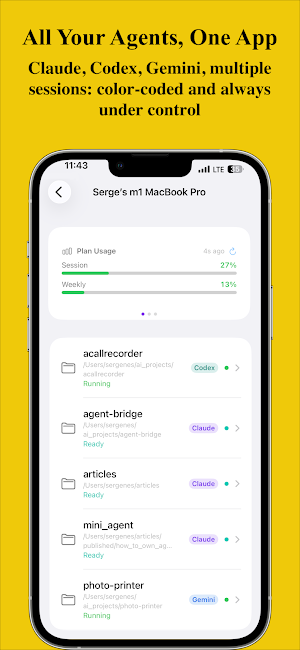
Multi-Agent Support: Running Claude Code on one project and Codex on another? Both appear in Agents At Work, color-coded and labeled. Claude is purple, Codex is teal, Gemini is Google blue, Grok is black, Ollama is yellow.
Session Status: Live status for every session: Running, Thinking, Waiting for Input, or Finished.
End-to-End Encrypted: Your prompts and agent responses are encrypted on your Mac with AES-256 before they leave for the cloud. The encryption key is exchanged directly between your Mac and your phone via a one-time QR scan. Firebase never sees your conversation content in plaintext. Your code stays on your machine. Your conversations stay between your devices.
HOW IT WORKS
1. Download Agents At Work on your Android Phone.
2. Install the free macOS companion on your Mac (download at agentsatwork.app).
3. Sign in on your Mac with Google or email/password.
4. In the Mac app, click Link Mobile; a QR code appears. On your phone, open Agents At Work and tap Scan QR Code. That one scan links your phone and sets up end-to-end encryption. No separate account needed on your phone.
5. Launch any Claude Code, Codex, Gemini, Grok, or Ollama session as usual.
6. Your phone gets notified. Respond, approve, or monitor from anywhere.
Your code, API keys, and agent output never leave your Mac. Events flow to your phone through your own secure Firebase account, encrypted end-to-end. We don't have a backend that reads your code.
SUPPORTED AGENTS
• Claude Code by Anthropic
• OpenAI Codex CLI
• Google Gemini CLI
• Grok CLI
• Ollama
REQUIREMENTS
• Android 8.0 (API 26) or later
• Mac with macOS 13 Ventura or later (companion app required)
• Claude Code, Codex CLI, Gemini CLI, or Grok CLI installed on your Mac, or Ollama
PRIVACY
Agents At Work does not collect or store your code, prompts, or agent responses on any server we control. Conversation content is encrypted end-to-end on your Mac before it reaches Firebase, only your devices hold the key. We collect only what is necessary to deliver notifications and manage your subscription.
Put your Mac to work. Take your phone anywhere.
Terms of Use: https://www.apple.com/legal/internet-services/itunes/dev/stdeula/
Agents At Work is the mobile companion for developers running Claude, Codex, Gemini, Grok CLI, Ollama (chat or agentic) on their Mac. Get instant push notifications when your agent needs approval, finishes a task, or hits an error, and respond from anywhere, without touching your Mac.
WHY NOT JUST USE SOMETHING ELSE?
- Claude.ai mobile lets you dispatch tasks to Claude while your Mac is awake: good for simple jobs. But it only controls Claude, offers limited real-time visibility, simpler permission prompts, and no rich conversation feed. No Codex, Grok, or Gemini support.
- Generic push tools (Pushover, ntfy, etc.) only send notifications with zero context or ability to reply/approve.
- OpenClaw provides remote control via Telegram for quick commands, but it requires complex setup and lacks a dedicated rich conversation UI with full context.
Agents At Work is different.
WHAT YOU GET
Push Notifications: Your phone buzzes the moment your agent needs input or completes work. Rich notifications show what happened so you can act without opening the app.
Permission Prompt Approvals: When your agent asks to run a command, edit a file, or use a tool, the prompt lands on your phone. Tap Yes, No, or "Yes for this session"; your agent continues instantly.
Auto-Approve Mode: Enable auto-approve with one tap for trusted operations. Your agent runs without interruption; you stay in the loop without lifting a finger.
Conversation Thread View: Every message, every tool call, every response in a clean scrollable feed. Tap to expand long output. Exactly what's on your Mac screen, in real time.
Remote Messaging: Send follow-up instructions from your phone. Type from anywhere; your agent receives it instantly.
Multi-Agent Support: Running Claude Code on one project and Codex on another? Both appear in Agents At Work, color-coded and labeled. Claude is purple, Codex is teal, Gemini is Google blue, Grok is black, Ollama is yellow.
Session Status: Live status for every session: Running, Thinking, Waiting for Input, or Finished.
End-to-End Encrypted: Your prompts and agent responses are encrypted on your Mac with AES-256 before they leave for the cloud. The encryption key is exchanged directly between your Mac and your phone via a one-time QR scan. Firebase never sees your conversation content in plaintext. Your code stays on your machine. Your conversations stay between your devices.
HOW IT WORKS
1. Download Agents At Work on your Android Phone.
2. Install the free macOS companion on your Mac (download at agentsatwork.app).
3. Sign in on your Mac with Google or email/password.
4. In the Mac app, click Link Mobile; a QR code appears. On your phone, open Agents At Work and tap Scan QR Code. That one scan links your phone and sets up end-to-end encryption. No separate account needed on your phone.
5. Launch any Claude Code, Codex, Gemini, Grok, or Ollama session as usual.
6. Your phone gets notified. Respond, approve, or monitor from anywhere.
Your code, API keys, and agent output never leave your Mac. Events flow to your phone through your own secure Firebase account, encrypted end-to-end. We don't have a backend that reads your code.
SUPPORTED AGENTS
• Claude Code by Anthropic
• OpenAI Codex CLI
• Google Gemini CLI
• Grok CLI
• Ollama
REQUIREMENTS
• Android 8.0 (API 26) or later
• Mac with macOS 13 Ventura or later (companion app required)
• Claude Code, Codex CLI, Gemini CLI, or Grok CLI installed on your Mac, or Ollama
PRIVACY
Agents At Work does not collect or store your code, prompts, or agent responses on any server we control. Conversation content is encrypted end-to-end on your Mac before it reaches Firebase, only your devices hold the key. We collect only what is necessary to deliver notifications and manage your subscription.
Put your Mac to work. Take your phone anywhere.
Terms of Use: https://www.apple.com/legal/internet-services/itunes/dev/stdeula/
What’s new
Version 2.11 · Updated October 23, 2026
New: Schedule a prompt for later. Queue work now and your agent runs it at a time you pick, like 2 AM when your token limit resets, so a spent quota turns into work done overnight. Set, edit, or cancel scheduled prompts from your phone. End-to-end encrypted.
Alternatives to AI Agents At Work: You can Go!
Looking for apps like AI Agents At Work: You can Go!? Here are 6 similar Android apps on Google Play. The highest rated is Hedy: AI Meeting Coach & Notes (4.8/5), and all 6 are free to download.
-
Jasper AI Copy Content Writer 4.7
-
TicNote: AI Recorder & Agent 3.2
-
Hedy: AI Meeting Coach & Notes 4.8
-
Liner - AI Search and Finance 4.0
-
Fabric: your second brain 4.5
-
Taskade - One Prompt. One App. 3.8
| App | Rating | Price | Installs | Last updated | Compare |
|---|---|---|---|---|---|
| AI Agents At Work: You can Go! | – | Free | 10+ | Oct 23, 2026 | |
| Jasper AI Copy Content Writer | 4.7 / 5 | Free | 100,000+ | – | Compare |
| TicNote: AI Recorder & Agent | 3.2 / 5 | Free | 10,000+ | Aug 14, 2026 | Compare |
| Hedy: AI Meeting Coach & Notes | 4.8 / 5 | Free | 10,000+ | Oct 6, 2026 | Compare |
| Liner - AI Search and Finance | 4.0 / 5 | Free | 500,000+ | Sep 22, 2026 | Compare |
| Fabric: your second brain | 4.5 / 5 | Free | 100,000+ | Oct 7, 2026 | Compare |
| Taskade - One Prompt. One App. | 3.8 / 5 | Free | 1,000,000+ | Sep 15, 2026 | Compare |
Similar apps on Google Play
- Jasper AI Copy Content Writer
- TicNote: AI Recorder & Agent
- Hedy: AI Meeting Coach & Notes
- Liner - AI Search and Finance
- Fabric: your second brain
- Taskade - One Prompt. One App.
- GitMind: AI Mind Mapping App
- Friday: AI E-mail Assistant
- Daily AI Writer: Email, Letter
- Airtable
- Meeting.ai: Work Assistant
- Xmind: Mind Map & Brainstorm
- Fig - AI Agents & Automation
- Sider: AI GPT Deep Chat
- CHEF iQ
- KultureCity