
VoidLauncher
Tools In-app purchases
A premium Android launcher built for beautiful design
- Downloads
- 653K+
- on Google Play
- Price
- Free
- In-app purchases
- Updated
- Oct 10
- 2026
Screenshots


About VoidLauncher
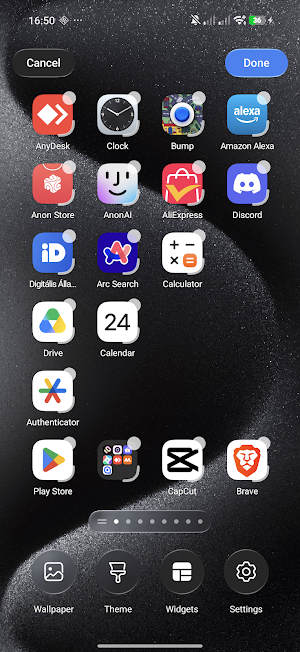
Void Launcher is a meticulous reimagining of the Android home screen. Designed with a profound focus on craftsmanship, materiality, and the behavior of light, it transforms your device into a living, tactile canvas.
Designed for the Senses.
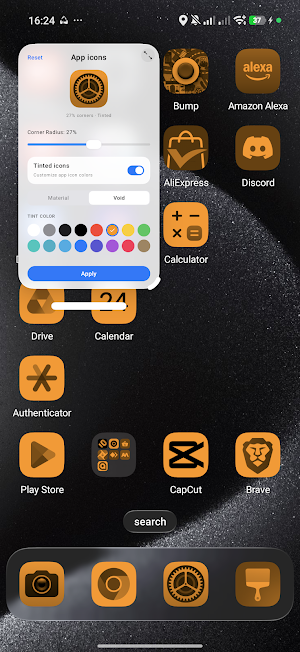
At the heart of Void Launcher is a custom-engineered liquid-glass interface. We studied how light filters through frosted glass, how layers interact in physical space, and how motion can feel entirely organic. The result is a layout defined by depth, subtle translucent layers, and high-fidelity graphics that elevate every interaction.
A Symphony of Fluid Motion.
Every gesture feels natural and responsive. Powered by custom AGSL physics engines, a gentle tap sends liquid ripples flowing across your wallpaper, while transitioning between screens feels weightless. It is not just about moving from page to page; it is about the poetry of motion.
The Beauty of Materiality.
Experience custom-crafted Monarch shapes that adapt harmoniously to your display. The interface behaves like a physical material—refracting light, shifting dynamically based on your wallpaper, and creating a sense of clean, structured space. It is quiet, elegant, and entirely focused on what matters most to you.
Intelligent Simplicity.
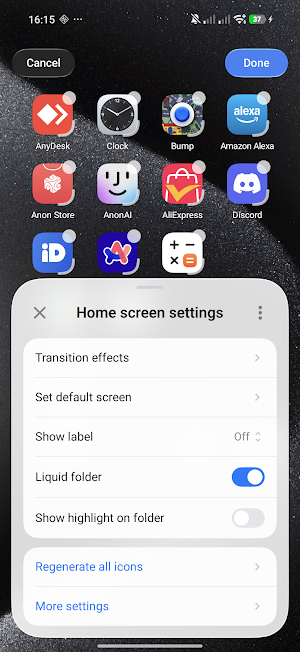
A highly refined home screen that respects your focus. Organize your workspace with precise grid adjustments, seamless icon pack integration, and custom blur parameters. It is an experience that stays out of your way, letting your content shine.
Integrated Voice Control.
For moments when you need it, a minimalist, built-in Voice and keyboard assistant rests quietly at the bottom of the screen. Available with a simple gesture, it allows you to effortlessly navigate pages or adjust launcher settings with natural command input.
ACCESSIBILITY SERVICE DISCLOSURE:
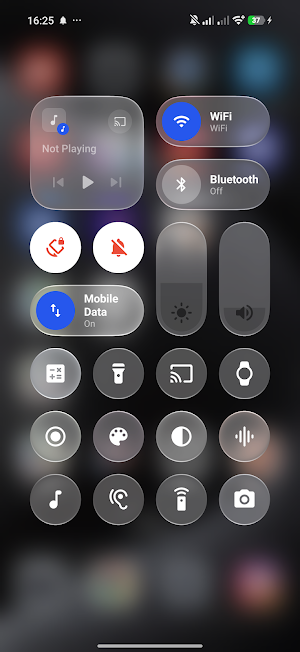
VoidLauncher uses the Android Accessibility Service API to provide its Control Center functionality while you are using other applications. The Accessibility Service allows VoidLauncher to display and control the Control Center overlay over other apps.
The Accessibility Service is used exclusively for this Control Center functionality. VoidLauncher does not collect, store, or share personal or sensitive user data through the Accessibility Service.
Designed for the Senses.
At the heart of Void Launcher is a custom-engineered liquid-glass interface. We studied how light filters through frosted glass, how layers interact in physical space, and how motion can feel entirely organic. The result is a layout defined by depth, subtle translucent layers, and high-fidelity graphics that elevate every interaction.
A Symphony of Fluid Motion.
Every gesture feels natural and responsive. Powered by custom AGSL physics engines, a gentle tap sends liquid ripples flowing across your wallpaper, while transitioning between screens feels weightless. It is not just about moving from page to page; it is about the poetry of motion.
The Beauty of Materiality.
Experience custom-crafted Monarch shapes that adapt harmoniously to your display. The interface behaves like a physical material—refracting light, shifting dynamically based on your wallpaper, and creating a sense of clean, structured space. It is quiet, elegant, and entirely focused on what matters most to you.
Intelligent Simplicity.
A highly refined home screen that respects your focus. Organize your workspace with precise grid adjustments, seamless icon pack integration, and custom blur parameters. It is an experience that stays out of your way, letting your content shine.
Integrated Voice Control.
For moments when you need it, a minimalist, built-in Voice and keyboard assistant rests quietly at the bottom of the screen. Available with a simple gesture, it allows you to effortlessly navigate pages or adjust launcher settings with natural command input.
ACCESSIBILITY SERVICE DISCLOSURE:
VoidLauncher uses the Android Accessibility Service API to provide its Control Center functionality while you are using other applications. The Accessibility Service allows VoidLauncher to display and control the Control Center overlay over other apps.
The Accessibility Service is used exclusively for this Control Center functionality. VoidLauncher does not collect, store, or share personal or sensitive user data through the Accessibility Service.
What’s new
Updated October 10, 2026
bugs
Alternatives to VoidLauncher
Looking for apps like VoidLauncher? Here are 6 similar Android apps on Google Play. The highest rated is Smart Launcher 6 ‧ Home Screen (4.6/5), and 5 of the 6 are free to download.
-
Magazine Lockscreen XOS 3.8
-
Smart Launcher 6 ‧ Home Screen 4.6
-
Good Lock : Custom Lock Screen 3.1
-
Ares Dark Icon Pack 4.4
-
XOS Launcher -Cool Stylish 4.2
-
Alpha Hybrid Launcher 4D theme 4.6
| App | Rating | Price | Installs | Last updated | Compare |
|---|---|---|---|---|---|
| VoidLauncher | – | Free | 500,000+ | Oct 10, 2026 | |
| Magazine Lockscreen XOS | 3.8 / 5 | Free | 100,000,000+ | Sep 10, 2026 | Compare |
| Smart Launcher 6 ‧ Home Screen | 4.6 / 5 | Free | 50,000,000+ | Oct 25, 2026 | Compare |
| Good Lock : Custom Lock Screen | 3.1 / 5 | Free | 1,000,000+ | Oct 26, 2026 | Compare |
| Ares Dark Icon Pack | 4.4 / 5 | 3.49 USD | 5,000+ | Oct 27, 2026 | Compare |
| XOS Launcher -Cool Stylish | 4.2 / 5 | Free | 500,000,000+ | Oct 16, 2026 | Compare |
| Alpha Hybrid Launcher 4D theme | 4.6 / 5 | Free | 5,000,000+ | Jun 16, 2026 | Compare |
Compare VoidLauncher with the top alternatives: ratings, updates, ASO score and keyword gaps →
Similar apps on Google Play
- Magazine Lockscreen XOS
- Smart Launcher 6 ‧ Home Screen
- Good Lock : Custom Lock Screen
- Ares Dark Icon Pack
- XOS Launcher -Cool Stylish
- Alpha Hybrid Launcher 4D theme
- GO Launcher S – 3D Theme, Wall
- Square Home
- HiOS Launcher - Fast
- One4Wall: 4K Wallpapers & Live
- Nova Launcher: Home Screen
- Action Launcher: Pixel Edition
- Walley-Wallpaper, Backgrounds
- Spatial Touch™ - Air Gestures
- P Launcher
- Cool Mi Launcher - CC Launcher
- Icon Pack Studio
- Tapet: Auto Wallpapers 4K
- Pie Launcher version 2026
- Wallpaper For Iphone - Wallway
- OxygenOS 16 Icon pack
- POCO Launcher 2.0 - Customize,
- Color Launcher, cool themes
- Zeel Walls - 4K Wallpapers
- 3DMark — The Gamer's Benchmark
- CPU Monitor - temperature
- Niagara Launcher ‧ Home Screen
- True Edge: Edge Lighting & AOD
- Borealis - Icon Pack
- GSMArena
- dynamicSpot - Dynamic Island
- CMM Launcher 2.0
- Lumina Wallpapers
- HDQWALLS 4k Wallpapers
- DNA Launcher ‧ Home Screen
- plug - Shop Tech
- Widgeet-Color Widgets(Widget)
- oraimo health
- PurpleLine Icon Pack : LineX
- MyICON - Icon Changer, Themes
- MakerFlo
- KWGT Kustom Widget Maker
- Backdrops - Wallpapers
- Pixelful - Icon Pack
- Muviz Edge: AOD & Edge Lights
- AIO Launcher
- Widget Lab:Wallpapers & Themes
- 4K Wallpapers - PhoneWalls
- LAVA+
- One Hand Operation +
- AppDash: App Manager & Backup
- Taskbar
- Everything Widgets
- Ares Light: Pastel Icon Pack
- Shizuku
- Reveri: Relief in Minutes
- Xiaomi Community
- Hi-tech Circuit Launcher
- Orion Intelligence
- GranPlayer
- G-CPU:Monitor CPU, RAM, Widget
- Cold Shower
- Anker soundcore
- Licowa -Photobooth & Wallpaper
- OnePlus Community
- Folder Widget - Large Folders
- Shortcut Maker
- Thenx: Calisthenics Training
- MacroDroid - Device Automation
- 4K, HD Wallpapers | Background
- Retro Mode - Icon Pack (Neon)
- My Health
- StandBy Mode: Clock & Widgets
- Move to iOS
- Elgato Stream Deck Mobile
- PUMATRAC Run, Train, Fitness
- X Live Wallpaper - HD 3D/4D
- Sesame Search & Shortcuts
- ProCam X - Lite :HD Camera Pro
- Bing Wallpapers
- Quikshort: Shortcut Creator
- Flip Clock: World Clock
- Formula 1®
- Ai Wallpapers : WallArt