

BlinkSSH
Andreas Alkstrand Tools
A focused SSH terminal with live sessions, smart suggestions and real OpenSSH.
- Downloads
- 8+
- on Google Play
- Price
- Free
- No in-app purchases
- Updated
- Sep 6
- 2026 · v1.1.1
Screenshots
About BlinkSSH
Your terminal. At home on Android.
BlinkSSH brings a focused terminal, thoughtful touch controls and real OpenSSH to your phone. Keep your servers close and your terminal in focus.
Move naturally between sessions
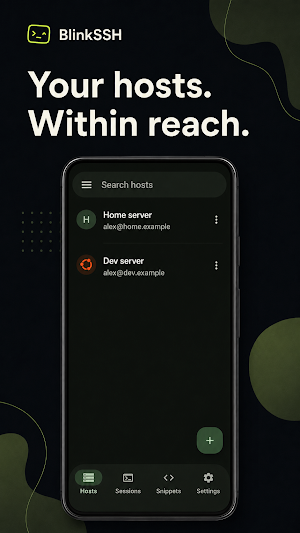
Find hosts by name, organize them into groups, and recognize them by their avatars. Switch terminals with compact tabs, or swipe into a carousel of live terminals and tap the one you need. Keep the keyboard open while you choose your next session.
Built for real terminal work
• Connect with the bundled OpenSSH engine
• Use passwords or key files already on your device
• Verify server host keys and get warned when a key changes
• Configure ProxyJump, ProxyCommand, keep-alives, startup commands, and port forwarding
• Keep explicitly opened sessions connected in the background
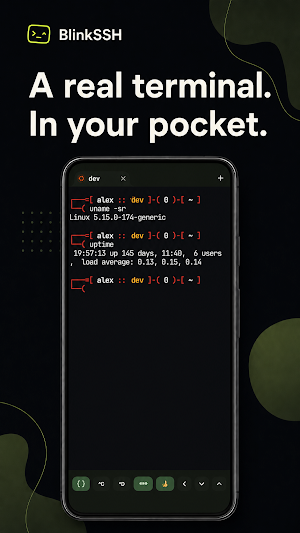
• Work in a full xterm-compatible terminal with color, Unicode, links, mouse input, and scrollback
Type less, stay in control
Get suggestions from your snippets, recent commands and shell context. Bash-aware autocomplete follows supported nested SSH sessions, so suggestions can stay relevant as you move between servers. Optional AI autocomplete runs on your device after you choose and download a model. Terminal context is not sent to an online AI service. Suggestions insert text for you to review; they do not execute it.
Your commands, one tap away
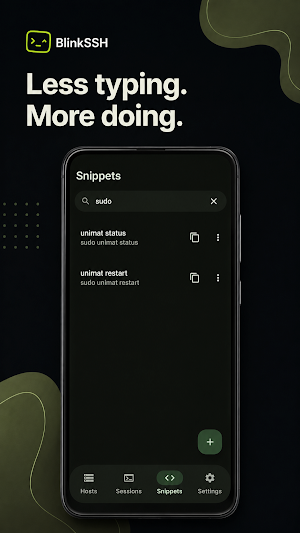
Save commands as snippets and arrange them in the order you use them. Open a paged snippet panel in the keyboard area, tap a snippet to run it, then return to typing. Build a keyboard row with the keys and actions you need.
Make it yours
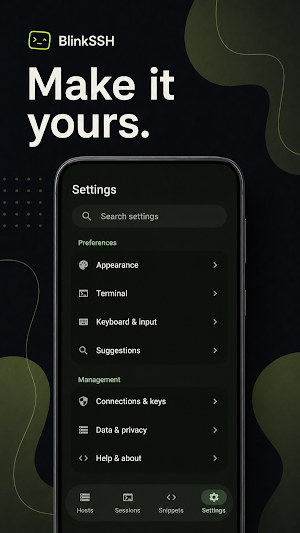
Choose the app theme, terminal palette, font size, cursor, keyboard row, haptics, clipboard safeguards, and accessibility behavior that suit the way you work.
Bring your setup
Import OpenSSH config hosts, organize reusable command snippets, and export host profiles for backup. Saved passwords are protected with Android Keystore-backed encryption, and exports leave out passwords, private keys, and known-host trust records.
Private by design
BlinkSSH has no account, ads, analytics, or developer telemetry. Your hosts, settings, snippets, and command history stay on your device. SSH traffic goes to the servers you choose—not to us.
Source code
BlinkSSH is GPL-3.0-only software. Download the source and build instructions for version 1.1.0:
https://github.com/Hackahal/blinkssh-privacy/releases/tag/blinkssh-v1.1.0-source
BlinkSSH brings a focused terminal, thoughtful touch controls and real OpenSSH to your phone. Keep your servers close and your terminal in focus.
Move naturally between sessions
Find hosts by name, organize them into groups, and recognize them by their avatars. Switch terminals with compact tabs, or swipe into a carousel of live terminals and tap the one you need. Keep the keyboard open while you choose your next session.
Built for real terminal work
• Connect with the bundled OpenSSH engine
• Use passwords or key files already on your device
• Verify server host keys and get warned when a key changes
• Configure ProxyJump, ProxyCommand, keep-alives, startup commands, and port forwarding
• Keep explicitly opened sessions connected in the background
• Work in a full xterm-compatible terminal with color, Unicode, links, mouse input, and scrollback
Type less, stay in control
Get suggestions from your snippets, recent commands and shell context. Bash-aware autocomplete follows supported nested SSH sessions, so suggestions can stay relevant as you move between servers. Optional AI autocomplete runs on your device after you choose and download a model. Terminal context is not sent to an online AI service. Suggestions insert text for you to review; they do not execute it.
Your commands, one tap away
Save commands as snippets and arrange them in the order you use them. Open a paged snippet panel in the keyboard area, tap a snippet to run it, then return to typing. Build a keyboard row with the keys and actions you need.
Make it yours
Choose the app theme, terminal palette, font size, cursor, keyboard row, haptics, clipboard safeguards, and accessibility behavior that suit the way you work.
Bring your setup
Import OpenSSH config hosts, organize reusable command snippets, and export host profiles for backup. Saved passwords are protected with Android Keystore-backed encryption, and exports leave out passwords, private keys, and known-host trust records.
Private by design
BlinkSSH has no account, ads, analytics, or developer telemetry. Your hosts, settings, snippets, and command history stay on your device. SSH traffic goes to the servers you choose—not to us.
Source code
BlinkSSH is GPL-3.0-only software. Download the source and build instructions for version 1.1.0:
https://github.com/Hackahal/blinkssh-privacy/releases/tag/blinkssh-v1.1.0-source
What’s new
Version 1.1.1 · Updated September 6, 2026
• Fixed session swiping and preview selection when the keyboard is hidden • Simplified keyboard controls: the command pad is now always available • Replaced compact settings toggles with clearer, easy-to-tap radio lists
Alternatives to BlinkSSH
Looking for apps like BlinkSSH? Here are 6 similar Android apps on Google Play. The highest rated is KCTCS (4.7/5), and all 6 are free to download.
-
KCTCS 4.7
-
Pocket Prep IT & Cybersecurity 4.2
-
Alerts for eBay: Dealerts 4.3
-
RepairSolutionsPRO 3.8
-
SE ATI TEAS & HESI Prep 2025 4.0
-
Rite Aid Pharmacy 3.5
| App | Rating | Price | Installs | Last updated | Compare |
|---|---|---|---|---|---|
| BlinkSSH | – | Free | 5+ | Sep 6, 2026 | |
| KCTCS | 4.7 / 5 | Free | 50,000+ | Aug 19, 2026 | Compare |
| Pocket Prep IT & Cybersecurity | 4.2 / 5 | Free | 100,000+ | Oct 27, 2026 | Compare |
| Alerts for eBay: Dealerts | 4.3 / 5 | Free | 1,000+ | Oct 24, 2026 | Compare |
| RepairSolutionsPRO | 3.8 / 5 | Free | 50,000+ | Aug 18, 2026 | Compare |
| SE ATI TEAS & HESI Prep 2025 | 4.0 / 5 | Free | 500+ | Mar 5, 2024 | Compare |
| Rite Aid Pharmacy | 3.5 / 5 | Free | 1,000,000+ | Aug 19, 2025 | Compare |
Compare BlinkSSH with the top alternatives: ratings, updates, ASO score and keyword gaps →
Similar apps on Google Play
- KCTCS
- Pocket Prep IT & Cybersecurity
- Alerts for eBay: Dealerts
- RepairSolutionsPRO
- SE ATI TEAS & HESI Prep 2025
- Rite Aid Pharmacy
- BILT: 3D Instructions
- IFTTT - Automate work and home
- MYCPE ONE
- The RockED App
- UserLAnd - Linux on Android
- Roomvu
- TAP Kiln Control Mobile
- Termius - Modern SSH Client
- Croux
- Gallup Access
- CyberTrophy
- HamStudy.org
- RealVNC Viewer: Remote Desktop
- Nextcloud
- FAX Desk: Send Fax from Phone
- Cyberpunk Red Companion
- ManaBox MTG