

A-Beam Pro
Anan R. Productivity
Professional multi-span beam analysis with diagrams and technical PDF reports.
- Downloads
- 5+
- on Google Play
- Price
- $4.99
- No in-app purchases
- Updated
- Jul 28
- 2026 · v1.1.4
Screenshots


About A-Beam Pro
Whether you are designing a new structure or verifying field calculations, ABeam Pro provides the clarity and detail you need through high-fidelity diagrams and comprehensive technical reports.
KEY FEATURES:
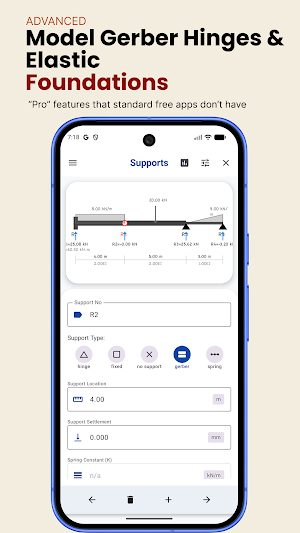
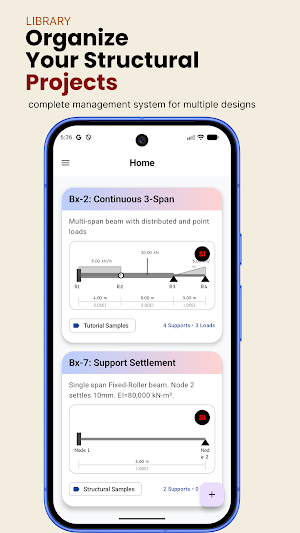
• Multi-Span Analysis: Model beams with multiple spans, hinges, and varying support conditions (Fixed, Hinge, Roller, Spring, or Gerber).
• Comprehensive Load Support: Apply point loads, uniform distributed loads (UDL), triangular loads, and concentrated point moments.
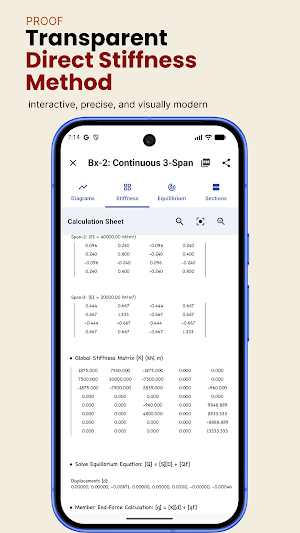
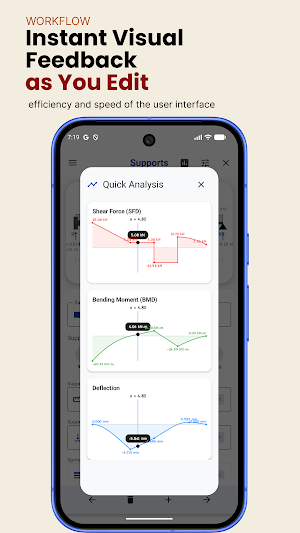
• Precision Solver Engine: Built on standard structural analysis matrices to provide accurate Shear Force (SFD), Bending Moment (BMD), and Deflection results.
• Equilibrium Validation: Every calculation includes a detailed mathematical expansion of $\sum F_y$ and $\sum M$, ensuring your analysis is perfectly balanced and verifiable.
•Interactive Drawing Canvas: Visualize your beam in real-time. Customize your view with adjustable font scales and professional engineering fonts including Tekton, Chalkboard, Segoe WP, and Frank the Architect.
PROFESSIONAL PDF REPORTS:
Generate and share formal calculation sheets directly from your device. Our PDF reports are formatted to industry standards and include:
• Boxed project and beam identification headers.
• Clear Free Body Diagrams (FBD) showing all loads and reactions.
• High-resolution SFD, BMD, and Deflection diagrams with peak values labeled.
• Step-by-step equilibrium check derivations.
• Span-by-span data tables showing forces and displacements at specific intervals.
• Professional footer for sign-offs and dates.
FLEXIBLE UNIT SYSTEMS:
Work in the system that suits your project. Toggle effortlessly between:
• US Customary: kip, ft, in, psi, kip-ft.
• SI / Metric: kN, m, mm, GPa, kN-m.
WhO IS IT FOR?
• Civil & Structural Engineers: Perform rapid verification and site checks.
• Architects: Quickly estimate member sizes and beam behavior.
• Engineering Students: Gain a deep understanding of beam theory with verifiable equilibrium checks.
Download ABeam Pro today and bring professional-grade structural analysis to your pocket.
What’s new
Version 1.1.4 · Updated July 28, 2026
• New Unit System UI: A completely redesigned, color-coded unit management system for a more professional and intuitive experience. • Enhanced Span Editing: You can now edit span lengths directly, and the app will automatically adjust all subsequent supports and loads to maintain structural consistency. • Refined Design: Updated action overlays on beam cards with a new minimal, plain-color design. • Launcher Icon Fix: Fixed display issues with the app icon on the "About" screen.
Alternatives to A-Beam Pro
Looking for apps like A-Beam Pro? Here are 6 similar Android apps on Google Play. All of them are free to download.






| App | Rating | Price | Installs | Last updated | Compare |
|---|---|---|---|---|---|
| A-Beam Pro | – | $4.99 | 5+ | Jul 28, 2026 | |
| AutoLedge | – | Free | 10+ | – | Compare |
| QuickPDF | – | Free | 0+ | – | Compare |
| Aethera: Manifestation & Calm | – | Free | 10+ | Aug 17, 2026 | Compare |
| Winsome | – | Free | 10+ | Jul 27, 2026 | Compare |
| AirPoint - Control Your PC | – | Free | 10+ | Aug 21, 2026 | Compare |
| RM Runners | – | Free | 100+ | – | Compare |
Compare A-Beam Pro with the top alternatives: ratings, updates, ASO score and keyword gaps →
Similar apps on Google Play
- AutoLedge
- QuickPDF
- Aethera: Manifestation & Calm
- Winsome
- AirPoint - Control Your PC
- RM Runners
- SpinFire XR
- Audibly: Text to Speech
- AgriAI Assistant
- Personaas AI
- PCG Rutas Probesa
- Danna
- RawBook
- فیلامینگو فیلم و سریال دوبله
- InsightFlow - My Second Brain
- Alarm Clock
- Pagelight: Scanner OCR
- Psicoplanner
- AgroWeather
- RiceWatch
- Charge Ledger
- My Docs : PDF Tools
- APCP 2026
- Smart PDF: Convert, Scan & OCR
- FEM Mobile: Structural Design