
My Docs : PDF Tools
Productivity Contains ads
My docs: PDF, Word, Excel Tool
- Downloads
- 221+
- on Google Play
- Price
- Free
- No in-app purchases
- Updated
- Aug 4
- 2026 · v1.1.0
Screenshots


About My Docs : PDF Tools
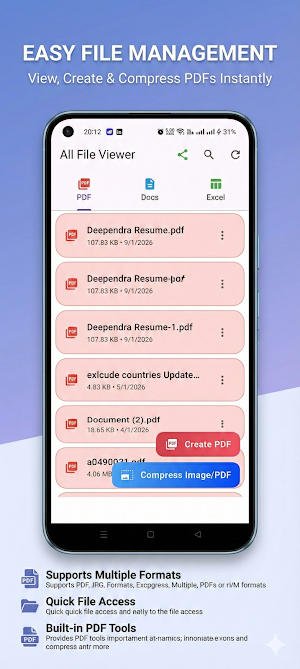
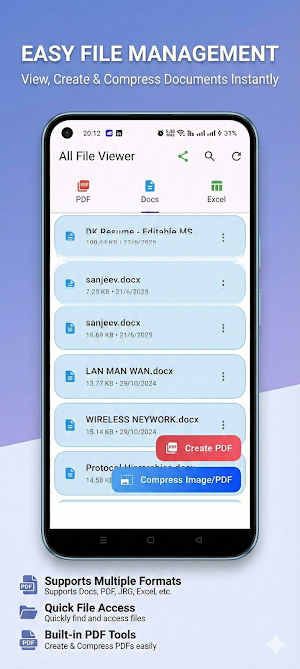
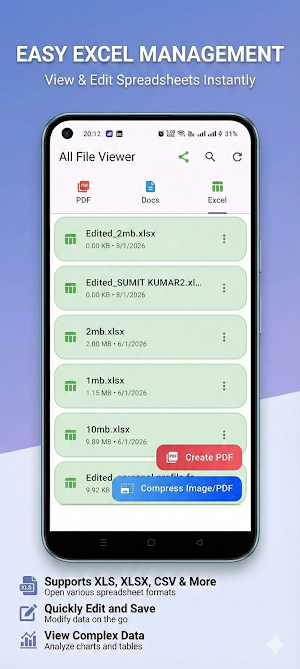
My Docs: PDF Tools is an all-in-one document management app that lets you view, edit, convert, scan, and organize your files in one place. Open PDF, Excel (XLSX, XLS), Word (DOCX, DOC), RTF, and image files with a fast, lightweight, and offline document viewer.
Whether you're working, studying, or managing personal documents, My Docs: PDF Tools provides powerful PDF tools, document viewing, OCR scanning, image conversion, and file management without requiring an internet connection.
PDF Viewer & PDF Editor
Fast PDF viewer with smooth scrolling and zoom
View PDF files instantly
Search text inside PDF documents
Bookmark important pages
Add digital signatures to PDF files
Annotate PDFs with highlights and notes
Add custom watermarks
Rotate, delete, and reorder PDF pages
Print PDF documents
Share PDF files easily
PDF Tools
Convert images to PDF
Merge multiple PDF files
Split PDF documents
Compress PDF files
Resize PDF pages
Optimize PDF files for sharing
Convert PDF documents quickly
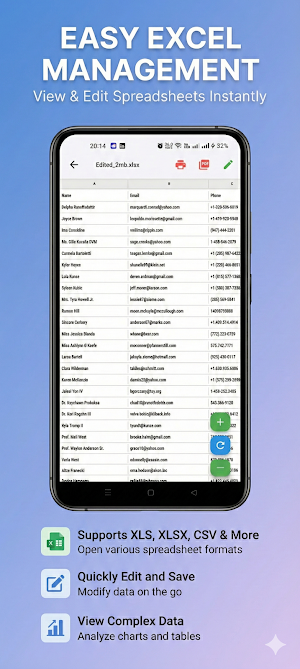
Excel Viewer & Excel Editor
Open XLSX and XLS spreadsheets
View Excel files with formatting preserved
Edit Excel spreadsheets
Convert Excel to PDF
Print Excel documents
Navigate large spreadsheets smoothly
Word Document Viewer & Editor
Open DOCX and DOC files
View Word documents with original formatting
Edit Word documents
Convert Word to PDF
Read RTF files
Print Word documents
Image to PDF Converter
Convert JPG to PDF
Convert PNG to PDF
Convert JPEG to PDF
Create multi-page PDF documents from images
Batch image to PDF conversion
Crop images before conversion
Compress images before creating PDFs
OCR Scanner
Scan documents using your camera
Extract text from images using Google ML Kit
Convert scanned documents into editable text
Offline OCR support
Multiple language recognition
Image Tools
Resize images
Crop photos
Compress images
Support for JPG, PNG, and JPEG formats
File Manager
Browse all documents in one place
Recent files
Search documents quickly
Open files from other apps
Share documents instantly
Storage Access Framework support
Dark Mode
Comfortable reading in low-light environments
Modern dark theme
Improved reading experience
Privacy & Security
Works completely offline
No cloud uploads
Your documents remain on your device
No account required
Secure document handling
Fast Performance
Fast file loading
Smooth scrolling and zooming
Optimized memory usage
Works on phones and tablets
Lightweight and efficient
Perfect For
Students
Teachers
Office professionals
Business users
Freelancers
Anyone who works with PDF files and office documents
Supported File Formats
PDF (.pdf)
Microsoft Excel (.xlsx, .xls)
Microsoft Word (.docx, .doc)
Rich Text Format (.rtf)
JPG
JPEG
PNG
Why Choose My Docs: PDF Tools
View PDF, Word, and Excel files in one app
Edit PDF, Word, and Excel documents
Convert images and office documents to PDF
Merge, split, compress, and resize PDF files
Scan documents with OCR
Manage all your documents in one place
Works offline without an internet connection
Simple, fast, and easy to use
Regular updates with new features and performance improvements
Download My Docs: PDF Tools to view PDF files, edit Word and Excel documents, convert images to PDF, scan documents with OCR, compress and merge PDFs, and manage all your files from one powerful document app.
Whether you're working, studying, or managing personal documents, My Docs: PDF Tools provides powerful PDF tools, document viewing, OCR scanning, image conversion, and file management without requiring an internet connection.
PDF Viewer & PDF Editor
Fast PDF viewer with smooth scrolling and zoom
View PDF files instantly
Search text inside PDF documents
Bookmark important pages
Add digital signatures to PDF files
Annotate PDFs with highlights and notes
Add custom watermarks
Rotate, delete, and reorder PDF pages
Print PDF documents
Share PDF files easily
PDF Tools
Convert images to PDF
Merge multiple PDF files
Split PDF documents
Compress PDF files
Resize PDF pages
Optimize PDF files for sharing
Convert PDF documents quickly
Excel Viewer & Excel Editor
Open XLSX and XLS spreadsheets
View Excel files with formatting preserved
Edit Excel spreadsheets
Convert Excel to PDF
Print Excel documents
Navigate large spreadsheets smoothly
Word Document Viewer & Editor
Open DOCX and DOC files
View Word documents with original formatting
Edit Word documents
Convert Word to PDF
Read RTF files
Print Word documents
Image to PDF Converter
Convert JPG to PDF
Convert PNG to PDF
Convert JPEG to PDF
Create multi-page PDF documents from images
Batch image to PDF conversion
Crop images before conversion
Compress images before creating PDFs
OCR Scanner
Scan documents using your camera
Extract text from images using Google ML Kit
Convert scanned documents into editable text
Offline OCR support
Multiple language recognition
Image Tools
Resize images
Crop photos
Compress images
Support for JPG, PNG, and JPEG formats
File Manager
Browse all documents in one place
Recent files
Search documents quickly
Open files from other apps
Share documents instantly
Storage Access Framework support
Dark Mode
Comfortable reading in low-light environments
Modern dark theme
Improved reading experience
Privacy & Security
Works completely offline
No cloud uploads
Your documents remain on your device
No account required
Secure document handling
Fast Performance
Fast file loading
Smooth scrolling and zooming
Optimized memory usage
Works on phones and tablets
Lightweight and efficient
Perfect For
Students
Teachers
Office professionals
Business users
Freelancers
Anyone who works with PDF files and office documents
Supported File Formats
PDF (.pdf)
Microsoft Excel (.xlsx, .xls)
Microsoft Word (.docx, .doc)
Rich Text Format (.rtf)
JPG
JPEG
PNG
Why Choose My Docs: PDF Tools
View PDF, Word, and Excel files in one app
Edit PDF, Word, and Excel documents
Convert images and office documents to PDF
Merge, split, compress, and resize PDF files
Scan documents with OCR
Manage all your documents in one place
Works offline without an internet connection
Simple, fast, and easy to use
Regular updates with new features and performance improvements
Download My Docs: PDF Tools to view PDF files, edit Word and Excel documents, convert images to PDF, scan documents with OCR, compress and merge PDFs, and manage all your files from one powerful document app.
User reviews

super fast to use

Great App

Very Nice App

very nice app for users👍👍👍💯
Alternatives to My Docs : PDF Tools
Looking for apps like My Docs : PDF Tools? Here are 6 similar Android apps on Google Play. The highest rated is ProBooks: Invoice Maker (4.7/5), and all 6 are free to download.
-
SignNow: Sign & Fill PDF Docs 4.4
-
ProBooks: Invoice Maker 4.7
-
PDFelement-PDF Editor & Reader 4.1
-
Easy Invoice & Quotation Maker 3.9
-
pdfFiller Edit, fill, sign PDF 3.9
-
Smallpdf: Scanner & PDF Editor 4.5
| App | Rating | Price | Installs | Last updated | Compare |
|---|---|---|---|---|---|
| My Docs : PDF Tools | – | Free | 100+ | Aug 4, 2026 | |
| SignNow: Sign & Fill PDF Docs | 4.4 / 5 | Free | 5,000,000+ | Oct 20, 2026 | Compare |
| ProBooks: Invoice Maker | 4.7 / 5 | Free | 100,000+ | Aug 28, 2026 | Compare |
| PDFelement-PDF Editor & Reader | 4.1 / 5 | Free | 5,000,000+ | Oct 16, 2026 | Compare |
| Easy Invoice & Quotation Maker | 3.9 / 5 | Free | 100,000+ | Feb 5, 2026 | Compare |
| pdfFiller Edit, fill, sign PDF | 3.9 / 5 | Free | 5,000,000+ | Oct 22, 2026 | Compare |
| Smallpdf: Scanner & PDF Editor | 4.5 / 5 | Free | 5,000,000+ | Oct 7, 2026 | Compare |
Similar apps on Google Play
- SignNow: Sign & Fill PDF Docs
- ProBooks: Invoice Maker
- PDFelement-PDF Editor & Reader
- Easy Invoice & Quotation Maker
- pdfFiller Edit, fill, sign PDF
- Smallpdf: Scanner & PDF Editor
- Regula Document Reader
- PDF Reader Zone
- Office Reader - PDF,Word,Excel
- Quotation Maker
- All Document Reader: PDF, Word
- Rocketbook
- Mobile Scanner App - Scan PDF
- Document Reader - PDF Editor
- PDF Scanner - Document Scanner
- PDF Editor – Edit Everything!
- PDF Scanner - Document Scanner
- Foxit PDF Editor
- PDF Reader App: Read All PDF
- PDF Reader - PDF Editor
- Polaris Office: Edit&View, PDF
- OfficeSuite Pro + PDF
- Falcon PDF - Editor & Tools
- Image to PDF - PDF Maker
- PDF Scanner Plus - Doc Scanner
- DOCX Editor: PDF, DOC, XLSX
- PDF Reader(KDAN PDF): Edit PDF
- ONLYOFFICE Documents
- Total Drive - Cloud Storage
- CSV File Viewer - Smart CSV
- Genius Scan - PDF Scanner
- PDF Merge: Scan, Sign & Edit
- Tiny Scanner - PDF Scanner App
- Mobi PDF・Editor・Scanner・Reader
- CS PDF Reader - PDF Editor
- iLovePDF: PDF Editor & Scanner
- PDF Reader App - PDF Viewer
- FastField: Field Service Forms