
Alarm Clock
Productivity Contains ads
Smart alarm clock app with weather, world clock, stopwatch & snooze
- Rating
- 4.8
- 7 ratings
- Downloads
- 12.3K+
- on Google Play
- Price
- Free
- No in-app purchases
- Updated
- Aug 17
- 2026 · v0.0.6
Screenshots


About Alarm Clock
Stay on time and in control with a smart alarm clock app designed for daily routines. This clock app helps you manage every moment with a reliable alarm, accurate clock, and useful tools for work, travel, and life. Whether you need a simple alarma or multiple clocks, this app brings everything together in one easy place.
Key Features
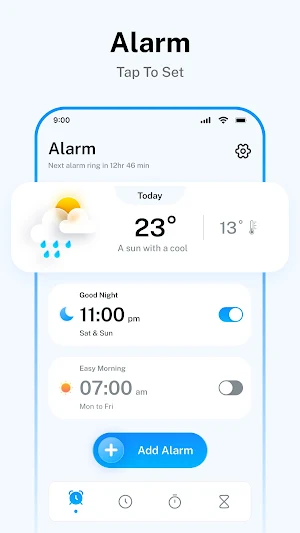
• Alarm Set – Quickly set an alarm clock for any time of the day
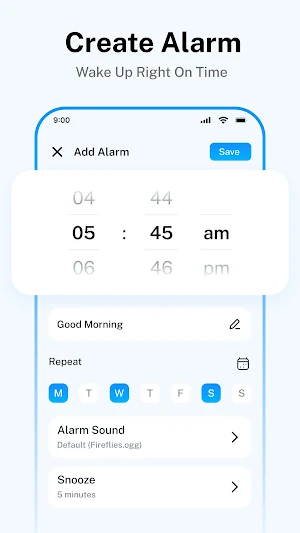
• Add Alarm – Create multiple alarms with custom preferences in your alarm clock app
• Weather Updates – Check real-time weather along with your clock
• Language Options – Use this clock app in different languages
• Theme Mode – Switch between light and dark themes for better visibility
• Timer – Stay on Track – Set countdown timers to manage tasks, workouts, cooking, study sessions, and daily routines with ease.
• Widgets – Add convenient clock and alarm widgets to your home screen for quick access to time, alarms, and essential clock features.
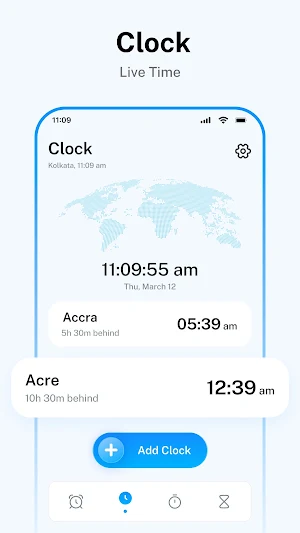
• Date & Time – Accurate and automatic clock updates anytime
• Sound Settings – Personalize your alarm tones and volume
• World Clock – Track global clocks and time zones easily
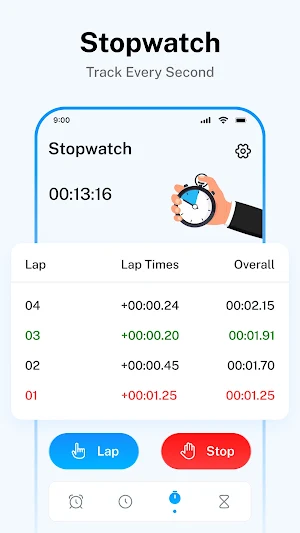
• Stopwatch – Use a precise clock app tool for timing tasks
• Snooze Function – Extend your alarm clock with adjustable snooze
• Instant Call Summary - Right after your call ends, you’ll see useful info and quick options to help you do more with just a tap.
Why Use This Alarm Clock App
• Manage your day easily with a dependable alarm and smart clock
• Use multiple alarma settings for different schedules
• Access all essential clocks in one simple clock app
• Customize your alarm clock experience with sound and theme options
• Stay updated with time, weather, and global clock features
How It Works
Open the alarm clock app and view the main clock screen
Tap to set an alarm or add a new alarma
Customize your alarm clock settings like sound and snooze
Use the clock app tools like stopwatch or world clocks as needed
This alarm clock app is designed to support your everyday schedule. Whether you need a quick alarm, a detailed clock app, or multiple clocks, it helps you stay organized and on time.
Start using this alarm clock today to simplify your routine and manage time better with a smart and flexible clock app.
Disclaimer & Privacy
This alarm clock app provides general time, weather, and scheduling features. Weather information may vary based on location data. For details on how data is handled, please review the privacy policy available on the Google Play Store listing.
Key Features
• Alarm Set – Quickly set an alarm clock for any time of the day
• Add Alarm – Create multiple alarms with custom preferences in your alarm clock app
• Weather Updates – Check real-time weather along with your clock
• Language Options – Use this clock app in different languages
• Theme Mode – Switch between light and dark themes for better visibility
• Timer – Stay on Track – Set countdown timers to manage tasks, workouts, cooking, study sessions, and daily routines with ease.
• Widgets – Add convenient clock and alarm widgets to your home screen for quick access to time, alarms, and essential clock features.
• Date & Time – Accurate and automatic clock updates anytime
• Sound Settings – Personalize your alarm tones and volume
• World Clock – Track global clocks and time zones easily
• Stopwatch – Use a precise clock app tool for timing tasks
• Snooze Function – Extend your alarm clock with adjustable snooze
• Instant Call Summary - Right after your call ends, you’ll see useful info and quick options to help you do more with just a tap.
Why Use This Alarm Clock App
• Manage your day easily with a dependable alarm and smart clock
• Use multiple alarma settings for different schedules
• Access all essential clocks in one simple clock app
• Customize your alarm clock experience with sound and theme options
• Stay updated with time, weather, and global clock features
How It Works
Open the alarm clock app and view the main clock screen
Tap to set an alarm or add a new alarma
Customize your alarm clock settings like sound and snooze
Use the clock app tools like stopwatch or world clocks as needed
This alarm clock app is designed to support your everyday schedule. Whether you need a quick alarm, a detailed clock app, or multiple clocks, it helps you stay organized and on time.
Start using this alarm clock today to simplify your routine and manage time better with a smart and flexible clock app.
Disclaimer & Privacy
This alarm clock app provides general time, weather, and scheduling features. Weather information may vary based on location data. For details on how data is handled, please review the privacy policy available on the Google Play Store listing.
What’s new
Version 0.0.6 · Updated August 17, 2026
⚡ Faster scrolling & navigation 🎯 Enhanced user experience
Alternatives to Alarm Clock
Looking for apps like Alarm Clock? Here are 6 similar Android apps on Google Play. The highest rated is Alarm Clock Xtreme & Timer (4.5/5), and all 6 are free to download.
-
Clock Phone 16, Alarm & Timer 3.7
-
Alarm Clock Xtreme & Timer 4.5
-
Sleep Number 4.2
-
The Clock: Alarm Clock & Timer 4.1
-
SnoreLogic: Track Your Snoring 3.2
-
Cardata Mobile 2.9
| App | Rating | Price | Installs | Last updated | Compare |
|---|---|---|---|---|---|
| Alarm Clock | 4.8 / 5 | Free | 10,000+ | Aug 17, 2026 | |
| Clock Phone 16, Alarm & Timer | 3.7 / 5 | Free | 1,000,000+ | – | Compare |
| Alarm Clock Xtreme & Timer | 4.5 / 5 | Free | 50,000,000+ | Apr 9, 2026 | Compare |
| Sleep Number | 4.2 / 5 | Free | 1,000,000+ | Sep 15, 2026 | Compare |
| The Clock: Alarm Clock & Timer | 4.1 / 5 | Free | 1,000,000+ | Aug 24, 2026 | Compare |
| SnoreLogic: Track Your Snoring | 3.2 / 5 | Free | 100,000+ | Sep 15, 2026 | Compare |
| Cardata Mobile | 2.8 / 5 | Free | 10,000+ | Sep 4, 2026 | Compare |
Compare Alarm Clock with the top alternatives: ratings, updates, ASO score and keyword gaps →