
3MF & STL Viewer — MeshView
Tools
3MF & STL viewer: true filament colours, printability checks. No ads, offline.
- Downloads
- 500+
- on Google Play
- Price
- Free
- No in-app purchases
- Updated
- Sep 7
- 2026 · v1.1.4
Screenshots


About 3MF & STL Viewer — MeshView
Tap a 3MF or STL file and see it. That's the whole app.
No ad before your model loads. No account. No subscription. Nothing to dismiss between you and the file you just tapped.
OPENS 3MF — NOT JUST STL
Most mobile viewers handle STL and stop there. MeshView opens 3MF too, so the file your slicer or model site actually gave you just works. Both formats, same instant open.
REAL COLOURS, NOT A GREY BLOB
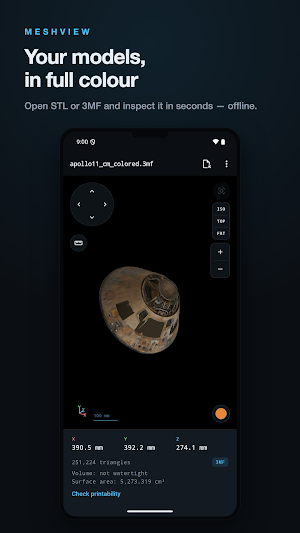
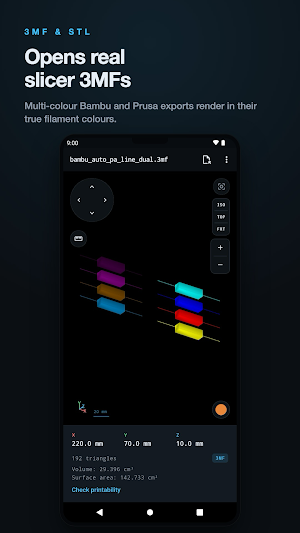
A multi-colour 3MF opens in its own colours. MeshView reads the 3MF colour spec (materials and colour groups) and also the filament colours a real Bambu Studio export stores in its own project files — so an eight-colour plate looks like an eight-colour plate, not a single grey shape. Multi-part Bambu exports, where the geometry sits in separate sub-model files, open correctly too. For STL — a format with no colour field at all — pick a filament colour yourself.
PRINTABILITY CHECKS — INCLUDED, NOT LOCKED
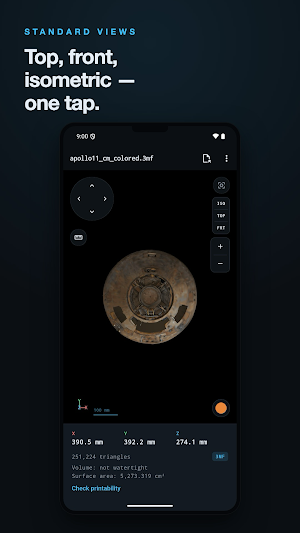
Check a model before you waste filament on it. MeshView reports open edges and boundary loops (is it watertight?), flipped normals, non-manifold edges, and degenerate faces, then gives you a plain verdict. Free, no unlock, no video to watch. Checks always run on the full-resolution file.
MEASUREMENTS
• Point-to-point distance — tap two points on the model
• Volume and surface area
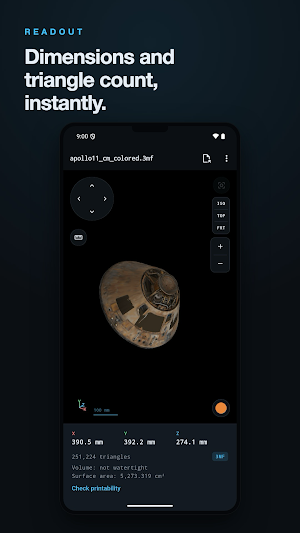
• Bounding box in millimetres, per axis
• Triangle count
WHAT YOU GET
• Rotate, pan and zoom — pinch and drag, or on-screen buttons when one hand is full
• Standard views — isometric, top, front — one tap each
• Orientation gizmo and a scale bar, so you always know which way is up and how big it is
• Orthographic projection, so what you measure on screen matches the part
• Binary and ASCII STL, including files whose headers confuse other viewers
OPEN FROM ANYWHERE
Share a file to MeshView from Gmail, Drive, WhatsApp, your file manager — any app that can send a file. It lands straight in the viewer.
YOUR FILES STAY ON YOUR PHONE
Parsing and rendering happen entirely on-device. Your models are never uploaded, never sent to a server, never shared. There is no account and no sign-in. MeshView sends anonymous usage counts (like when the app is opened, or which format a file was) and nothing else — no filenames, no file contents, no exact measurements.
BUILT TO BE FAST
The file parser is written in Rust and compiled to native code, so files open quickly and the app stays small.
HONEST ABOUT LIMITS
Very large models are simplified automatically so the preview stays smooth, while the readout keeps showing your file's real triangle count — you always see what the file actually contains. If a 3MF has brush-painted colour regions, MeshView tells you so rather than quietly showing you the wrong colours: it reads painted files, but does not draw the painted areas themselves. We would rather tell you than pretend.
MeshView is for anyone who prints: checking a download before slicing, confirming dimensions, or just looking at a model on the couch. It does one job and gets out of the way.
No ad before your model loads. No account. No subscription. Nothing to dismiss between you and the file you just tapped.
OPENS 3MF — NOT JUST STL
Most mobile viewers handle STL and stop there. MeshView opens 3MF too, so the file your slicer or model site actually gave you just works. Both formats, same instant open.
REAL COLOURS, NOT A GREY BLOB
A multi-colour 3MF opens in its own colours. MeshView reads the 3MF colour spec (materials and colour groups) and also the filament colours a real Bambu Studio export stores in its own project files — so an eight-colour plate looks like an eight-colour plate, not a single grey shape. Multi-part Bambu exports, where the geometry sits in separate sub-model files, open correctly too. For STL — a format with no colour field at all — pick a filament colour yourself.
PRINTABILITY CHECKS — INCLUDED, NOT LOCKED
Check a model before you waste filament on it. MeshView reports open edges and boundary loops (is it watertight?), flipped normals, non-manifold edges, and degenerate faces, then gives you a plain verdict. Free, no unlock, no video to watch. Checks always run on the full-resolution file.
MEASUREMENTS
• Point-to-point distance — tap two points on the model
• Volume and surface area
• Bounding box in millimetres, per axis
• Triangle count
WHAT YOU GET
• Rotate, pan and zoom — pinch and drag, or on-screen buttons when one hand is full
• Standard views — isometric, top, front — one tap each
• Orientation gizmo and a scale bar, so you always know which way is up and how big it is
• Orthographic projection, so what you measure on screen matches the part
• Binary and ASCII STL, including files whose headers confuse other viewers
OPEN FROM ANYWHERE
Share a file to MeshView from Gmail, Drive, WhatsApp, your file manager — any app that can send a file. It lands straight in the viewer.
YOUR FILES STAY ON YOUR PHONE
Parsing and rendering happen entirely on-device. Your models are never uploaded, never sent to a server, never shared. There is no account and no sign-in. MeshView sends anonymous usage counts (like when the app is opened, or which format a file was) and nothing else — no filenames, no file contents, no exact measurements.
BUILT TO BE FAST
The file parser is written in Rust and compiled to native code, so files open quickly and the app stays small.
HONEST ABOUT LIMITS
Very large models are simplified automatically so the preview stays smooth, while the readout keeps showing your file's real triangle count — you always see what the file actually contains. If a 3MF has brush-painted colour regions, MeshView tells you so rather than quietly showing you the wrong colours: it reads painted files, but does not draw the painted areas themselves. We would rather tell you than pretend.
MeshView is for anyone who prints: checking a download before slicing, confirming dimensions, or just looking at a model on the couch. It does one job and gets out of the way.
What’s new
Version 1.1.4 · Updated September 7, 2026
Files shared without a proper name or extension now open: MeshView detects STL and 3MF from the file contents. Clearer message for unsupported files, including a hint to extract ZIP downloads first.
Alternatives to 3MF & STL Viewer — MeshView
Looking for apps like 3MF & STL Viewer — MeshView? Here are 4 similar Android apps on Google Play. All of them are free to download.
-
DICOM Converter & Tag Viewer
-
Radix DICOM Viewer: CT & MRI
-
PCOS Indaga: Track & Learn
-
DebtWise - Smart Debt Payoff
| App | Rating | Price | Installs | Last updated | Compare |
|---|---|---|---|---|---|
| 3MF & STL Viewer — MeshView | – | Free | 500+ | Sep 7, 2026 | |
| DICOM Converter & Tag Viewer | – | Free | 100+ | Aug 10, 2026 | Compare |
| Radix DICOM Viewer: CT & MRI | – | Free | 1,000+ | Oct 15, 2026 | Compare |
| PCOS Indaga: Track & Learn | – | Free | 50+ | Jul 23, 2026 | Compare |
| DebtWise - Smart Debt Payoff | – | Free | 100+ | Oct 6, 2026 | Compare |