Schlage Utility Software - SUS
SUS from Schlage interfaces with select Schlage electronic locks/devices
About Schlage Utility Software - SUS
The Schlage Utility Software (SUS) mobile app is designed specifically for use with the Schlage SUS-A cable and works with select Schlage electronic locks and accessories (see list of compatible devices below).
This new SUS mobile app and cable replaces the current Schlage SUS and HHD solution.
The SUS and SUS-A cable are used with networked and offline locks to initialize and configure devices, test operational status, perform ongoing system maintenance and update device firmware.
In addition, for offline devices, the SUS solution is utilized to transfer access control data from the Schlage Express access control software (such as authorized user lists) via the Android mobile device to the locks. SUS is also utilized to download audit trail information from locks to the mobile device and then transfer that data back to Schlage Express for analysis and storage.
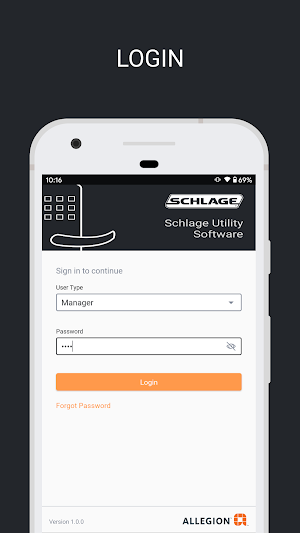
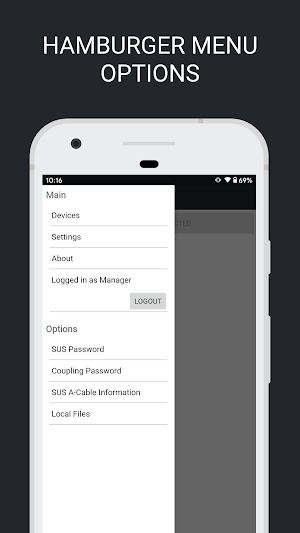
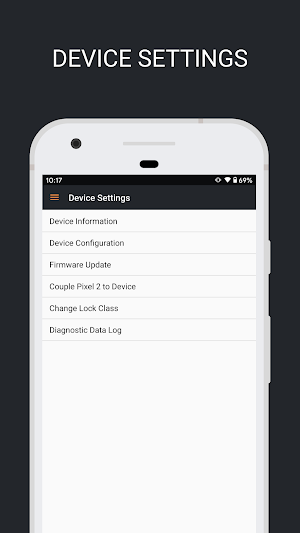
The intuitive screen layout of the free SUS mobile app provides easy navigation during use. The SUS-A cable (required) is an all-in-one solution with separate connectors – USB-A for our USB enabled devices and a 2-pin serial connection for our serial enabled devices – to connect the mobile device to the locks.
Compatible Schlage locks and devices
• AD400/401/402, AD300/301/302 locks, AD200, AD Series readers
• PIM400 (RSI &TD2), WPR400, WPR401, PIB300
• Legacy BE367/FE210 locks
• WRI400 and CT5000 controllers
Coming Soon: Compatible Schlage locks and devices
• CO200 lock (2021)
• AD201, AD250, CO220, CO250 locks (2021)
• Legacy CM, CL, KC2 locks (2021)
Features of the Schlage Utility Software (SUS) include:
• Intuitive and easy to use interface
• Single cable for Schlage AD Series locks and legacy BE367/FE210
devices
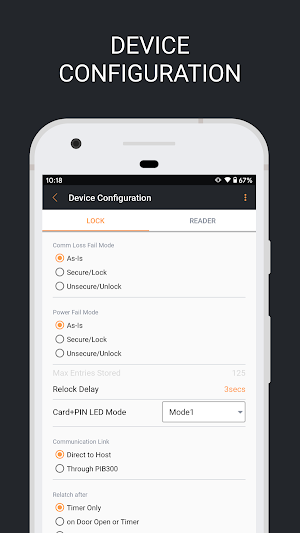
• Facilitates initialization and configuration of locks and accessories
• Tests operational status and performs ongoing system maintenance
• Simplifies firmware updates
• Cellular plan not required
• Import/Export Device Configuration feature simplifies the configuration
process
• Ability to reclass Schlage AD online Series, AD200 locks
• Manager and Operator user modes
• Diagnostic data log streamlines troubleshooting
Visit us.allegion.com for more information on supported locks and devices.
Android mobile device recommendations
• Android Pie 9.0 or newer (minimum SDK 28)
• For optimum performance, the SUS mobile app and SUS-A cable have been tested with flagship Android devices from major manufacturers including:
• Google Pixel 3 or newer
• Moto G6 or newer
• Samsung S8 or newer
Schlage Utility Software (SUS) must be used with the Schlage SUS-A cable from Allegion, PLC.
Similar Apps
Schlage Home
Schlage helps protect what matters most – peace of mind. The Schlage...
Schlage Mobile Access
The Schlage Mobile Access app is developed for multifamily, commercial and institutional...
Allegion ENGAGE
Welcome to ENGAGE™ technology, the new connectivity platform from Allegion that makes...
Overtur™ Mobile
Overtur™ Mobile provides a suite of tools for Overtur users to stay...
Frequently Asked Questions (FAQ)
What is the Schlage Utility Software (SUS)?
What does the SUS mobile app and cable replace?
What is the purpose of the SUS and SUS-A cable?
How is the SUS solution used for offline devices?
What features does the Schlage Utility Software (SUS) offer?
What locks and devices are compatible with the Schlage Utility Software (SUS)?
What locks and devices will be compatible with SUS in the future?
What are the recommended Android mobile device specifications for using SUS?
Is a cellular plan required to use the Schlage Utility Software (SUS)?
Where can I find more information on supported locks and devices for SUS?
What cable must be used with the Schlage Utility Software (SUS)?