

DearBuds Connect
Linkface Co., Ltd. Health & Fitness
[ The World’s First Wearable Ear Dehumidifier ] Monitor in real-time with App.
- Downloads
- 100+
- on Google Play
- Price
- Free
- No in-app purchases
- Updated
- Feb 13
- 2023 · v1.0.6
Screenshots


About DearBuds Connect
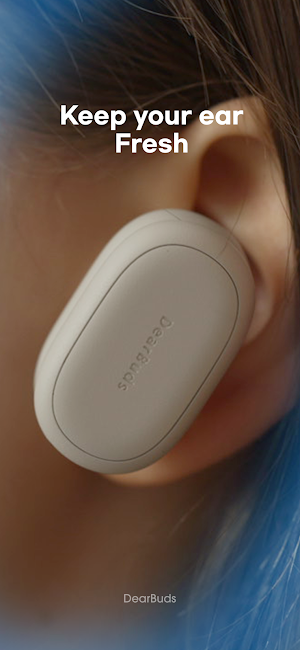
DearBuds is an ear-care device. Though DearBuds may resemble your typical wireless earbuds, it is not an audio device.
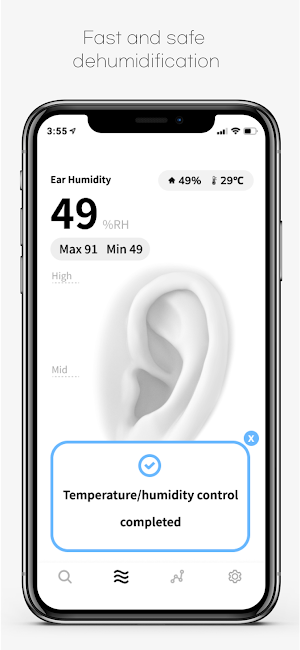
This smart device removes moisture, sweat, and water from your ear in less than 3 minutes, optimizing the humidity of your ear canal.
DearBuds’ technology far surpasses that of a hair dryer or fan. That’s because DearBuds uses air ventilation technology to dehumidify your ears.
When air is delicately circulated in the ear, there is little ear irritation. Rest assured that you won’t feel any fan discomfort while you’re using DearBuds.
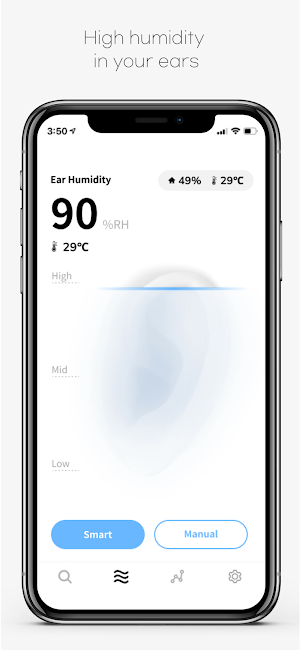
Plus, our exclusive DearBuds app lets you monitor the condition of your ears in real-time.
With DearBuds, you can select the mode that best matches your condition to properly adjust the humidity in your ears.
From the app, you can select between smart and manual modes.
Smart mode uses data from both the ambient environment AND your ears for smarter humidity control.
When the manual mode ends in the optimum humidity section, some humidity may be restored naturally by sweating. In smart mode, Humidity Rebound is prevented and optimum humidity is maintained.
Select the earphone icon for gentle dehumidification. Select the shower or exercise icons for stronger, long-lasting dehumidification.
Select the mode that best fits your situation! (Duration may vary based on user environment.)
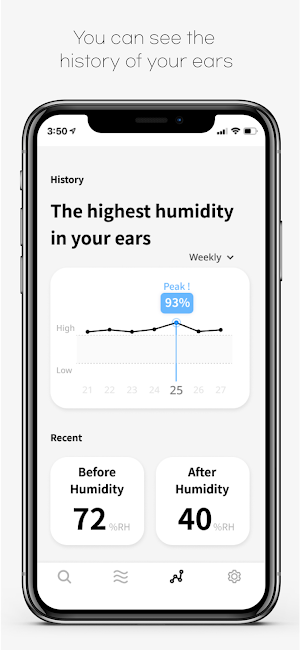
Dehumidifying metrics are recorded and analyzed in the DearBuds app.
But DearBuds doesn’t just measure your ear humidity. DearBuds also factors in the local humidity and temperature, so it can provide just the right level of humidity for your unique circumstances.
Records of Smart Mode dehumidifying are used as learning model, so DearBuds can better provide the best ear humidity and temperature levels for you and your environment.
When you select manual mode, you can set the intensity to whatever level you like.
Dual Mode will let you connect 2 different DearBuds SE for humidity and temperature relief and measurement in both ears at the same time.
This smart device removes moisture, sweat, and water from your ear in less than 3 minutes, optimizing the humidity of your ear canal.
DearBuds’ technology far surpasses that of a hair dryer or fan. That’s because DearBuds uses air ventilation technology to dehumidify your ears.
When air is delicately circulated in the ear, there is little ear irritation. Rest assured that you won’t feel any fan discomfort while you’re using DearBuds.
Plus, our exclusive DearBuds app lets you monitor the condition of your ears in real-time.
With DearBuds, you can select the mode that best matches your condition to properly adjust the humidity in your ears.
From the app, you can select between smart and manual modes.
Smart mode uses data from both the ambient environment AND your ears for smarter humidity control.
When the manual mode ends in the optimum humidity section, some humidity may be restored naturally by sweating. In smart mode, Humidity Rebound is prevented and optimum humidity is maintained.
Select the earphone icon for gentle dehumidification. Select the shower or exercise icons for stronger, long-lasting dehumidification.
Select the mode that best fits your situation! (Duration may vary based on user environment.)
Dehumidifying metrics are recorded and analyzed in the DearBuds app.
But DearBuds doesn’t just measure your ear humidity. DearBuds also factors in the local humidity and temperature, so it can provide just the right level of humidity for your unique circumstances.
Records of Smart Mode dehumidifying are used as learning model, so DearBuds can better provide the best ear humidity and temperature levels for you and your environment.
When you select manual mode, you can set the intensity to whatever level you like.
Dual Mode will let you connect 2 different DearBuds SE for humidity and temperature relief and measurement in both ears at the same time.
What’s new
Version 1.0.6 · Updated February 13, 2023
1. Multi-language support: English, Korean, Japanese 2. Support for DearBuds PE (Pet Edition) 3. Full-screen improvements 4. Prevent screen-lock 5. Dual mode improvement 6. Add cleaning mode function 7. fixed bugs and glitches
Frequently asked questions
What is DearBuds?
DearBuds is an ear-care device that removes moisture, sweat, and water from your ear using air ventilation technology.
How does DearBuds work?
DearBuds circulates air in the ear to dehumidify it, optimizing the humidity of your ear canal. It uses smart technology to control humidity based on data from the ambient environment and your ears.
Can I adjust the humidity level of DearBuds?
Yes, you can adjust the humidity level of DearBuds using the DearBuds app. You can select between smart and manual modes and set the intensity level in manual mode.
Does DearBuds consider local humidity and temperature?
Yes, DearBuds factors in the local humidity and temperature to provide the right level of humidity for your unique circumstances.
Can I use DearBuds for both ears simultaneously?
Yes, with Dual Mode, you can connect two different DearBuds SE devices for humidity and temperature relief and measurement in both ears at the same time.
What does the DearBuds app offer?
The DearBuds app allows you to monitor the condition of your ears in real-time, select the mode that best matches your condition, and view dehumidifying metrics and records.
Alternatives to DearBuds Connect
Looking for apps like DearBuds Connect? Here are 6 similar Android apps on Google Play. The highest rated is Tinnitus Therapy Pro (4.4/5), and 5 of the 6 are free to download.





| App | Rating | Price | Installs | Last updated | Compare |
|---|---|---|---|---|---|
| DearBuds Connect | – | Free | 100+ | Feb 13, 2023 | |
| PowerWave Life | – | Free | 1,000+ | Sep 15, 2025 | Compare |
| Lumo Health | – | Free | 500+ | Aug 18, 2022 | Compare |
| VibeCo Cycle | – | Free | 100+ | – | Compare |
| Oticon Companion | 2.9 / 5 | Free | 1,000,000+ | Jun 24, 2026 | Compare |
| Oticon ON | 3.1 / 5 | Free | 100,000+ | Feb 7, 2020 | Compare |
| Tinnitus Therapy Pro | 4.4 / 5 | 4.99 USD | 10,000+ | Jul 30, 2026 | Compare |
Compare DearBuds Connect with the top alternatives: ratings, updates, ASO score and keyword gaps →