
Scroll Gallery
Flash Software Solution Photography Contains ads
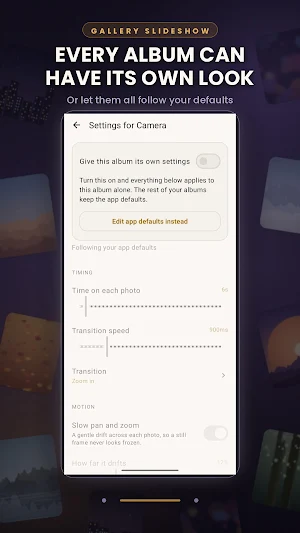
Play your photos as a slideshow. Every album can have its own settings.
- Downloads
- 92+
- on Google Play
- Price
- Free
- No in-app purchases
- Updated
- Aug 20
- 2026 · v1.1
Screenshots


About Scroll Gallery
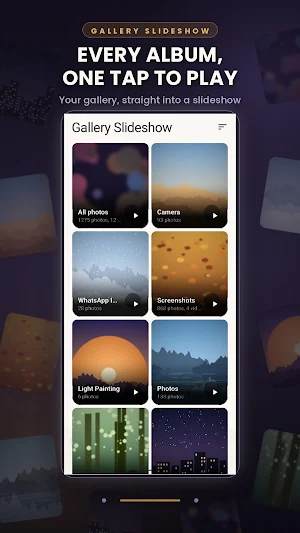
Scroll Gallery Slideshow plays the photos already on your phone. It is a slideshow player, not a video maker, so there is no exporting, no templates and no watermark. Pick an album, tap play, and your pictures fill the screen.
EVERY ALBUM CAN HAVE ITS OWN SETTINGS
This is the part other slideshow apps leave out. Set your defaults once, then give any album settings of its own.
Your holiday folder can run at 15 seconds a photo with a slow fade and a blurred backdrop. Pictures of the kids can run at 4 seconds, shuffled, with a gentle zoom. Screenshots can stay out of the slideshow entirely. Every other album keeps following your defaults, and any album can be handed back to them whenever you like.
SHUFFLE THAT REALLY SHUFFLES
Turn on shuffle and every photo is shown once before any of them come round again. No more watching the same handful of pictures while the rest of the folder never appears.
IT REMEMBERS WHERE YOU WERE
Come back to an album and the slideshow carries on from the photo you were looking at, rather than starting from the top again. It survives closing the app, and it works in shuffle mode too.
WHAT YOU CAN CHANGE
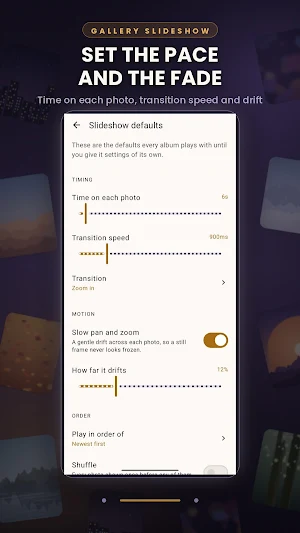
Timing: how long each photo stays, and how fast it changes. These are two separate controls, so a slow fade does not force a slow slideshow.
Transitions: fade, slide, zoom in, zoom out, depth, cube, flip, card stack, carousel, vertical, soft zoom, or a different one every time.
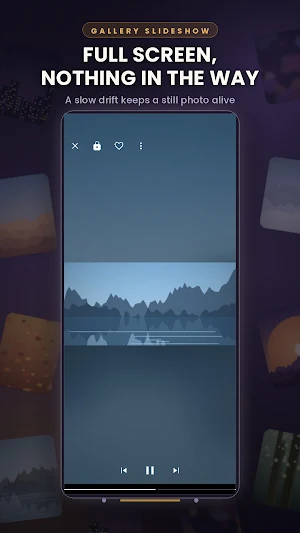
Motion: a slow pan and zoom across each photo, with the amount up to you.
Order: newest first, oldest first, by name, by size, shuffled, looping or stopping at the end.
Framing: fit the whole photo in or fill the screen, with a backdrop of black, white, or a blurred wash of colour taken from it.
Two upright photos side by side when you turn the phone sideways, instead of one picture between two empty bars.
What plays: photos, videos, or both. Play videos or show their first frame, cap long clips, mute them, and include or ignore subfolders.
On screen: a clock, the date, a caption with the file name, album, date taken or camera, a progress bar and a photo counter.
The screen: keep it awake, choose whether a tap pauses, lock the screen so a passing hand cannot stop the show, lock the rotation, and set the brightness.
Music: play your own audio files quietly behind the photos.
ALSO INSIDE
Favourites play as an album of their own, so the photos you love become a slideshow with one tap.
Hide albums you never want to see, and drop individual photos out of slideshows without deleting anything.
Pin the albums you open most to the top.
Use it as your screensaver, so your phone shows your photos while it charges.
Open any photo full screen and pinch to zoom, or check when and on what it was taken.
Make the app yours: light, dark or follow the phone, pure black for OLED screens, six accent colours, and a photo grid from two to six across.
YOUR PHOTOS STAY YOURS
No subscription. No account. No analytics. Nothing is uploaded and nothing leaves your phone. The app reads your gallery so it can play it, and that is all it does. It works with no internet connection, and it is a small download.
EVERY ALBUM CAN HAVE ITS OWN SETTINGS
This is the part other slideshow apps leave out. Set your defaults once, then give any album settings of its own.
Your holiday folder can run at 15 seconds a photo with a slow fade and a blurred backdrop. Pictures of the kids can run at 4 seconds, shuffled, with a gentle zoom. Screenshots can stay out of the slideshow entirely. Every other album keeps following your defaults, and any album can be handed back to them whenever you like.
SHUFFLE THAT REALLY SHUFFLES
Turn on shuffle and every photo is shown once before any of them come round again. No more watching the same handful of pictures while the rest of the folder never appears.
IT REMEMBERS WHERE YOU WERE
Come back to an album and the slideshow carries on from the photo you were looking at, rather than starting from the top again. It survives closing the app, and it works in shuffle mode too.
WHAT YOU CAN CHANGE
Timing: how long each photo stays, and how fast it changes. These are two separate controls, so a slow fade does not force a slow slideshow.
Transitions: fade, slide, zoom in, zoom out, depth, cube, flip, card stack, carousel, vertical, soft zoom, or a different one every time.
Motion: a slow pan and zoom across each photo, with the amount up to you.
Order: newest first, oldest first, by name, by size, shuffled, looping or stopping at the end.
Framing: fit the whole photo in or fill the screen, with a backdrop of black, white, or a blurred wash of colour taken from it.
Two upright photos side by side when you turn the phone sideways, instead of one picture between two empty bars.
What plays: photos, videos, or both. Play videos or show their first frame, cap long clips, mute them, and include or ignore subfolders.
On screen: a clock, the date, a caption with the file name, album, date taken or camera, a progress bar and a photo counter.
The screen: keep it awake, choose whether a tap pauses, lock the screen so a passing hand cannot stop the show, lock the rotation, and set the brightness.
Music: play your own audio files quietly behind the photos.
ALSO INSIDE
Favourites play as an album of their own, so the photos you love become a slideshow with one tap.
Hide albums you never want to see, and drop individual photos out of slideshows without deleting anything.
Pin the albums you open most to the top.
Use it as your screensaver, so your phone shows your photos while it charges.
Open any photo full screen and pinch to zoom, or check when and on what it was taken.
Make the app yours: light, dark or follow the phone, pure black for OLED screens, six accent colours, and a photo grid from two to six across.
YOUR PHOTOS STAY YOURS
No subscription. No account. No analytics. Nothing is uploaded and nothing leaves your phone. The app reads your gallery so it can play it, and that is all it does. It works with no internet connection, and it is a small download.
What’s new
Version 1.1 · Updated August 20, 2026
Bug fixes
User reviews

this app needs a lot of work, it has many bugs, the video continues to play, even with you move to the next, then the next video plays together, you cannot pause them.
Alternatives to Scroll Gallery
Looking for apps like Scroll Gallery? Here are 6 similar Android apps on Google Play. The highest rated is mcpro24fps manual video camera (4.6/5), and 5 of the 6 are free to download.
-
Manual Camera DSLR (Lite) 3.9
-
mcpro24fps manual video camera 4.6
-
Cameringo Lite. Filters Camera 4.1
-
PhotoSpot: For Travel Planning 4.4
-
Private Screenshots 3.6
-
MultiTimer: Multiple timers 4.5
| App | Rating | Price | Installs | Last updated | Compare |
|---|---|---|---|---|---|
| Scroll Gallery | – | Free | 50+ | Aug 20, 2026 | |
| Manual Camera DSLR (Lite) | 3.8 / 5 | Free | 5,000,000+ | May 8, 2024 | Compare |
| mcpro24fps manual video camera | 4.6 / 5 | 19.99 USD | 10,000+ | Sep 16, 2026 | Compare |
| Cameringo Lite. Filters Camera | 4.1 / 5 | Free | 10,000,000+ | Aug 26, 2023 | Compare |
| PhotoSpot: For Travel Planning | 4.4 / 5 | Free | 5,000+ | Jun 10, 2026 | Compare |
| Private Screenshots | 3.6 / 5 | Free | 1,000,000+ | Aug 6, 2026 | Compare |
| MultiTimer: Multiple timers | 4.5 / 5 | Free | 100,000+ | Oct 5, 2026 | Compare |
Compare Scroll Gallery with the top alternatives: ratings, updates, ASO score and keyword gaps →
Similar apps on Google Play
- Manual Camera DSLR (Lite)
- mcpro24fps manual video camera
- Cameringo Lite. Filters Camera
- PhotoSpot: For Travel Planning
- Private Screenshots
- MultiTimer: Multiple timers
- ISO Today
- Touch Screen Test
- Deleted Photo & Video Recovery
- MobiSaver: Data&Photo Recovery
- TAP Kiln Control Mobile
- Champ Scientific Calculator
- PRIVARY Secure Photo Vault
- HiNotes by HiDock
- Borealis - Icon Pack
- InstaSize: AI Photo Editor
- Elgato Stream Deck Mobile
- Nuki Smart Lock
- POV – Disposable Camera Events
- Sportvibez
- IronVest - Security & Privacy
- Cubii
- LockMyPix Photo Vault PREMIUM
- Avigilon Unity Video
- dynamicSpot - Dynamic Island