
Flim Negative Scanner
Flash Software Solution Photography Contains ads
See the photo, not the negative. Scan old film with your phone camera.
- Downloads
- 186+
- on Google Play
- Price
- Free
- No in-app purchases
- Updated
- Aug 22
- 2026 · v1.1
Screenshots

About Flim Negative Scanner
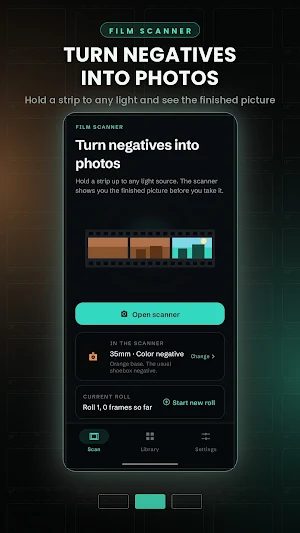
Film Negative Scanner turns old negatives into photographs using the camera you already have.
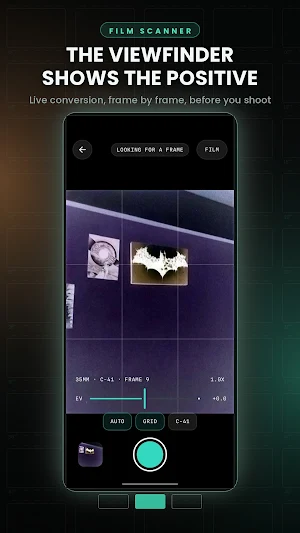
Hold a strip up to any light source and the viewfinder shows you the finished picture, not the negative. The conversion happens live, frame by frame, so you can see how a shot came out before you decide to keep it.
HOW IT WORKS
1. Backlight the film. A tablet showing a white screen works best, but a window or a lamp with a paper shade is fine too.
2. Rest the strip a centimetre or two above the light, and keep it flat.
3. Fill the frame and tap the shutter. The picture goes straight into your library.
BUILT FOR FILM, NOT FILTERS
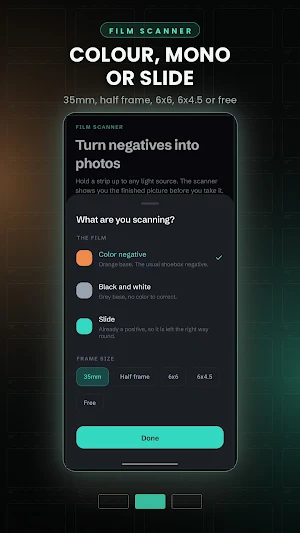
Colour negatives sit on an orange base, which is why a plain inversion comes out heavily blue. This app measures each colour channel on its own and stretches it back to full range, so the orange mask disappears as a side effect of fixing the colour. You never have to tell it which film stock you shot.
Black and white film is measured on shared brightness instead, because measuring it per channel would invent a colour cast on a grey negative. Slides are already positives, so they are left the right way round.
SCAN A WHOLE STRIP
Turn automatic capture on, hold a frame steady, and the scanner fires by itself and files the result. Slide the film along and repeat. Frames are numbered within a roll, and your library groups them the same way, so a shoebox of strips does not turn into one long pile of pictures.
ADJUST WITHOUT LOSING ANYTHING
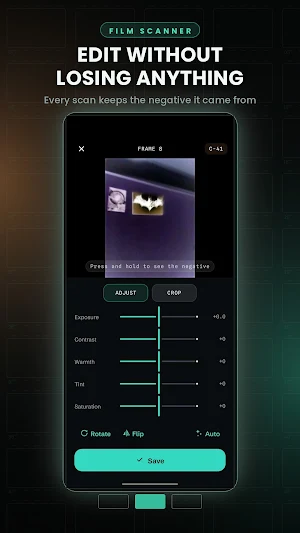
Every scan keeps the photograph of the negative it came from, so an edit is never destructive. Open a scan months later and the conversion runs again from the original frame.
• Exposure, contrast, warmth, tint and saturation
• Crop with corner handles, snapped to 35mm, half frame, 6x6, 6x4.5, or free
• Rotate and flip, for film that went in the wrong way round
• Press and hold to see the negative underneath
IN THE SCANNER
• A live positive viewfinder, with no raw negative to squint at
• Exposure compensation, for the bright light source behind the film
• Pinch to zoom and tap to focus, for getting in close
• A thirds grid for lining a strip up square
YOUR PHOTOS STAY YOURS
Everything happens on your phone. There is no account to make, nothing is uploaded anywhere, and the camera is the only permission the app asks for. Save the frames you like into your gallery, or share them straight from the app.
WHAT YOU NEED
A phone camera and a light source behind the film. The more even the light and the flatter the strip, the better the result, and a short guide inside the app walks through the setup in five steps.
Hold a strip up to any light source and the viewfinder shows you the finished picture, not the negative. The conversion happens live, frame by frame, so you can see how a shot came out before you decide to keep it.
HOW IT WORKS
1. Backlight the film. A tablet showing a white screen works best, but a window or a lamp with a paper shade is fine too.
2. Rest the strip a centimetre or two above the light, and keep it flat.
3. Fill the frame and tap the shutter. The picture goes straight into your library.
BUILT FOR FILM, NOT FILTERS
Colour negatives sit on an orange base, which is why a plain inversion comes out heavily blue. This app measures each colour channel on its own and stretches it back to full range, so the orange mask disappears as a side effect of fixing the colour. You never have to tell it which film stock you shot.
Black and white film is measured on shared brightness instead, because measuring it per channel would invent a colour cast on a grey negative. Slides are already positives, so they are left the right way round.
SCAN A WHOLE STRIP
Turn automatic capture on, hold a frame steady, and the scanner fires by itself and files the result. Slide the film along and repeat. Frames are numbered within a roll, and your library groups them the same way, so a shoebox of strips does not turn into one long pile of pictures.
ADJUST WITHOUT LOSING ANYTHING
Every scan keeps the photograph of the negative it came from, so an edit is never destructive. Open a scan months later and the conversion runs again from the original frame.
• Exposure, contrast, warmth, tint and saturation
• Crop with corner handles, snapped to 35mm, half frame, 6x6, 6x4.5, or free
• Rotate and flip, for film that went in the wrong way round
• Press and hold to see the negative underneath
IN THE SCANNER
• A live positive viewfinder, with no raw negative to squint at
• Exposure compensation, for the bright light source behind the film
• Pinch to zoom and tap to focus, for getting in close
• A thirds grid for lining a strip up square
YOUR PHOTOS STAY YOURS
Everything happens on your phone. There is no account to make, nothing is uploaded anywhere, and the camera is the only permission the app asks for. Save the frames you like into your gallery, or share them straight from the app.
WHAT YOU NEED
A phone camera and a light source behind the film. The more even the light and the flatter the strip, the better the result, and a short guide inside the app walks through the setup in five steps.
What’s new
Version 1.1 · Updated August 22, 2026
Bug fixes
Alternatives to Flim Negative Scanner
Looking for apps like Flim Negative Scanner? Here are 6 similar Android apps on Google Play. The highest rated is Camera FV-5 Lite (4.1/5), and all 6 are free to download.
-
Lotus Lantern 3.1
-
Manual Camera DSLR (Lite) 3.9
-
Loom – Screen and Cam Recorder 3.1
-
Camera FV-5 Lite 4.1
-
Cameringo Lite. Filters Camera 4.1
-
Lensa: photo editor & AI art 4.1
| App | Rating | Price | Installs | Last updated | Compare |
|---|---|---|---|---|---|
| Flim Negative Scanner | – | Free | 100+ | Aug 22, 2026 | |
| Lotus Lantern | 3.1 / 5 | Free | 10,000,000+ | – | Compare |
| Manual Camera DSLR (Lite) | 3.8 / 5 | Free | 5,000,000+ | May 8, 2024 | Compare |
| Loom – Screen and Cam Recorder | 3.1 / 5 | Free | 1,000,000+ | Oct 13, 2026 | Compare |
| Camera FV-5 Lite | 4.1 / 5 | Free | 10,000,000+ | May 26, 2026 | Compare |
| Cameringo Lite. Filters Camera | 4.1 / 5 | Free | 10,000,000+ | Aug 26, 2023 | Compare |
| Lensa: photo editor & AI art | 4.1 / 5 | Free | 10,000,000+ | Oct 16, 2026 | Compare |
Similar apps on Google Play
- Lotus Lantern
- Manual Camera DSLR (Lite)
- Loom – Screen and Cam Recorder
- Camera FV-5 Lite
- Cameringo Lite. Filters Camera
- Lensa: photo editor & AI art
- HD Camera
- MiX Camera for Mi Camera
- Photone - Grow Light Meter
- FilmBox Film Negatives Scanner
- LoFi Cam: Film Digital Camera
- FIMO - Analog Camera
- Litchi for DJI Drones
- PhotoPills
- Chaos Audio: Effects & Amp AI
- Framelapse 2 Time Lapse Camera
- Protake - Mobile Cinema Camera
- mcpro24fps manual video camera
- Polarr: Photo Filters & Editor
- Lightleap by Lightricks
- Sportvibez
- HiNotes by HiDock
- Video Converter Pro
- Seestar
- BlackVue
- Solocator - GPS Field Camera
- Stop Motion Studio Pro
- Nuki Smart Lock
- Photo Scan App by Photomyne
- GuruShots: Photo Game