
Routine Pochi: Habit Board
Chang Yuan-Yi Productivity Contains ads
Flip daily tasks on or off with a satisfying tap. Habits auto-reset at night.
- Downloads
- 15+
- on Google Play
- Price
- Free
- No in-app purchases
- Updated
- Jul 25
- 2026 · v1.20260725.1224543
Screenshots
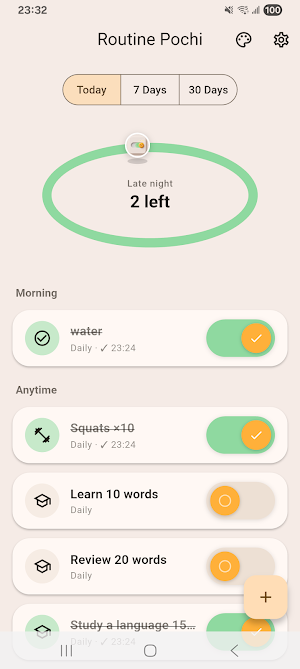
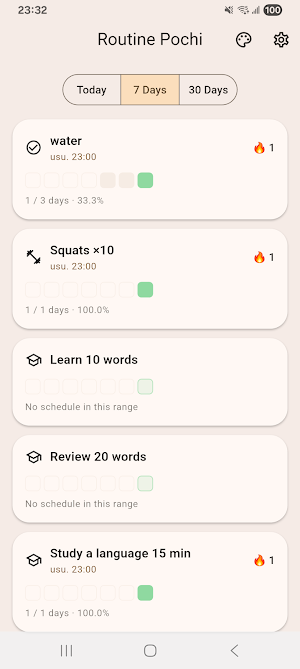
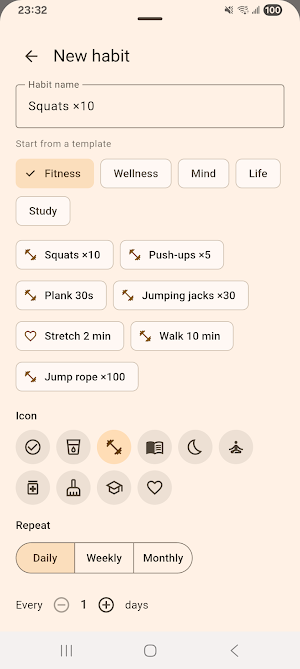
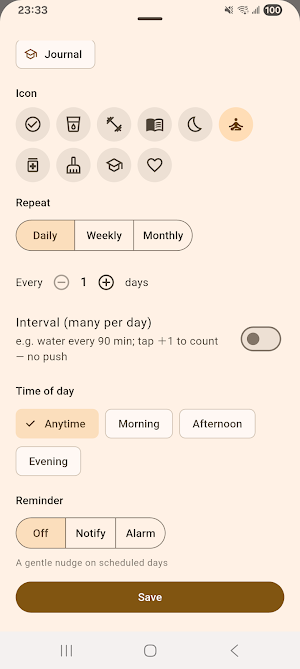

About Routine Pochi: Habit Board
Routine Pochi turns your daily routine into something you actually enjoy doing. Inspired by tactile "routine boards" and the satisfying flip of a physical switch, Pochi recreates that "snap" of sliding a task from Off to On — a calm, low-pressure way to stay on track.
No cluttered lists. No guilt-inducing deadlines. Just a friendly board of toggles you flip through as you go.
How it works:
- Add the habits and chores you want to keep up with — or start from a built-in template
- Flip each task On when it's done, with a smooth animation, sound, and haptic tap
- See only what matters today, filtered by the days (or times) you set for each habit
- Everything resets automatically after midnight, so you always start fresh
Start fast with templates & identity packs:
- Ready-made habits across Fitness, Wellness, Mind, Life, and Study
- "Who you want to become" identity packs add a whole themed set in one tap
- Type a name and matching templates appear as suggestions
Two kinds of habits:
- Daily / weekly / monthly toggles for the usual once-a-day routine
- Interval habits that gently recur every so often within an active window (water, stretch breaks, eye rest) — check in with a quick +1
Attach the things you follow along with:
- Give any habit notes with a link — a follow-along workout video, meditation music, an article, a craft tutorial
- Notes live in a reusable library, so one note (say, a warm-up video) can be shared across several habits
- Tap the link on the board and it opens right in the app it belongs to
Widget-first, notification-light:
- Check today's progress at a glance from your home screen widget — iPhone, iPad, and Android
- Check habits off directly from the widget, and open a habit's link or notes right from it
- Sizes from small up to iPad's extra-large, plus an optional large-text mode for an at-home, across-the-room board
- Reminders are gentle and off by default; per habit, choose a soft notification or a stronger time-sensitive alarm
Made to feel good:
- A playful, cozy design that makes routines feel light instead of heavy
- Satisfying toggle animations with optional sound and vibration
- Custom icons, repeat days, and ordering for each task
- An optional minimalist theme for a calmer, more understated look
- A gentle look back at the last 7 and 30 days — a soft heatmap and streaks, never cold percentages
Private by design:
- 100% local storage — your data stays on your device
- No account required to start
- Available in 12 languages
- Privacy policy and terms are available from within the app
Great for:
- Building and keeping small daily habits
- Morning and evening routines
- Household chores and daily upkeep
- Following along with workouts, meditation, reading, or study material
- Anyone who finds traditional to-do and habit apps overwhelming
Flip a task. Hear the snap. Turn your chores into a happy routine.
No cluttered lists. No guilt-inducing deadlines. Just a friendly board of toggles you flip through as you go.
How it works:
- Add the habits and chores you want to keep up with — or start from a built-in template
- Flip each task On when it's done, with a smooth animation, sound, and haptic tap
- See only what matters today, filtered by the days (or times) you set for each habit
- Everything resets automatically after midnight, so you always start fresh
Start fast with templates & identity packs:
- Ready-made habits across Fitness, Wellness, Mind, Life, and Study
- "Who you want to become" identity packs add a whole themed set in one tap
- Type a name and matching templates appear as suggestions
Two kinds of habits:
- Daily / weekly / monthly toggles for the usual once-a-day routine
- Interval habits that gently recur every so often within an active window (water, stretch breaks, eye rest) — check in with a quick +1
Attach the things you follow along with:
- Give any habit notes with a link — a follow-along workout video, meditation music, an article, a craft tutorial
- Notes live in a reusable library, so one note (say, a warm-up video) can be shared across several habits
- Tap the link on the board and it opens right in the app it belongs to
Widget-first, notification-light:
- Check today's progress at a glance from your home screen widget — iPhone, iPad, and Android
- Check habits off directly from the widget, and open a habit's link or notes right from it
- Sizes from small up to iPad's extra-large, plus an optional large-text mode for an at-home, across-the-room board
- Reminders are gentle and off by default; per habit, choose a soft notification or a stronger time-sensitive alarm
Made to feel good:
- A playful, cozy design that makes routines feel light instead of heavy
- Satisfying toggle animations with optional sound and vibration
- Custom icons, repeat days, and ordering for each task
- An optional minimalist theme for a calmer, more understated look
- A gentle look back at the last 7 and 30 days — a soft heatmap and streaks, never cold percentages
Private by design:
- 100% local storage — your data stays on your device
- No account required to start
- Available in 12 languages
- Privacy policy and terms are available from within the app
Great for:
- Building and keeping small daily habits
- Morning and evening routines
- Household chores and daily upkeep
- Following along with workouts, meditation, reading, or study material
- Anyone who finds traditional to-do and habit apps overwhelming
Flip a task. Hear the snap. Turn your chores into a happy routine.
What’s new
Version 1.20260725.1224543 · Updated July 25, 2026
- Attach notes and links to any habit
Alternatives to Routine Pochi: Habit Board
Looking for apps like Routine Pochi: Habit Board? Here are 6 similar Android apps on Google Play. All of them are free to download.
-
Sentry Saver
-
Bento Days: Photo Food Diary
-
iPTT 時光機
-
PTT 鄉民樂- 閃開!讓專業的來
-
AI PDF Sign: Fill & Signature
-
AI Photo Privacy: Blur & EXIF
| App | Rating | Price | Installs | Last updated | Compare |
|---|---|---|---|---|---|
| Routine Pochi: Habit Board | – | Free | 10+ | Jul 25, 2026 | |
| Sentry Saver | – | Free | 0+ | – | Compare |
| Bento Days: Photo Food Diary | – | Free | 1+ | Sep 30, 2026 | Compare |
| iPTT 時光機 | – | Free | 1+ | – | Compare |
| PTT 鄉民樂- 閃開!讓專業的來 | – | Free | 5+ | – | Compare |
| AI PDF Sign: Fill & Signature | – | Free | 5+ | Sep 30, 2026 | Compare |
| AI Photo Privacy: Blur & EXIF | – | Free | 5+ | – | Compare |
Similar apps on Google Play
- Sentry Saver
- Bento Days: Photo Food Diary
- iPTT 時光機
- PTT 鄉民樂- 閃開!讓專業的來
- AI PDF Sign: Fill & Signature
- AI Photo Privacy: Blur & EXIF
- AI Wi-Fi Analyzer: Speed Test
- JWT & Base64 Decoder/Verifier
- DNS Checker/Whois & IP Lookup
- SSL Certificate Checker
- PingGrid: Pro Web Monitor
- AInfo Frame Mobile
- AInfo Frame TV
- DLNA for Chromecast
- Can I Afford It – Home
- AI Detect: USB-C to HD Out
- MathPath Junior
- Bastion SSH - SSH/SFTP Client
- LANFinder: Ping & Port Scan
- QRGo! QRCode Scanner&Generator
- AnyDLNA - Any Cast/Chromecast