

Bastion SSH - SSH/SFTP Client
Chang Yuan-Yi Tools Contains ads
Multi-hop SSH with jump hosts, SFTP, and keys that never leave your device.
- Downloads
- 113+
- on Google Play
- Price
- Free
- No in-app purchases
- Updated
- Oct 11
- 2026 · v1.20261011.1215540
Screenshots
About Bastion SSH - SSH/SFTP Client
Bastion SSH is an SSH and SFTP client built for the way real infrastructure is laid out: not one server you can dial directly, but a bastion, then a machine behind it, then the box you actually wanted.
Chains, not just connections:
- Reach a host through any number of jump hosts, the way `ssh -J` does
- Every hop is a real SSH session, so every machine in the chain is authenticated and its host key checked — not just the first one
- Routes are named by where they go: "office-A → mac-mini". Past the first hop addresses stop being unique — a reverse tunnel puts every machine on its jump's localhost — so the path is what tells two otherwise identical routes apart
- Add a new jump host inline while you set one up, at any depth
- When a chain fails it names the hop, the stage it got to, and the jump it came through, so you can tell a dead tunnel from a machine that is switched off
Know what will happen before you connect:
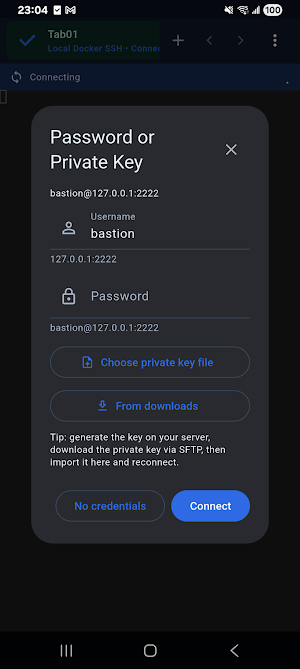
- Open a route and see it hop by hop, with what each step will use: a stored key, a stored password, or a prompt
- It answers the question up front — "1 of 3 hops will ask for credentials"
- Install a public key onto any hop from the same screen
Keys that stay on the device:
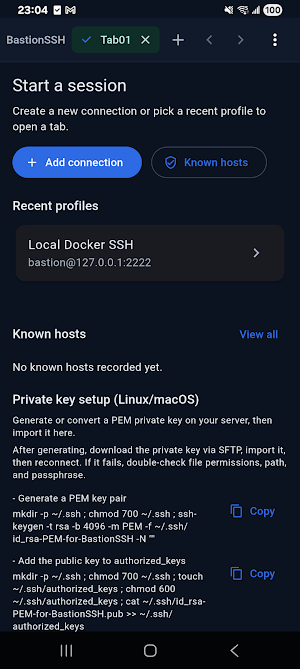
- Import the key you already own: OpenSSH format (what ssh-keygen writes by default) or PEM, encrypted or not, with no conversion step
- "This device" lists every key with its type, fingerprint, which hosts use it, and whether it was generated here or imported
- Use one key across several hosts, and delete a key only after being told how many hosts depend on it
Host keys you can verify:
- Fingerprints are the OpenSSH SHA256 form, exactly what `ssh-keygen -lf` prints, so you can compare them with the server instead of taking them on trust
- A changed host key asks you, every time
- Records are kept per route, so two machines that both answer on their bastion's localhost are never confused
Multi-session terminal:
- Session tabs that live independently — switch, close or retry one without disturbing the rest
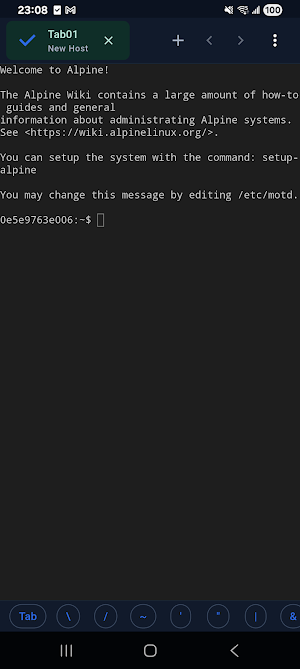
- xterm-compatible terminal with selection, copy and paste, and resize
- Quick keys for the commands and control sequences you keep reaching for
- Per-host keep-alive, and reconnection that backs off instead of hammering the server
Files:
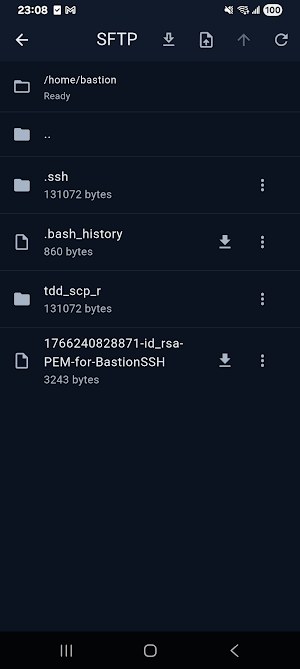
- Browse, download, upload, rename and delete over SFTP
- Downloads keep running when you leave the screen, with progress and cancel
- Save into Files / iCloud or keep them in the app
Credentials, on your terms:
- A hop's password can be kept in the device key store, per host, and using it needs the device's own check — Face ID, a fingerprint, or your passcode
- One check covers a few minutes of use, then it locks itself again — a found phone is not an open door
- Each stored password says which protection it has
- A stored password the server rejects is dropped and you are asked again, instead of failing the same way on every attempt
- Review and revoke everything that is stored from one screen
Yours, and only on your device:
- Hosts, keys and known-host records stay on the device. No account, no sync, nothing to sign up for
- Private keys live only in the system key store, never as plaintext files
- Privacy policy and terms are available from within the app
Great for:
- Anyone whose servers sit behind a bastion or a reverse tunnel
- Sysadmins and developers checking on machines away from a desk
- Keeping several sessions open at once — logs in one tab, work in another
- Setting up key authentication from a phone, without moving a private key around
Open the route. See the hops. Connect.
Chains, not just connections:
- Reach a host through any number of jump hosts, the way `ssh -J` does
- Every hop is a real SSH session, so every machine in the chain is authenticated and its host key checked — not just the first one
- Routes are named by where they go: "office-A → mac-mini". Past the first hop addresses stop being unique — a reverse tunnel puts every machine on its jump's localhost — so the path is what tells two otherwise identical routes apart
- Add a new jump host inline while you set one up, at any depth
- When a chain fails it names the hop, the stage it got to, and the jump it came through, so you can tell a dead tunnel from a machine that is switched off
Know what will happen before you connect:
- Open a route and see it hop by hop, with what each step will use: a stored key, a stored password, or a prompt
- It answers the question up front — "1 of 3 hops will ask for credentials"
- Install a public key onto any hop from the same screen
Keys that stay on the device:
- Import the key you already own: OpenSSH format (what ssh-keygen writes by default) or PEM, encrypted or not, with no conversion step
- "This device" lists every key with its type, fingerprint, which hosts use it, and whether it was generated here or imported
- Use one key across several hosts, and delete a key only after being told how many hosts depend on it
Host keys you can verify:
- Fingerprints are the OpenSSH SHA256 form, exactly what `ssh-keygen -lf` prints, so you can compare them with the server instead of taking them on trust
- A changed host key asks you, every time
- Records are kept per route, so two machines that both answer on their bastion's localhost are never confused
Multi-session terminal:
- Session tabs that live independently — switch, close or retry one without disturbing the rest
- xterm-compatible terminal with selection, copy and paste, and resize
- Quick keys for the commands and control sequences you keep reaching for
- Per-host keep-alive, and reconnection that backs off instead of hammering the server
Files:
- Browse, download, upload, rename and delete over SFTP
- Downloads keep running when you leave the screen, with progress and cancel
- Save into Files / iCloud or keep them in the app
Credentials, on your terms:
- A hop's password can be kept in the device key store, per host, and using it needs the device's own check — Face ID, a fingerprint, or your passcode
- One check covers a few minutes of use, then it locks itself again — a found phone is not an open door
- Each stored password says which protection it has
- A stored password the server rejects is dropped and you are asked again, instead of failing the same way on every attempt
- Review and revoke everything that is stored from one screen
Yours, and only on your device:
- Hosts, keys and known-host records stay on the device. No account, no sync, nothing to sign up for
- Private keys live only in the system key store, never as plaintext files
- Privacy policy and terms are available from within the app
Great for:
- Anyone whose servers sit behind a bastion or a reverse tunnel
- Sysadmins and developers checking on machines away from a desk
- Keeping several sessions open at once — logs in one tab, work in another
- Setting up key authentication from a phone, without moving a private key around
Open the route. See the hops. Connect.
What’s new
Version 1.20261011.1215540 · Updated October 11, 2026
- New quick keys for \r, \n and the arrow keys, plus an optional setting that makes the keyboard's Return key submit in apps like Claude Code.
Alternatives to Bastion SSH - SSH/SFTP Client
Looking for apps like Bastion SSH - SSH/SFTP Client? Here are 6 similar Android apps on Google Play. All of them are free to download.
-
Sentry Saver
-
Bento Days: Photo Food Diary
-
Routine Pochi: Habit Board
-
iPTT 時光機
-
PTT 鄉民樂- 閃開!讓專業的來
-
AI PDF Sign: Fill & Signature
| App | Rating | Price | Installs | Last updated | Compare |
|---|---|---|---|---|---|
| Bastion SSH - SSH/SFTP Client | – | Free | 100+ | Oct 11, 2026 | |
| Sentry Saver | – | Free | 0+ | – | Compare |
| Bento Days: Photo Food Diary | – | Free | 1+ | Sep 30, 2026 | Compare |
| Routine Pochi: Habit Board | – | Free | 10+ | – | Compare |
| iPTT 時光機 | – | Free | 1+ | – | Compare |
| PTT 鄉民樂- 閃開!讓專業的來 | – | Free | 5+ | – | Compare |
| AI PDF Sign: Fill & Signature | – | Free | 5+ | – | Compare |
Similar apps on Google Play
- Sentry Saver
- Bento Days: Photo Food Diary
- Routine Pochi: Habit Board
- iPTT 時光機
- PTT 鄉民樂- 閃開!讓專業的來
- AI PDF Sign: Fill & Signature
- AI Photo Privacy: Blur & EXIF
- AI Wi-Fi Analyzer: Speed Test
- JWT & Base64 Decoder/Verifier
- DNS Checker/Whois & IP Lookup
- SSL Certificate Checker
- PingGrid: Pro Web Monitor
- AInfo Frame Mobile
- AInfo Frame TV
- DLNA for Chromecast
- Can I Afford It – Home
- AI Detect: USB-C to HD Out
- MathPath Junior
- LANFinder: Ping & Port Scan
- QRGo! QRCode Scanner&Generator
- AnyDLNA - Any Cast/Chromecast