
Zero Typing AI: Voice to Text
NEXTGEN DIGITAL - FZCO Productivity In-app purchases
AI voice typing that turns speech into clean, ready-to-send text in any app.
- Downloads
- 54.3K+
- on Google Play
- Price
- Free
- In-app purchases
- Updated
- Oct 8
- 2026 · v2.7.4
Screenshots
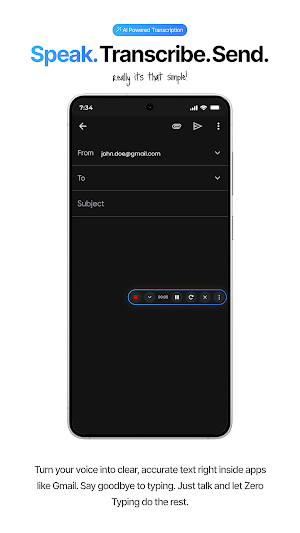


About Zero Typing AI: Voice to Text
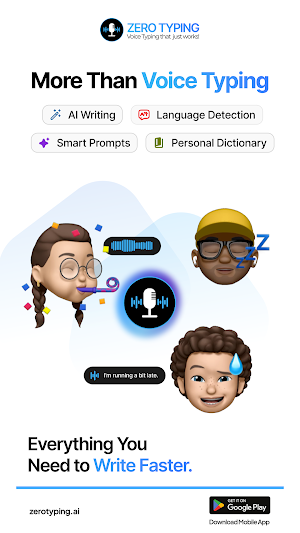
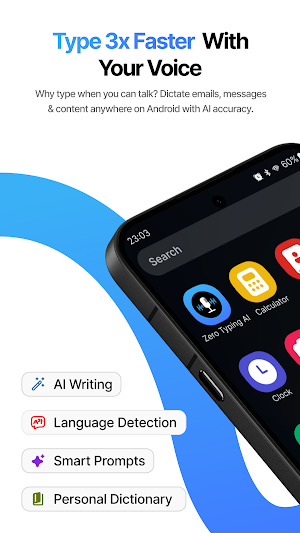
Zero Typing AI is an AI voice-to-text and voice typing app that turns natural speech into clean, formatted, ready-to-send text.
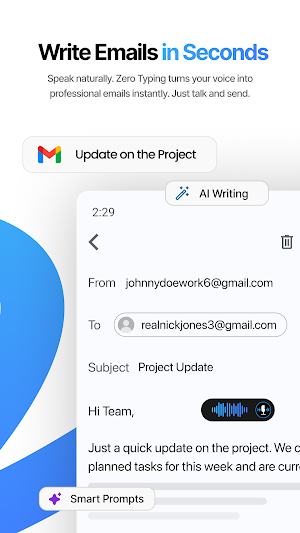
Talk instead of typing and create emails, messages, notes, documents, and AI prompts faster.
Zero Typing AI can improve your grammar and organize your speech, so you spend less time correcting messy dictation.
Use Zero Typing AI across everyday apps, including WhatsApp, Gmail, ChatGPT, LinkedIn, and more.
ACCESSIBILITY SERVICE USAGE
Zero Typing AI uses Android’s AccessibilityService API to provide its core system-wide voice typing functionality.
When you enable the Accessibility Service, Zero Typing AI uses it to:
• Detect when an editable text field and on-screen keyboard are active
• Display the floating voice typing controls over other apps
• Identify the currently focused text field
• Access existing text in the focused field when you explicitly request a rewriting or editing feature
• Insert your dictated or user-requested AI-processed text into the focused field
Accessibility access is used only to provide user-initiated voice typing and text-editing features. Zero Typing AI does not use the AccessibilityService API to change device settings, bypass Android privacy or security controls, record remote calls, perform autonomous actions, or prevent you from disabling or uninstalling the app.
Enabling the Accessibility Service is optional, requires your explicit approval in Android Settings, and can be disabled at any time. Without this access, system-wide voice typing, the floating voice typing button, and automatic text insertion will not be available.
WHY USE ZERO TYPING AI?
• Voice typing across apps
Speak naturally and insert text directly into the app you are using.
• Clean, formatted output
Turn speech into readable text with punctuation, paragraphs, and improved grammar.
• AI-powered rewriting
Improve clarity, shorten, expand, summarize, or change the tone of your text.
• Ask AI using your voice
Speak a question or instruction and receive an AI-generated response without typing.
• Custom AI prompts
Create reusable prompts for the way you write and work.
• Personal dictionary
Add names, company terms, technical words, and uncommon spellings.
• Floating voice typing button
Start dictating without leaving the app you are using.
BUILT-IN WRITING STYLES
• Transcript Only
Converts speech into text as it was said, without corrections or formatting.
• Ask AI
Ask questions or receive an AI-generated response using your voice.
• Format Text
Organizes text into clear paragraphs or bullet points.
• Professional
Turns casual speech into polished language for emails, reports, and professional writing.
• Casual
Rewrites your message to sound natural and conversational.
• Rephrase
Uses fresh wording while preserving the original meaning.
• Organize Thoughts
Turns brainstorming or rough notes into a clear, logical structure.
• Fix Grammar
Corrects grammar, punctuation, and formatting.
VOICE TYPING FOR DAILY WORK
Zero Typing AI helps you write:
• Emails
• WhatsApp messages
• ChatGPT prompts
• LinkedIn messages
• Notes and ideas
• Reports and documents
• Customer support replies
• CRM updates
• Business communications
MORE THAN SPEECH TO TEXT
Standard voice dictation often produces a raw transcript that still needs correcting. Zero Typing AI is designed to produce finished output.
Speak naturally and let AI improve the punctuation, grammar, structure, and tone before you use the result.
HOW IT WORKS
1. Focus a text field in a supported app.
2. Open the Zero Typing AI floating button.
3. Speak naturally.
4. Zero Typing AI converts your speech into text.
5. Insert the transcript or apply an AI writing style.
Zero Typing AI combines voice typing, speech to text, AI dictation, automatic punctuation, and AI writing tools in one app.
Talk instead of typing and create emails, messages, notes, documents, and AI prompts faster.
Zero Typing AI can improve your grammar and organize your speech, so you spend less time correcting messy dictation.
Use Zero Typing AI across everyday apps, including WhatsApp, Gmail, ChatGPT, LinkedIn, and more.
ACCESSIBILITY SERVICE USAGE
Zero Typing AI uses Android’s AccessibilityService API to provide its core system-wide voice typing functionality.
When you enable the Accessibility Service, Zero Typing AI uses it to:
• Detect when an editable text field and on-screen keyboard are active
• Display the floating voice typing controls over other apps
• Identify the currently focused text field
• Access existing text in the focused field when you explicitly request a rewriting or editing feature
• Insert your dictated or user-requested AI-processed text into the focused field
Accessibility access is used only to provide user-initiated voice typing and text-editing features. Zero Typing AI does not use the AccessibilityService API to change device settings, bypass Android privacy or security controls, record remote calls, perform autonomous actions, or prevent you from disabling or uninstalling the app.
Enabling the Accessibility Service is optional, requires your explicit approval in Android Settings, and can be disabled at any time. Without this access, system-wide voice typing, the floating voice typing button, and automatic text insertion will not be available.
WHY USE ZERO TYPING AI?
• Voice typing across apps
Speak naturally and insert text directly into the app you are using.
• Clean, formatted output
Turn speech into readable text with punctuation, paragraphs, and improved grammar.
• AI-powered rewriting
Improve clarity, shorten, expand, summarize, or change the tone of your text.
• Ask AI using your voice
Speak a question or instruction and receive an AI-generated response without typing.
• Custom AI prompts
Create reusable prompts for the way you write and work.
• Personal dictionary
Add names, company terms, technical words, and uncommon spellings.
• Floating voice typing button
Start dictating without leaving the app you are using.
BUILT-IN WRITING STYLES
• Transcript Only
Converts speech into text as it was said, without corrections or formatting.
• Ask AI
Ask questions or receive an AI-generated response using your voice.
• Format Text
Organizes text into clear paragraphs or bullet points.
• Professional
Turns casual speech into polished language for emails, reports, and professional writing.
• Casual
Rewrites your message to sound natural and conversational.
• Rephrase
Uses fresh wording while preserving the original meaning.
• Organize Thoughts
Turns brainstorming or rough notes into a clear, logical structure.
• Fix Grammar
Corrects grammar, punctuation, and formatting.
VOICE TYPING FOR DAILY WORK
Zero Typing AI helps you write:
• Emails
• WhatsApp messages
• ChatGPT prompts
• LinkedIn messages
• Notes and ideas
• Reports and documents
• Customer support replies
• CRM updates
• Business communications
MORE THAN SPEECH TO TEXT
Standard voice dictation often produces a raw transcript that still needs correcting. Zero Typing AI is designed to produce finished output.
Speak naturally and let AI improve the punctuation, grammar, structure, and tone before you use the result.
HOW IT WORKS
1. Focus a text field in a supported app.
2. Open the Zero Typing AI floating button.
3. Speak naturally.
4. Zero Typing AI converts your speech into text.
5. Insert the transcript or apply an AI writing style.
Zero Typing AI combines voice typing, speech to text, AI dictation, automatic punctuation, and AI writing tools in one app.
What’s new
Version 2.7.4 · Updated October 8, 2026
Bug Fixes and Stability Improvements
User reviews

💎💎💎💎💎

I really dig this app! I'm actually using it to chat right now, so it’s coming out way better than if I just typed. The only catch is that if you try to write something a bit too edgy or rough, it won’t take it. So, you’ve gotta keep it pretty clean. But honestly, other than that, it’s a blast, and I’m having a grea...
Alternatives to Zero Typing AI: Voice to Text
Looking for apps like Zero Typing AI: Voice to Text? Here are 6 similar Android apps on Google Play. The highest rated is Pelago (4.2/5), and all 6 are free to download.
-
Pelago 4.2
-
Aardvark Book Club 3.3
-
Bluente - Learn Business Terms
-
Soaak 4.0
-
Mobile Hotel PMS by Hotel Sync
-
SolaVieve 4.1
| App | Rating | Price | Installs | Last updated | Compare |
|---|---|---|---|---|---|
| Zero Typing AI: Voice to Text | – | Free | 50,000+ | Oct 8, 2026 | |
| Pelago | 4.2 / 5 | Free | 100,000+ | Sep 10, 2026 | Compare |
| Aardvark Book Club | 3.3 / 5 | Free | 10,000+ | Jul 22, 2026 | Compare |
| Bluente - Learn Business Terms | – | Free | 10,000+ | Jun 6, 2024 | Compare |
| Soaak | 4.0 / 5 | Free | 50,000+ | Oct 19, 2026 | Compare |
| Mobile Hotel PMS by Hotel Sync | – | Free | 10,000+ | Oct 5, 2026 | Compare |
| SolaVieve | 4.1 / 5 | Free | 10,000+ | Oct 16, 2026 | Compare |
Similar apps on Google Play
- Pelago
- Aardvark Book Club
- Bluente - Learn Business Terms
- Soaak
- Mobile Hotel PMS by Hotel Sync
- SolaVieve
- jtx Board | journals & tasks
- EMT Prep 2025: Pass Exam Test
- Neurozone
- CrowdHealth
- Ham Radio Prep
- FNP Exam Prep Test Practice
- Airlyn, the asthma app
- Easy Diary
- CircuitMess Playground
- Airhead ATPL
- Gallup Access
- Dig Local
- Trident Mindset
- CISSP Exam Prep & Test 2026
- proudP: Urine Flow Test
- ElephantTrax: Storage Tracker
- Norwex Consultant App
- Champ Scientific Calculator
- Acadium
- Twos: Remember & Share Things
- Book summaries: Accelerated
- KYRO: Storm, Linemen & VM
- Pocket Prep Behavioral Health
- Pavlok
- MagPie - Native speech
- Pocket Prep Professional 2026
- Ace PDG+SJT 2026 USAF PFE Prep
- MySudo - Identity Protection
- Trendy Transfers
- Microhealth Bleeding Disorders
- Wondr Health
- Storypark for Families
- Mastered.It
- Pocket Prep Fitness 2026
- Dashpivot
- Freedom Mortgage
- Howtotalk: Practical Parenting
- WaiverForever - Online Waiver
- ASVAB Practice Test 2026
- Fireflies: AI notetaker
- Freed: AI Clinician Assistant
- Brain Fit Life: Mental Health
- KnowHow
- Canopie for Parents
- Sleep Tracker - Sleep Cycle
- Sleep Number
- Autio - Travel Companion
- Sunsational Swim Instructor
- Understood: Support ADHD Kids
- KultureCity
- Intellifi by Adtran®
- RED Church App
- Embr Wave 2
- Cell-Ed
- Cosmo: Learn GenAI & More
- TAP Kiln Control Mobile
- Express Scripts
- OneCalc: All-in-one Calculator