
Receipt Scanner
Business In-app purchases
AI-powered. Extract data, organize expenses, automate bookkeeping.
- Rating
- 4.8
- 218 ratings
- Downloads
- 11.8K+
- on Google Play
- Price
- Free
- In-app purchases
- Updated
- Oct 10
- 2026 · v1.0.0
Screenshots


About Receipt Scanner
📄 Receipt Scanner - AI-Powered Expense Management
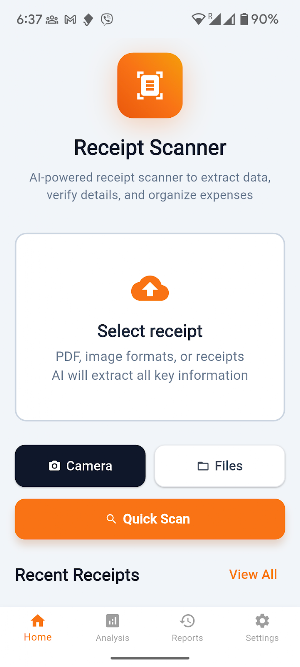
Transform tedious receipts processing into seconds with advanced AI technology. Receipt Scanner automatically extracts data from receipts and invoices, organizes expenses, and integrates seamlessly with your accounting workflow.
💰 KEY FEATURES
🔍 SMART RECEIPT SCANNING
- AI-powered data extraction from any receipt format
- Camera scanning for instant receipt processing
- Upload PDF, image, and document files
- 99% accuracy in data recognition and parsing
📊 AUTOMATED EXPENSE MANAGEMENT
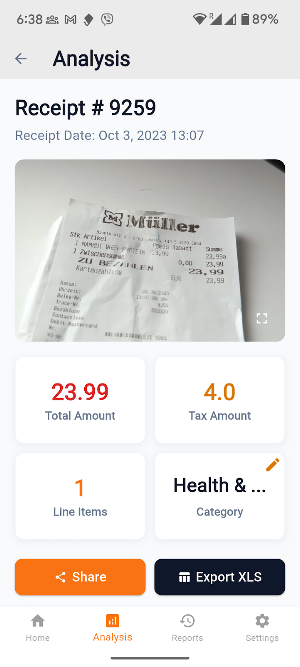
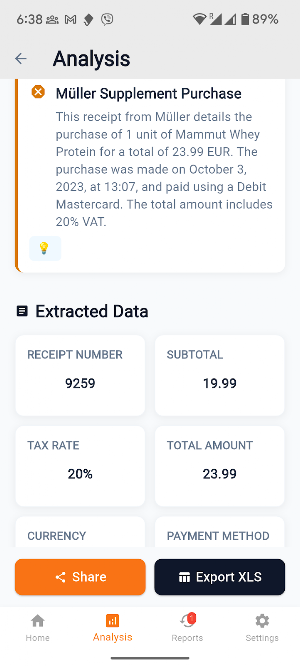
- Automatic vendor and amount extraction
- Smart expense categorization and tagging
- Tax calculation and breakdown analysis
- Edit receipt category
💼 BUSINESS INTEGRATION
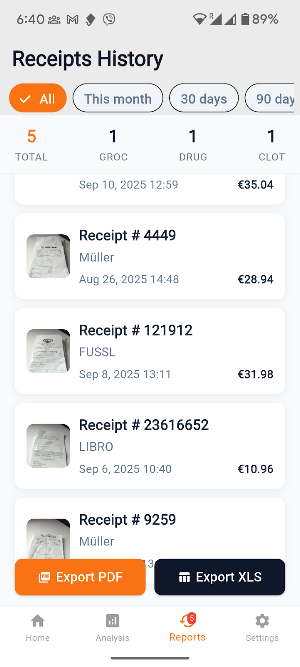
- Export to Excel, CSV, and PDF formats
- (PLANNED): QuickBooks and Xero integration ready
- (PLANNED): Batch processing for multiple invoices
- (PLANNED): Professional expense reports generation
📱 MOBILE-FIRST DESIGN
- Scan receipts anywhere with your phone
- Offline processing for sensitive documents
- Cloud sync across all your devices
- Intuitive interface for quick data review
⚡ TIME-SAVING AUTOMATION
- Eliminate manual data entry completely
- Process invoices 10x faster than manual methods
- Reduce bookkeeping errors and missed payments
- Automated backup and document organization
🎯 PERFECT FOR
- Small business owners managing expenses
- Freelancers tracking project expenses
- Accounting firms processing client receipts
- Corporate finance teams handling AP/AR
- Tax preparers organizing client documents
- Anyone tired of manual expense tracking
✨ INTELLIGENT FEATURES
- Multi-language receipts support
- Currency conversion and recognition
- (PLANNED): Duplicate receipts detection
- Historical spending analysis and insights
🏢 BUSINESS BENEFITS
- Save 5-10 hours per week on data entry
- Improve cash flow with due date tracking
- Maximize tax deductions with organized records
- Reduce audit risk with complete documentation
- Streamline vendor payment processes
🔒 SECURITY & PRIVACY
- Bank-level encryption for sensitive data
- Local processing option for confidential documents
- No document retention on external servers
📈 ADVANCED ANALYTICS
- Spending patterns
- Budget tracking
- Tax category breakdowns
- (PLANNED): Monthly and quarterly expense summaries
- (PLANNED): Custom reporting and data visualization
Whether you're managing a small business, tracking freelance expenses, or handling corporate receipts, Receipt Scanner eliminates the tedious work of manual data entry and transforms your financial workflow.
From the creators of professional business apps, Receipt Scanner combines enterprise-grade AI with mobile convenience to deliver accurate, fast, and secure receipts processing for everyone.
Download now and experience the future of expense management - where AI handles the paperwork so you can focus on growing your business!
📞 SUPPORT
Need help? Contact our support team through the app or visit our website for tutorials and best practices.
Transform tedious receipts processing into seconds with advanced AI technology. Receipt Scanner automatically extracts data from receipts and invoices, organizes expenses, and integrates seamlessly with your accounting workflow.
💰 KEY FEATURES
🔍 SMART RECEIPT SCANNING
- AI-powered data extraction from any receipt format
- Camera scanning for instant receipt processing
- Upload PDF, image, and document files
- 99% accuracy in data recognition and parsing
📊 AUTOMATED EXPENSE MANAGEMENT
- Automatic vendor and amount extraction
- Smart expense categorization and tagging
- Tax calculation and breakdown analysis
- Edit receipt category
💼 BUSINESS INTEGRATION
- Export to Excel, CSV, and PDF formats
- (PLANNED): QuickBooks and Xero integration ready
- (PLANNED): Batch processing for multiple invoices
- (PLANNED): Professional expense reports generation
📱 MOBILE-FIRST DESIGN
- Scan receipts anywhere with your phone
- Offline processing for sensitive documents
- Cloud sync across all your devices
- Intuitive interface for quick data review
⚡ TIME-SAVING AUTOMATION
- Eliminate manual data entry completely
- Process invoices 10x faster than manual methods
- Reduce bookkeeping errors and missed payments
- Automated backup and document organization
🎯 PERFECT FOR
- Small business owners managing expenses
- Freelancers tracking project expenses
- Accounting firms processing client receipts
- Corporate finance teams handling AP/AR
- Tax preparers organizing client documents
- Anyone tired of manual expense tracking
✨ INTELLIGENT FEATURES
- Multi-language receipts support
- Currency conversion and recognition
- (PLANNED): Duplicate receipts detection
- Historical spending analysis and insights
🏢 BUSINESS BENEFITS
- Save 5-10 hours per week on data entry
- Improve cash flow with due date tracking
- Maximize tax deductions with organized records
- Reduce audit risk with complete documentation
- Streamline vendor payment processes
🔒 SECURITY & PRIVACY
- Bank-level encryption for sensitive data
- Local processing option for confidential documents
- No document retention on external servers
📈 ADVANCED ANALYTICS
- Spending patterns
- Budget tracking
- Tax category breakdowns
- (PLANNED): Monthly and quarterly expense summaries
- (PLANNED): Custom reporting and data visualization
Whether you're managing a small business, tracking freelance expenses, or handling corporate receipts, Receipt Scanner eliminates the tedious work of manual data entry and transforms your financial workflow.
From the creators of professional business apps, Receipt Scanner combines enterprise-grade AI with mobile convenience to deliver accurate, fast, and secure receipts processing for everyone.
Download now and experience the future of expense management - where AI handles the paperwork so you can focus on growing your business!
📞 SUPPORT
Need help? Contact our support team through the app or visit our website for tutorials and best practices.
What’s new
Version 1.0.0 · Updated October 10, 2026
- Save Excel and PDF reports to device - Possibility to include Excel in backups - Bulk export of receipts into Excel and PDF
User reviews

Useful app.

This is good. Kindly add tags to group them by trip or job, and also filter by those tags/jobs and export by that as well.

Just does what it does, simple, doesn't require registration like others
Alternatives to Receipt Scanner
Looking for apps like Receipt Scanner? Here are 6 similar Android apps on Google Play. All of them are free to download.
-
Brutality: AI Style assessment
-
Meter Reader
-
AI Home Design
-
Contract Analysis
-
Fashion Try On
-
Discovery Lens
| App | Rating | Price | Installs | Last updated | Compare |
|---|---|---|---|---|---|
| Receipt Scanner | 4.8 / 5 | Free | 10,000+ | Oct 10, 2026 | |
| Brutality: AI Style assessment | – | Free | 0+ | Sep 11, 2025 | Compare |
| Meter Reader | – | Free | 10+ | Sep 5, 2025 | Compare |
| AI Home Design | – | Free | 10+ | Aug 20, 2025 | Compare |
| Contract Analysis | – | Free | 10+ | Aug 20, 2025 | Compare |
| Fashion Try On | – | Free | 50+ | Sep 9, 2025 | Compare |
| Discovery Lens | – | Free | 5+ | Aug 15, 2025 | Compare |
Compare Receipt Scanner with the top alternatives: ratings, updates, ASO score and keyword gaps →