
FrameCraft: Collage & Poster
ZY App Studio Lifestyle
Create aesthetic photo collages, custom grids, and stylish poster templates.
- Downloads
- 11+
- on Google Play
- Price
- Free
- No in-app purchases
- Updated
- Oct 1
- 2026 · v2.73.13399
Screenshots
About FrameCraft: Collage & Poster
Transform your favorite photos into stunning visual stories with FrameCraft, the sleek, high-performance collage maker and poster designer built for creators.
Whether you’re sharing a weekend recap, styling a photo dump, or crafting trend-setting social posts, FrameCraft provides a smooth, lag-free editing experience packed with dynamic layouts, aesthetic templates, and total creative control.
Key Features
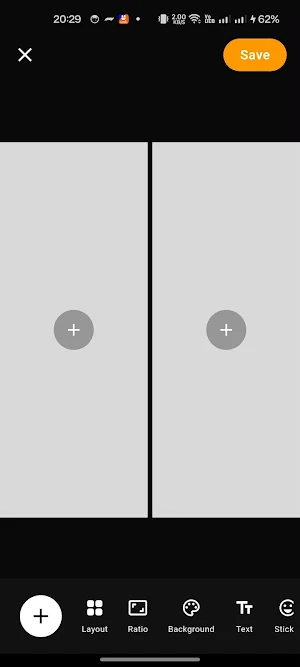
📸 25+ Dynamic Grid & Collage Layouts
Flexible Grids: Choose from dozens of flexible grid layouts accommodating anywhere from 1 to 8+ photos.
Drag-and-Drop Swapping: Hold and swap photo positions effortlessly across your collage slots.
Precise Control: Fine-tune image framing with smooth pan, 10x pinch-to-zoom, and double-tap snap reset.
🎨 Aesthetic Poster & Story Templates
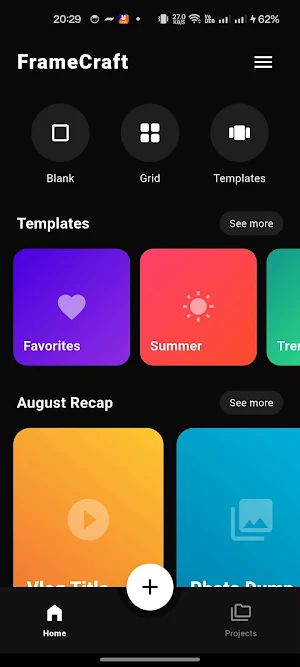
Access pre-built curated templates for Travel, Summer Vibe, Photo Dumps, Trends, and Vlog Highlights.
Dynamic, multi-slot layouts crafted with modern typography, gradients, and stylized cutouts.
🔤 Interactive Text & Sticker Layers
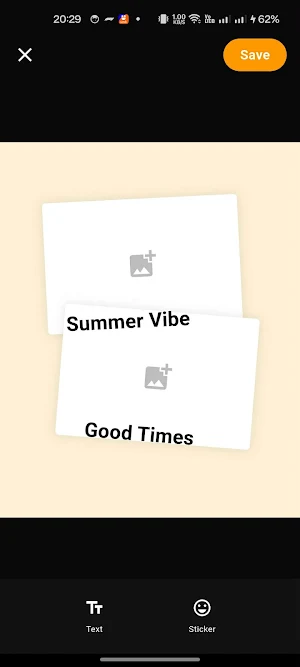
Custom Text Editor: Add bold titles, subtle captions, and stylish quotes with custom color controls.
Moveable Stickers: Overlay icons and stickers with full touch-based drag, scale, and 360° rotation gestures.
📐 Social-Ready Aspect Ratios & Backgrounds
Instantly adapt your artwork for any platform with built-in aspect ratios: 1:1, 4:5 (Instagram Feed), 3:4, 16:9, and 9:16 (Stories & TikTok).
Customize backdrop canvas colors or dark mode palettes to make your photos pop.
⚡ Ultra-HD High-Resolution Export
Export crisp, studio-quality images (3x pixel ratio export) directly to your device gallery without quality loss.
Designed with a sleek, distraction-free dark interface built for speed and creativity.
Why Choose FrameCraft?
Zero Lag: Hardware-accelerated canvas engine for real-time interactions.
No Complexity: Tap to pick photos, drag to adjust, and export instantly.
All-in-One Studio: Combine photo grids, text, stickers, and poster art in one lightweight app.
Whether you’re sharing a weekend recap, styling a photo dump, or crafting trend-setting social posts, FrameCraft provides a smooth, lag-free editing experience packed with dynamic layouts, aesthetic templates, and total creative control.
Key Features
📸 25+ Dynamic Grid & Collage Layouts
Flexible Grids: Choose from dozens of flexible grid layouts accommodating anywhere from 1 to 8+ photos.
Drag-and-Drop Swapping: Hold and swap photo positions effortlessly across your collage slots.
Precise Control: Fine-tune image framing with smooth pan, 10x pinch-to-zoom, and double-tap snap reset.
🎨 Aesthetic Poster & Story Templates
Access pre-built curated templates for Travel, Summer Vibe, Photo Dumps, Trends, and Vlog Highlights.
Dynamic, multi-slot layouts crafted with modern typography, gradients, and stylized cutouts.
🔤 Interactive Text & Sticker Layers
Custom Text Editor: Add bold titles, subtle captions, and stylish quotes with custom color controls.
Moveable Stickers: Overlay icons and stickers with full touch-based drag, scale, and 360° rotation gestures.
📐 Social-Ready Aspect Ratios & Backgrounds
Instantly adapt your artwork for any platform with built-in aspect ratios: 1:1, 4:5 (Instagram Feed), 3:4, 16:9, and 9:16 (Stories & TikTok).
Customize backdrop canvas colors or dark mode palettes to make your photos pop.
⚡ Ultra-HD High-Resolution Export
Export crisp, studio-quality images (3x pixel ratio export) directly to your device gallery without quality loss.
Designed with a sleek, distraction-free dark interface built for speed and creativity.
Why Choose FrameCraft?
Zero Lag: Hardware-accelerated canvas engine for real-time interactions.
No Complexity: Tap to pick photos, drag to adjust, and export instantly.
All-in-One Studio: Combine photo grids, text, stickers, and poster art in one lightweight app.
What’s new
Version 2.73.13399 · Updated October 1, 2026
Stable release
Alternatives to FrameCraft: Collage & Poster
Looking for apps like FrameCraft: Collage & Poster? Here are 6 similar Android apps on Google Play. All of them are free to download.
-
CausewayGo - JB SG Traffic
-
Days Until: Event Countdown
-
Destiny Flip Coin
-
Drag Log
-
Food Decider
-
Do It Now - No more delay
| App | Rating | Price | Installs | Last updated | Compare |
|---|---|---|---|---|---|
| FrameCraft: Collage & Poster | – | Free | 10+ | Oct 1, 2026 | |
| CausewayGo - JB SG Traffic | – | Free | 100+ | Sep 22, 2026 | Compare |
| Days Until: Event Countdown | – | Free | 10+ | – | Compare |
| Destiny Flip Coin | – | Free | 1+ | – | Compare |
| Drag Log | – | Free | 5+ | Sep 23, 2026 | Compare |
| Food Decider | – | Free | 10+ | – | Compare |
| Do It Now - No more delay | – | Free | 1+ | – | Compare |
Similar apps on Google Play
- CausewayGo - JB SG Traffic
- Days Until: Event Countdown
- Destiny Flip Coin
- Drag Log
- Food Decider
- Do It Now - No more delay
- BMI Calculator
- AI- AR Ruler
- Ruler TrueScale Tool
- Motivation: Daily Quotes
- Easy Signboard: ElderSign
- Queue WA
- Flashlight: Bright & Fast
- Singapore Calendar & Leave
- QR Scanner - Clean & Fast
- QR Generator - No Ads
- CyberMerit Zen Muyu AntiStress
- Lucky 4D Number Dictionary
- Cozy Fireplace
- Flip Clock & Tomato Time Focus
- Car Popularity Malaysia
- SOS Wallpaper
- Dawn: Daily Create Images
- MyCuti Calendar -Leave Planner
- Malaysia Fuel Tracker Ron95/97
- Malaysia JPJ Running Number