
Easy Signboard: ElderSign
ZY App Studio Communication
Big text signboard with voice dictation & bright themes for easy reading.
- Downloads
- 17+
- on Google Play
- Price
- Free
- No in-app purchases
- Updated
- Sep 22
- 2026 · v1.9.998
Screenshots
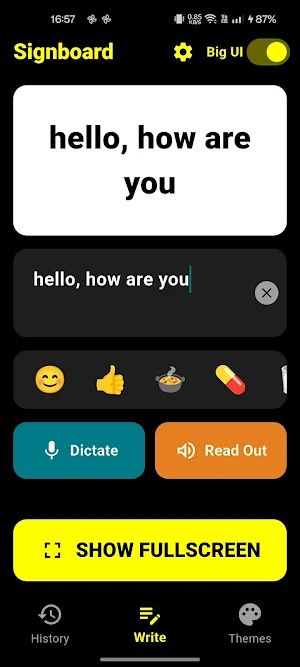
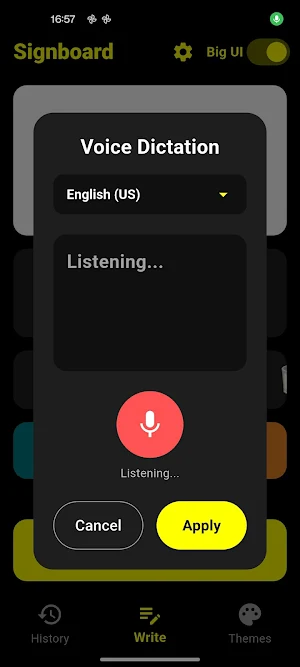
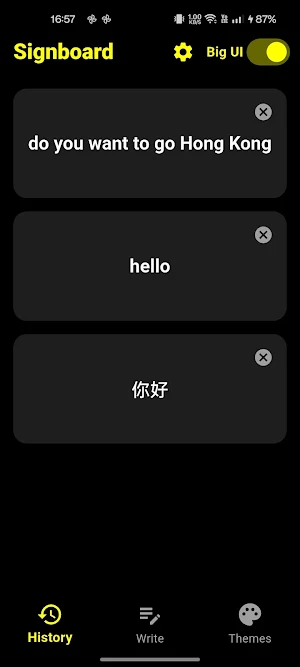
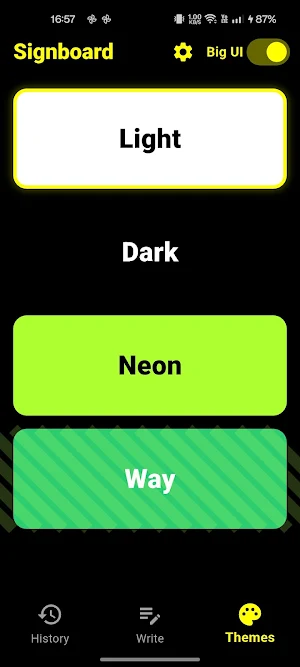
About Easy Signboard: ElderSign
Transform your phone into a high-visibility digital signboard. Perfect for elders, caregivers, and quick communication without straining your voice!
Need to communicate across a quiet room, a noisy car, or help someone with hearing difficulties? ElderSign makes it effortless. Type your message or speak directly into the app, and see your words transform into massive, crystal-clear text that anyone can read from afar.
Designed with an ultra-accessible "Big UI" mode, this app removes all the clutter so seniors and caregivers can use it with absolute confidence.
🌟 KEY FEATURES DESIGNED FOR ACCESSIBILITY:
Massive Fullscreen Text: Double-tap to turn your screen into a giant text banner. Perfect for ordering food, showing a quick message, or calling for assistance.
Easy Voice Dictation: Don't want to type? Tap the microphone and just speak. Supports over 30 global languages to instantly turn your voice into large print.
Read Out Loud (Text-to-Speech): Let the app speak for you. Ideal for individuals with speech difficulties or voice fatigue.
Elder-Friendly "Big UI" Mode: Toggle a giant user interface with extra-large buttons and high-contrast text that is easy to see and tap.
Quick Emoji Shortcuts: Instantly add helpful everyday icons like 🍲 (Food), 💊 (Medicine), 🥛 (Water), or 🚨 (Alert) with a single tap.
Blinking & Scrolling Modes: Grab attention quickly by flashing the text or letting it scroll smoothly across the screen.
Mirror Mode: Perfect for drivers or front-seat passengers to show clear messages to cars behind or ahead through mirrors.
Keep Screen Awake: Your signboard stays bright and active for as long as you need it without dimming or locking automatically.
Message History: Tap on previously saved messages to show them again instantly—no retyping required!
🩹 WHO IS THIS APP FOR?
Seniors & Elders looking for an easy-to-read interface that responds to voice commands.
Caregivers & Family Members communicating with loved ones who are hard of hearing.
Individuals with speech difficulties or recovering from medical procedures who need a visual voice.
Everyday users who need a bright, high-visibility digital banner at airports, restaurants, taxis, or noisy events.
ElderSign is completely free from distracting mock setups—just clean, reliable, and straightforward communication when you need it most.
Download ElderSign: Easy Signboard today and make your voice seen!
Need to communicate across a quiet room, a noisy car, or help someone with hearing difficulties? ElderSign makes it effortless. Type your message or speak directly into the app, and see your words transform into massive, crystal-clear text that anyone can read from afar.
Designed with an ultra-accessible "Big UI" mode, this app removes all the clutter so seniors and caregivers can use it with absolute confidence.
🌟 KEY FEATURES DESIGNED FOR ACCESSIBILITY:
Massive Fullscreen Text: Double-tap to turn your screen into a giant text banner. Perfect for ordering food, showing a quick message, or calling for assistance.
Easy Voice Dictation: Don't want to type? Tap the microphone and just speak. Supports over 30 global languages to instantly turn your voice into large print.
Read Out Loud (Text-to-Speech): Let the app speak for you. Ideal for individuals with speech difficulties or voice fatigue.
Elder-Friendly "Big UI" Mode: Toggle a giant user interface with extra-large buttons and high-contrast text that is easy to see and tap.
Quick Emoji Shortcuts: Instantly add helpful everyday icons like 🍲 (Food), 💊 (Medicine), 🥛 (Water), or 🚨 (Alert) with a single tap.
Blinking & Scrolling Modes: Grab attention quickly by flashing the text or letting it scroll smoothly across the screen.
Mirror Mode: Perfect for drivers or front-seat passengers to show clear messages to cars behind or ahead through mirrors.
Keep Screen Awake: Your signboard stays bright and active for as long as you need it without dimming or locking automatically.
Message History: Tap on previously saved messages to show them again instantly—no retyping required!
🩹 WHO IS THIS APP FOR?
Seniors & Elders looking for an easy-to-read interface that responds to voice commands.
Caregivers & Family Members communicating with loved ones who are hard of hearing.
Individuals with speech difficulties or recovering from medical procedures who need a visual voice.
Everyday users who need a bright, high-visibility digital banner at airports, restaurants, taxis, or noisy events.
ElderSign is completely free from distracting mock setups—just clean, reliable, and straightforward communication when you need it most.
Download ElderSign: Easy Signboard today and make your voice seen!
What’s new
Version 1.9.998 · Updated September 22, 2026
Added (20-locale UI + Auto, voice Auto-first + ur-PK, 4 free contrast themes, Settings pickers, console copy), Changed (voice default auto, plan rewrite), Fixed (auto-mismatch), plus honest TODOs (EN-only leftovers, broken widget test, dead share code, premium placeholder).
Alternatives to Easy Signboard: ElderSign
Looking for apps like Easy Signboard: ElderSign? Here are 4 similar Android apps on Google Play. The highest rated is Chaos Audio: Effects & Amp AI (4.2/5), and all 4 are free to download.


| App | Rating | Price | Installs | Last updated | Compare |
|---|---|---|---|---|---|
| Easy Signboard: ElderSign | – | Free | 10+ | Sep 22, 2026 | |
| Syd | – | Free | 1,000+ | Oct 2, 2026 | Compare |
| HiNotes by HiDock | 3.8 / 5 | Free | 10,000+ | Sep 24, 2026 | Compare |
| Chaos Audio: Effects & Amp AI | 4.2 / 5 | Free | 1,000+ | Sep 25, 2026 | Compare |
| SCRIBZEE® | 2.8 / 5 | Free | 1,000,000+ | Oct 20, 2026 | Compare |