

Weekly Task Planner
Productivity
Weekly task planner, divides one month into 4 weeks, with log and sticky notes.
- Downloads
- 50+
- on Google Play
- Price
- Free
- No in-app purchases
- Updated
- Aug 8
- 2023 · v1.0
Screenshots
About Weekly Task Planner
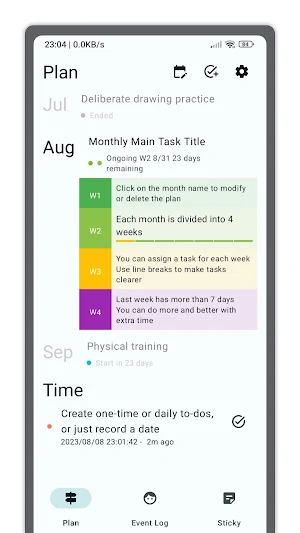
Weekly Task Planner is a simple task planner, especially suitable for people with goal-driven actions, to help create weekly or monthly plans or tasks, such as learning skills, deliberate practice items, habit formation, project planning, etc. . The Weekly Task Planner itself also plans in weekly tasks and guides developers to complete it.
Weekly task planner supports the following features:
1. Weekly or monthly task planner;
2. One-time to-do tasks and daily recurring to-do tasks;
3. An event log or diary;
4. Sticky notes.
Weekly task planner supports dividing the month into 4 weeks, each week has a progress indicator, usually a week is defined as 7 days, in most cases the 4th week is longer than 7 days, you can use the extra time to complete before unfinished tasks, or doing more, or doing something better, can of course also be used for rest.
The Weekly Task Planner supports the creation of additional to-do tasks. To-do tasks can only record a date, or be one-time, or a daily cycle.
The daily cycle of tasks can record the number of times completed, which is suitable for recording some matters that require long-term persistence, such as deliberate practice.
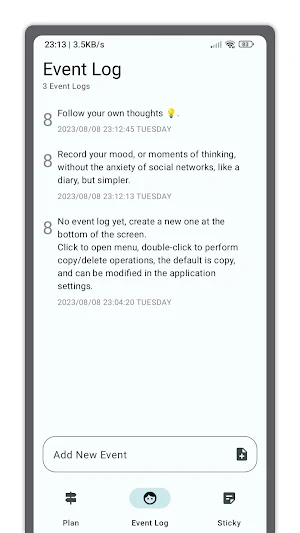
The event log is used to record some items that need to be remembered, or the key nodes of something. You can also use it as a diary, or an offline social networking feed.
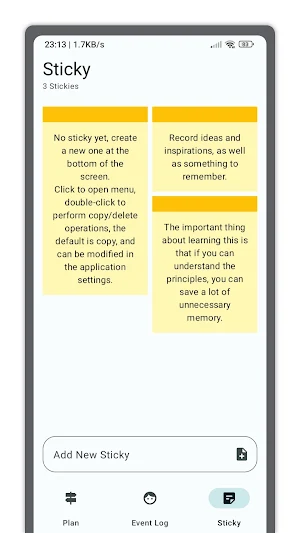
Sticky notes are used to record trivial information or sudden inspiration.
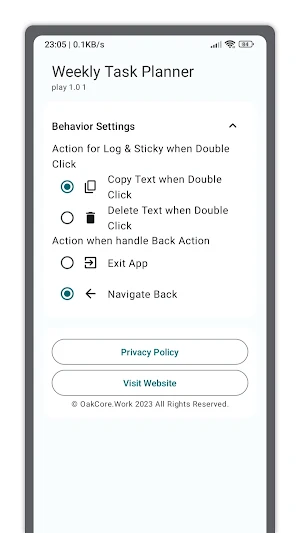
Both event logs and sticky notes support double-click shortcut operations. The default is to copy the text content, and it can also be set to delete, which needs to be changed in the application settings.
Weekly task planner supports the following features:
1. Weekly or monthly task planner;
2. One-time to-do tasks and daily recurring to-do tasks;
3. An event log or diary;
4. Sticky notes.
Weekly task planner supports dividing the month into 4 weeks, each week has a progress indicator, usually a week is defined as 7 days, in most cases the 4th week is longer than 7 days, you can use the extra time to complete before unfinished tasks, or doing more, or doing something better, can of course also be used for rest.
The Weekly Task Planner supports the creation of additional to-do tasks. To-do tasks can only record a date, or be one-time, or a daily cycle.
The daily cycle of tasks can record the number of times completed, which is suitable for recording some matters that require long-term persistence, such as deliberate practice.
The event log is used to record some items that need to be remembered, or the key nodes of something. You can also use it as a diary, or an offline social networking feed.
Sticky notes are used to record trivial information or sudden inspiration.
Both event logs and sticky notes support double-click shortcut operations. The default is to copy the text content, and it can also be set to delete, which needs to be changed in the application settings.
What’s new
Version 1.0 · Updated August 8, 2023
The first version of Weekly Task Planner, supports weekly or monthly task planners, as well as event logs and sticky notes.
Alternatives to Weekly Task Planner
Looking for apps like Weekly Task Planner? Here are 3 similar Android apps on Google Play. All of them are free to download.



| App | Rating | Price | Installs | Last updated | Compare |
|---|---|---|---|---|---|
| Weekly Task Planner | – | Free | 50+ | Aug 8, 2023 | |
| Live Wallpaper Picker | – | Free | 1,000+ | Oct 1, 2023 | Compare |
| Blue Dynamic Live Wallpaper | – | Free | 10+ | Dec 4, 2023 | Compare |
| Painter Gallery - Color Value | – | Free | 100+ | Jul 8, 2023 | Compare |