

PayNote – Offline Expense Log
Finance In-app purchases
Type the amount, tap a category, done. Budgets and stats. Offline, no account.
- Downloads
- 36+
- on Google Play
- Price
- Free
- In-app purchases
- Updated
- Sep 14
- 2026 · v1.0.0
Screenshots


About PayNote – Offline Expense Log
Tap. Pick. Done.
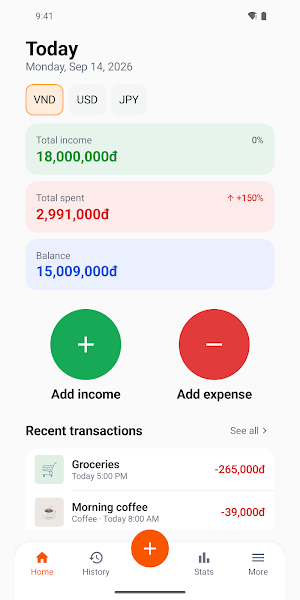
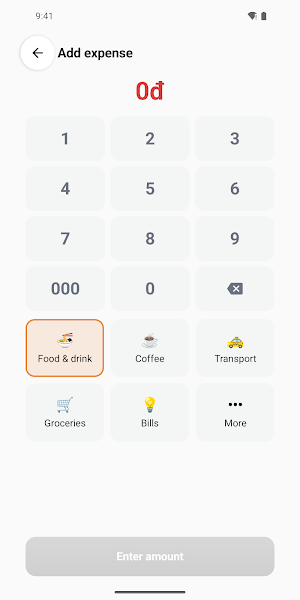
PayNote is a personal expense book that stays on your phone. Open the app, type the amount on the number pad, tap a category tile — and the expense is in your book, on the right day, under the right heading, for the right amount. A few seconds, and nothing is required except the amount.
Nothing to remember and enter tonight. No spreadsheet to open.
EVERYTHING STAYS ON YOUR PHONE
PayNote works fully offline. No sign-up, no login, no account, no server holding your spending history. It never asks to read your messages, never reads bank notifications, and is connected to no bank or e-wallet — so nobody, us included, can see your account.
To move to a new phone or keep a spare copy, export a backup file to Google Drive, a memory card or anywhere you like. The file is encrypted and can carry a password, so a copy that ends up in someone else's hands is unreadable. The format is identical on iOS, so moving between the two platforms restores your whole book.
QUICK ENTRY
• Add income and Add expense right on the home screen and on the home-screen widget
• A dedicated number keypad with a 000 key, built for one thumb
• 15 default categories with icons; rename them, change the icon, add your own
• Made a mistake? Edit the entry — the app keeps a history of the change
• A daily reminder at the time you choose, scheduled entirely on the phone
AN EXPENSE BOOK THAT STAYS SIMPLE
• The home screen shows this month's income, spending and balance, with recent entries
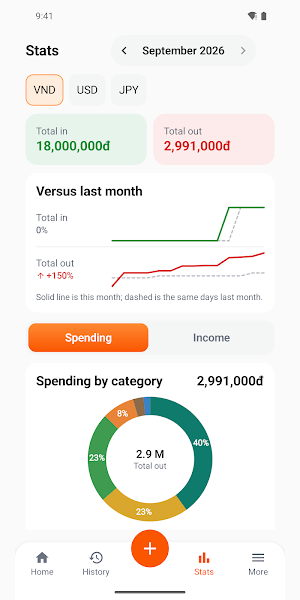
• Monthly statistics: spending by category, income against spending, one tap to switch months
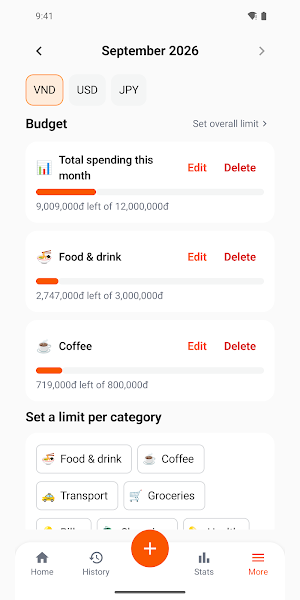
• Spending limits for the month and for each category, with a warning before you go over
• Several wallets — cash, bank, e-wallet — each with its own balance
• 20 currencies: VND, USD, JPY, EUR… one per wallet, switched right on the home screen
• Search your history, accent-insensitive
• Vietnamese, English and Japanese interface, amounts formatted the way each language reads them
BASIC AND PRO
PayNote has no ads, in the free version and the paid one alike.
Basic is free and is a complete expense book: unlimited entries, categories, history, monthly statistics, budgets including per-category limits, the widget, the daily reminder, 2 wallets, and CSV export that opens in Excel or Google Sheets.
PayNote PRO is a one-time purchase, yours forever — not a subscription, nothing auto-renews. PRO adds unlimited wallets so cash and each bank keep their own balance, month-on-month and six-month trend reports, password-protected encrypted backup and full restore, and categorisation that learns from what you log. A 7-day trial is included, no card required.
PayNote is a personal expense book that stays on your phone. Open the app, type the amount on the number pad, tap a category tile — and the expense is in your book, on the right day, under the right heading, for the right amount. A few seconds, and nothing is required except the amount.
Nothing to remember and enter tonight. No spreadsheet to open.
EVERYTHING STAYS ON YOUR PHONE
PayNote works fully offline. No sign-up, no login, no account, no server holding your spending history. It never asks to read your messages, never reads bank notifications, and is connected to no bank or e-wallet — so nobody, us included, can see your account.
To move to a new phone or keep a spare copy, export a backup file to Google Drive, a memory card or anywhere you like. The file is encrypted and can carry a password, so a copy that ends up in someone else's hands is unreadable. The format is identical on iOS, so moving between the two platforms restores your whole book.
QUICK ENTRY
• Add income and Add expense right on the home screen and on the home-screen widget
• A dedicated number keypad with a 000 key, built for one thumb
• 15 default categories with icons; rename them, change the icon, add your own
• Made a mistake? Edit the entry — the app keeps a history of the change
• A daily reminder at the time you choose, scheduled entirely on the phone
AN EXPENSE BOOK THAT STAYS SIMPLE
• The home screen shows this month's income, spending and balance, with recent entries
• Monthly statistics: spending by category, income against spending, one tap to switch months
• Spending limits for the month and for each category, with a warning before you go over
• Several wallets — cash, bank, e-wallet — each with its own balance
• 20 currencies: VND, USD, JPY, EUR… one per wallet, switched right on the home screen
• Search your history, accent-insensitive
• Vietnamese, English and Japanese interface, amounts formatted the way each language reads them
BASIC AND PRO
PayNote has no ads, in the free version and the paid one alike.
Basic is free and is a complete expense book: unlimited entries, categories, history, monthly statistics, budgets including per-category limits, the widget, the daily reminder, 2 wallets, and CSV export that opens in Excel or Google Sheets.
PayNote PRO is a one-time purchase, yours forever — not a subscription, nothing auto-renews. PRO adds unlimited wallets so cash and each bank keep their own balance, month-on-month and six-month trend reports, password-protected encrypted backup and full restore, and categorisation that learns from what you log. A 7-day trial is included, no card required.
What’s new
Version 1.0.0 · Updated September 14, 2026
First release. • Log an entry in seconds: type the amount, tap a category, Save • Monthly statistics, plus per-category spending limits • Several wallets, 20 currencies, a home-screen widget and a daily reminder • Encrypted backup file that also restores on iPhone
Alternatives to PayNote – Offline Expense Log
Looking for apps like PayNote – Offline Expense Log? Here are 4 similar Android apps on Google Play. All of them are free to download.




| App | Rating | Price | Installs | Last updated | Compare |
|---|---|---|---|---|---|
| PayNote – Offline Expense Log | – | Free | 10+ | Sep 14, 2026 | |
| BackHere: Save Parking Spot | – | Free | 1+ | Sep 2, 2026 | Compare |
| TimePhoto: Timestamp Camera | – | Free | 100+ | Sep 7, 2026 | Compare |
| Z-Pets | – | Free | 5+ | Aug 17, 2026 | Compare |
| Z-Cloud Workspace | – | Free | 10+ | Aug 28, 2026 | Compare |