
CastBrowser TV Cast Receiver
RotundaApps Video Players & Editors
Receive web videos and live streams from your phone on Android TV and Google TV
- Downloads
- 4.3K+
- on Google Play
- Price
- Free
- No in-app purchases
- Updated
- Aug 27
- 2026 · v1.0.7
Screenshots
About CastBrowser TV Cast Receiver
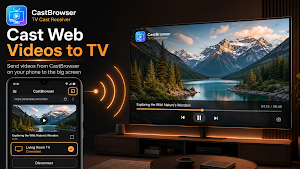
CastBrowser TV Cast Receiver turns your Android TV or Google TV into the big-screen receiver for the CastBrowser mobile app. Send web videos, online videos, and live streams from your phone to your TV over Wi-Fi.
This is the TV companion for CastBrowser. Install the mobile app on your phone or tablet first, then use this receiver to connect your devices and play media on the big screen.
How to use
1. Install CastBrowser mobile app on your phone or tablet.
2. Install this receiver on your Android TV, Google TV, or Android TV box.
3. Connect both devices to the same Wi-Fi network or hotspot.
4. Open CastBrowser on your phone, select this TV, approve the connection, and start casting.
Key features
- TV cast receiver: Receive web videos from your phone and watch them on the big screen.
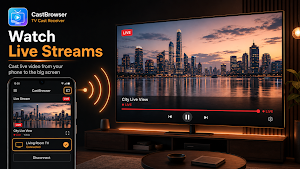
- Live stream playback: Play supported HLS, DASH, MP4, and other common web streams.
- Simple pairing: Find your phone automatically on the local network or enter the 3-character connection code.
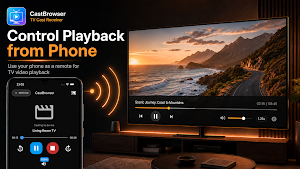
- Phone controls: Play, pause, seek, adjust volume, stop playback, or change speed from your phone.
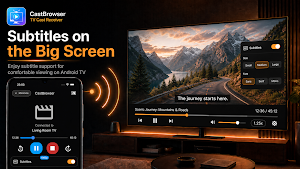
- Subtitle support: Add subtitles and adjust subtitle size or font for easier viewing.
- Stable playback: The receiver service helps keep the phone connection and media session active.
- Built for Android TV: Designed for TV remotes, Google TV devices, and Android TV boxes.
Perfect for
- Watching web videos, tutorials, and online movies on your TV.
- Streaming live news, sports, events, and other live video links.
- Playing long videos from your phone without holding a small screen.
- Using subtitles for web videos and live streams on a larger display.
Compatibility
This receiver works with Android TV, Google TV, and Android TV boxes that can install apps from Google Play. The receiver and phone app must be on the same Wi-Fi network or hotspot.
This app does not replace the CastBrowser mobile app. It lets your TV accept video, live stream, subtitle, and playback control commands from CastBrowser on your phone.
Install this receiver to start casting web videos from your phone to your TV.
This is the TV companion for CastBrowser. Install the mobile app on your phone or tablet first, then use this receiver to connect your devices and play media on the big screen.
How to use
1. Install CastBrowser mobile app on your phone or tablet.
2. Install this receiver on your Android TV, Google TV, or Android TV box.
3. Connect both devices to the same Wi-Fi network or hotspot.
4. Open CastBrowser on your phone, select this TV, approve the connection, and start casting.
Key features
- TV cast receiver: Receive web videos from your phone and watch them on the big screen.
- Live stream playback: Play supported HLS, DASH, MP4, and other common web streams.
- Simple pairing: Find your phone automatically on the local network or enter the 3-character connection code.
- Phone controls: Play, pause, seek, adjust volume, stop playback, or change speed from your phone.
- Subtitle support: Add subtitles and adjust subtitle size or font for easier viewing.
- Stable playback: The receiver service helps keep the phone connection and media session active.
- Built for Android TV: Designed for TV remotes, Google TV devices, and Android TV boxes.
Perfect for
- Watching web videos, tutorials, and online movies on your TV.
- Streaming live news, sports, events, and other live video links.
- Playing long videos from your phone without holding a small screen.
- Using subtitles for web videos and live streams on a larger display.
Compatibility
This receiver works with Android TV, Google TV, and Android TV boxes that can install apps from Google Play. The receiver and phone app must be on the same Wi-Fi network or hotspot.
This app does not replace the CastBrowser mobile app. It lets your TV accept video, live stream, subtitle, and playback control commands from CastBrowser on your phone.
Install this receiver to start casting web videos from your phone to your TV.
What’s new
Version 1.0.7 · Updated August 27, 2026
✅ Bug fixes and performance improvements.
Alternatives to CastBrowser TV Cast Receiver
Looking for apps like CastBrowser TV Cast Receiver? Here are 6 similar Android apps on Google Play. The highest rated is Made4 - Fitness & Running (4.7/5), and all 6 are free to download.
-
IZZY TV 4.2
-
Yippee TV: Christian Movies 4.4
-
NSCA TV
-
RTÉ Player 4.2
-
TiviMate IPTV Player 4.0
-
Made4 - Fitness & Running 4.7
| App | Rating | Price | Installs | Last updated | Compare |
|---|---|---|---|---|---|
| CastBrowser TV Cast Receiver | – | Free | 1,000+ | Aug 27, 2026 | |
| IZZY TV | 4.2 / 5 | Free | 100,000+ | – | Compare |
| Yippee TV: Christian Movies | 4.4 / 5 | Free | 500,000+ | Sep 18, 2026 | Compare |
| NSCA TV | – | Free | 10,000+ | Sep 22, 2026 | Compare |
| RTÉ Player | 4.2 / 5 | Free | 1,000,000+ | Oct 20, 2026 | Compare |
| TiviMate IPTV Player | 4.0 / 5 | Free | 5,000,000+ | Jun 22, 2026 | Compare |
| Made4 - Fitness & Running | 4.7 / 5 | Free | 5,000+ | Oct 20, 2026 | Compare |
Similar apps on Google Play
- IZZY TV
- Yippee TV: Christian Movies
- NSCA TV
- RTÉ Player
- TiviMate IPTV Player
- Made4 - Fitness & Running
- Yoto: Music, Stories, Sleep
- Movafit — Workout Plans & AI
- Centr: Personal Fitness App
- TV Bro
- Wahoo: Ride, Run, Train
- rova – radio, music, podcasts
- Dr. Dish Player
- Linksys
- Send files to TV
- InBrowser - Incognito Browsing
- Kinomap: Ride Run Row Indoor