
Smart Resume Maker: CV Builder
Productivity Contains ads
Create professional resumes and AI-powered CVs with Smart Resume Maker.
- Downloads
- 912+
- on Google Play
- Price
- Free
- No in-app purchases
- Updated
- Dec 16
- 2025 · v1.2
Screenshots
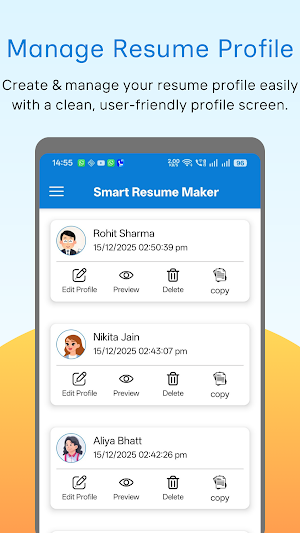
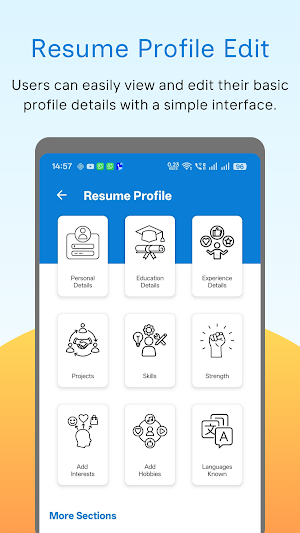


About Smart Resume Maker: CV Builder
⭐ Smart Resume Maker: CV Builder – Create Professional Resumes, CVs & Biodata Easily
Smart Resume Maker: CV Builder is a simple and efficient app that helps students, freshers, job seekers, and professionals create clean and well-structured resumes, CVs, and biodata. The app is designed to make resume creation easy for beginners while still offering flexibility for users who want a detailed or multi-page document.
Whether you are preparing for a job interview, internship, campus placement, academic application, or professional submission, this resume builder provides a clear layout and guided sections to help you organize your information effectively.
Create different types of documents, including:
Professional resumes
Modern CVs
Biodata for job or personal use
Internship CVs
Academic resumes and project profiles
Portfolio-style documents
Fresher resumes
Multi-page CVs for experienced professionals
🔥 Key Features
✔ Professional Resume Templates
Choose from simple, modern, and professional templates suitable for different resume styles and formatting preferences.
✔ PDF Export
Download your resume or CV as a high-quality PDF that can be shared, printed, or uploaded to job portals and academic platforms.
✔ Guided Resume Builder
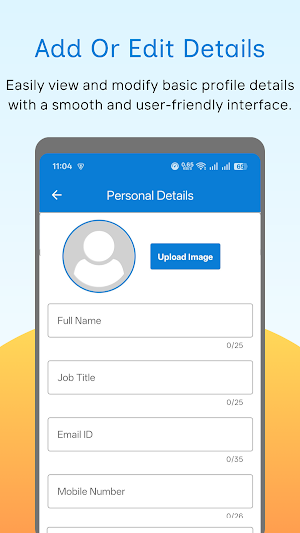
Enter details step-by-step, including personal information, education, skills, work experience, and a profile summary. The app organizes everything into a clean layout.
✔ Optional Photo Section
Add a profile photograph if required based on regional or employer preferences. This feature is optional to support different resume formats.
✔ Biodata & Portfolio Maker
Create structured biodata and basic portfolio documents commonly used for academic submissions, job applications, or personal requirements.
✔ Multiple Format Styles
Supports one-page and multi-page resumes, different CV formats, and structured layouts suitable for various professional or academic needs.
👤 Who Can Use This App?
This app is useful for:
Students preparing resumes for internships and placements
Freshers creating their first CV
Professionals updating resumes for career growth
Freelancers creating project-based CVs
Job seekers preparing for interviews
Academicians preparing qualification-based CVs
Applicants creating resumes for certifications, scholarships, or academic programs
Users creating biodata for formal or personal purposes
🎯 Why Choose Smart Resume Maker: CV Builder?
Easy-to-use interface for beginners and professionals
Clean and readable resume layouts
Organized and structured document formatting
Auto-save functionality for quick editing and updates
Works smoothly on most Android devices
No account or login required
🎯 Key Advantages
Simple and intuitive design
Professionally structured templates
Templates follow standard resume formatting guidelines
Organized sections for clarity and readability
Works well on older or low-end devices
Quick document creation and editing
🔑 Additional Benefits
Compatible with major job portals and HR systems
Supports clear and structured resume formats
Useful for academic, professional, or personal documentation
Users can create and save resumes without internet access
📩 Feedback & Support
We value your suggestions and feedback.
If you need help or want to share ideas for improvement, contact us anytime:
📧 [email protected]
Smart Resume Maker: CV Builder is a simple and efficient app that helps students, freshers, job seekers, and professionals create clean and well-structured resumes, CVs, and biodata. The app is designed to make resume creation easy for beginners while still offering flexibility for users who want a detailed or multi-page document.
Whether you are preparing for a job interview, internship, campus placement, academic application, or professional submission, this resume builder provides a clear layout and guided sections to help you organize your information effectively.
Create different types of documents, including:
Professional resumes
Modern CVs
Biodata for job or personal use
Internship CVs
Academic resumes and project profiles
Portfolio-style documents
Fresher resumes
Multi-page CVs for experienced professionals
🔥 Key Features
✔ Professional Resume Templates
Choose from simple, modern, and professional templates suitable for different resume styles and formatting preferences.
✔ PDF Export
Download your resume or CV as a high-quality PDF that can be shared, printed, or uploaded to job portals and academic platforms.
✔ Guided Resume Builder
Enter details step-by-step, including personal information, education, skills, work experience, and a profile summary. The app organizes everything into a clean layout.
✔ Optional Photo Section
Add a profile photograph if required based on regional or employer preferences. This feature is optional to support different resume formats.
✔ Biodata & Portfolio Maker
Create structured biodata and basic portfolio documents commonly used for academic submissions, job applications, or personal requirements.
✔ Multiple Format Styles
Supports one-page and multi-page resumes, different CV formats, and structured layouts suitable for various professional or academic needs.
👤 Who Can Use This App?
This app is useful for:
Students preparing resumes for internships and placements
Freshers creating their first CV
Professionals updating resumes for career growth
Freelancers creating project-based CVs
Job seekers preparing for interviews
Academicians preparing qualification-based CVs
Applicants creating resumes for certifications, scholarships, or academic programs
Users creating biodata for formal or personal purposes
🎯 Why Choose Smart Resume Maker: CV Builder?
Easy-to-use interface for beginners and professionals
Clean and readable resume layouts
Organized and structured document formatting
Auto-save functionality for quick editing and updates
Works smoothly on most Android devices
No account or login required
🎯 Key Advantages
Simple and intuitive design
Professionally structured templates
Templates follow standard resume formatting guidelines
Organized sections for clarity and readability
Works well on older or low-end devices
Quick document creation and editing
🔑 Additional Benefits
Compatible with major job portals and HR systems
Supports clear and structured resume formats
Useful for academic, professional, or personal documentation
Users can create and save resumes without internet access
📩 Feedback & Support
We value your suggestions and feedback.
If you need help or want to share ideas for improvement, contact us anytime:
📧 [email protected]
What’s new
Version 1.2 · Updated December 16, 2025
🧾 First release of the app! 🎨 Create professional, modern resumes and CVs with ease. ✏️ Edit sections like personal info, education, experience, skills, and more. 📥 Export your resume to PDF instantly.
User reviews

nice

Best resume builder app I've used. Templates are on point and easy to customize.

> Great resume builder for freshers. Many good design options included. Easy download and sharing feature. Nice and practical app.

> Excellent tool for making resumes quickly. Multiple templates to choose from. Easy to download and share CVs. Highly recommended for students.

the smart resume app really helping members...I like this..

Superb resume app 👌
Alternatives to Smart Resume Maker: CV Builder
Looking for apps like Smart Resume Maker: CV Builder? Here are 2 similar Android apps on Google Play. All of them are free to download.

| App | Rating | Price | Installs | Last updated | Compare |
|---|---|---|---|---|---|
| Smart Resume Maker: CV Builder | – | Free | 500+ | Dec 16, 2025 | |
| Ok Scanner: PDF Scanner App | – | Free | 100,000+ | Feb 28, 2026 | Compare |
| Smart Financial Calculator | – | Free | 100+ | Feb 24, 2026 | Compare |