

IntelityNET
Tools
Manage your devices wherever you are.
- Downloads
- 10+
- on Google Play
- Price
- Free
- No in-app purchases
- Updated
- Aug 12
- 2026 · v2.15
Screenshots


About IntelityNET
About the app
IntelityNET is a smart system for remote control of gates, garages, lights and other dedicated electronic devices.
With simple connection and intuitive interface, it gives you full control over your facility, anywhere and anytime.
Adding a device
Installation and connection are extremely simple:
- Turn the device on
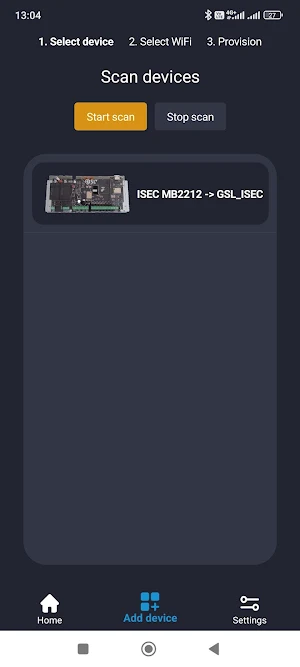
- Select "Add Device" in the application
- Turn on Bluetooth and connect with one touch
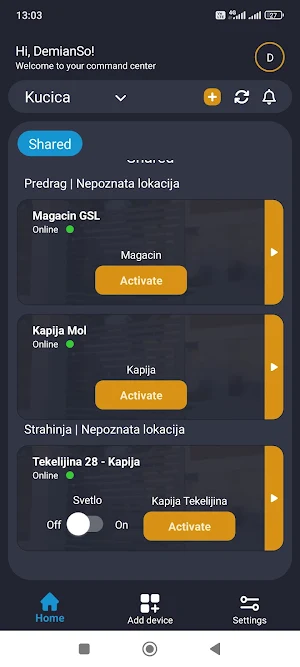
After that, the device automatically appears on the home screen, ready to use.
Modes of operation and control
IntelityNET devices support various relay modes and opening pulses, such as:
- Impulse / Permanent Unlock
- Impulse / Permanent Lock
- Impulse Time
- Switch Permanently Open
- Switch Permanent Lock
- Switch Time
These modes allow precise control of each output - whether it's a gate, garage, light or other device.
Activity and history
Each device has its own History and Activity log, where every action and execution time is recorded.
Only admin users have insight into the usage history and can track who and when used which device.
Users and permissions
There are two roles in the system:
Owner - the user who first connected and created the device.
He has the highest rights in the system: he can delete other admins, edit all device settings and, if necessary, transfer ownership to another user.
- Admin – can add and delete users, assign them rights and monitor activities
- User – has access to the devices assigned to him by the admin
Adding users is simple: long press on the desired device → Device Users → enter e-mail address and assign permissions.
Each user can rename the device assigned to him, and all devices to which he has access appear in a special "Shared" tab.
The devices that the user adds themselves are in their personal categories that they name themselves.
Advantages of the IntelityNET system:
- Quick installation and simple connection
- Multiple relay and pulse modes for advanced control
- Detailed activity history of each device
- Precise control of user rights (Owner, Admin, User)
- Secure and encrypted communication between the device and the application
- Designed for homes, commercial spaces and automated systems
IntelityNET - Smart control. Wherever you are
IntelityNET is a smart system for remote control of gates, garages, lights and other dedicated electronic devices.
With simple connection and intuitive interface, it gives you full control over your facility, anywhere and anytime.
Adding a device
Installation and connection are extremely simple:
- Turn the device on
- Select "Add Device" in the application
- Turn on Bluetooth and connect with one touch
After that, the device automatically appears on the home screen, ready to use.
Modes of operation and control
IntelityNET devices support various relay modes and opening pulses, such as:
- Impulse / Permanent Unlock
- Impulse / Permanent Lock
- Impulse Time
- Switch Permanently Open
- Switch Permanent Lock
- Switch Time
These modes allow precise control of each output - whether it's a gate, garage, light or other device.
Activity and history
Each device has its own History and Activity log, where every action and execution time is recorded.
Only admin users have insight into the usage history and can track who and when used which device.
Users and permissions
There are two roles in the system:
Owner - the user who first connected and created the device.
He has the highest rights in the system: he can delete other admins, edit all device settings and, if necessary, transfer ownership to another user.
- Admin – can add and delete users, assign them rights and monitor activities
- User – has access to the devices assigned to him by the admin
Adding users is simple: long press on the desired device → Device Users → enter e-mail address and assign permissions.
Each user can rename the device assigned to him, and all devices to which he has access appear in a special "Shared" tab.
The devices that the user adds themselves are in their personal categories that they name themselves.
Advantages of the IntelityNET system:
- Quick installation and simple connection
- Multiple relay and pulse modes for advanced control
- Detailed activity history of each device
- Precise control of user rights (Owner, Admin, User)
- Secure and encrypted communication between the device and the application
- Designed for homes, commercial spaces and automated systems
IntelityNET - Smart control. Wherever you are
What’s new
Version 2.15 · Updated August 12, 2026
Nova funkcionalnost u aplikaciji -> Konfigurisanje GSL BLE uređaja Trenutno podržan uređaj GSL WiFi2Eth
Alternatives to IntelityNET
Looking for apps like IntelityNET? Here are 6 similar Android apps on Google Play. 5 of the 6 are free to download.




| App | Rating | Price | Installs | Last updated | Compare |
|---|---|---|---|---|---|
| IntelityNET | – | Free | 10+ | Aug 12, 2026 | |
| BailacFCP | – | Free | 500+ | – | Compare |
| Pure-QR | – | 0.99 USD | 10+ | Apr 12, 2026 | Compare |
| HomeGrid Monitor: INV & BMS | – | Free | 500+ | – | Compare |
| Vigilum | – | Free | 50+ | – | Compare |
| SimplyNet: LAN & WiFi Scanner | – | Free | 10+ | Sep 4, 2026 | Compare |
| Meu_QR | – | Free | 100+ | – | Compare |
Compare IntelityNET with the top alternatives: ratings, updates, ASO score and keyword gaps →
Similar apps on Google Play
- BailacFCP
- Pure-QR
- HomeGrid Monitor: INV & BMS
- Vigilum
- SimplyNet: LAN & WiFi Scanner
- Meu_QR
- All Email - Easy Mail & Secure
- Notifly: Push Notifications
- SMDUM: Data Usage Monitor
- Guardian for Centauri Carbon
- DailySpend: Expense Tracker
- Great Glutes Now
- LIFE4LV Assistant
- Mixo VPN
- Attendance System by GuestRAR
- Invoice Kit
- Story Saver for Whatsapp
- Auto Reloader & Refresher
- Bruno Brown Interna
- AI Tom Bud
- IQSKey
- V720 Mini Camera App
- Cannector
- yaarwin colour game
- Lottery Results for Powerball