
CourierGo Planer Tras i dostaw
xxup Maps & Navigation In-app purchases
Route planner, Navigation.
- Downloads
- 82+
- on Google Play
- Price
- Free
- In-app purchases
- Updated
- Aug 16
- 2026 · v1.0.9.94
Screenshots
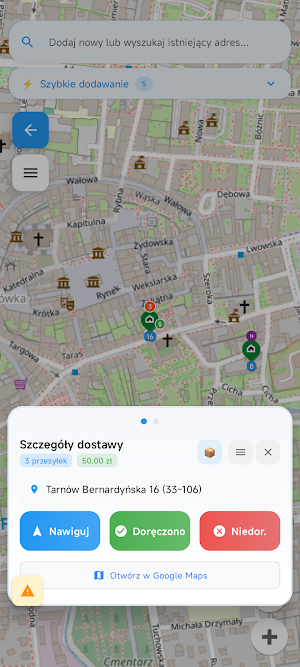


About CourierGo Planer Tras i dostaw
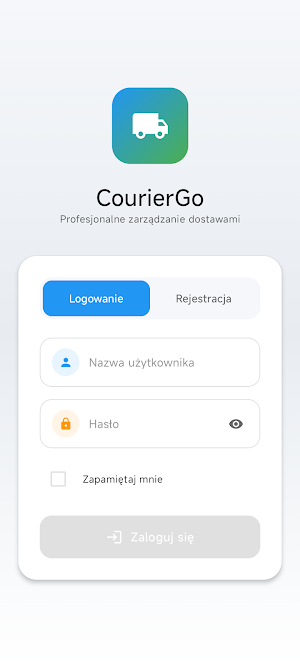
The CourierGo app was created by a long-time courier service provider. My experience allowed me to create a CourierGo app that meets all my needs in one app.
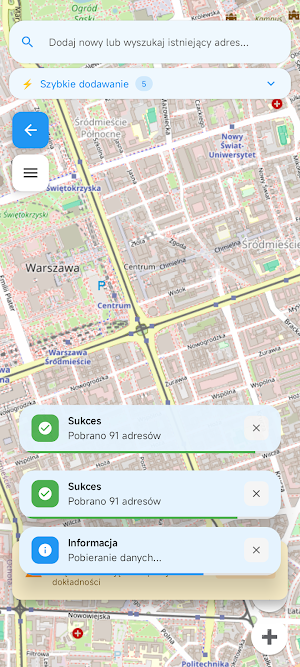
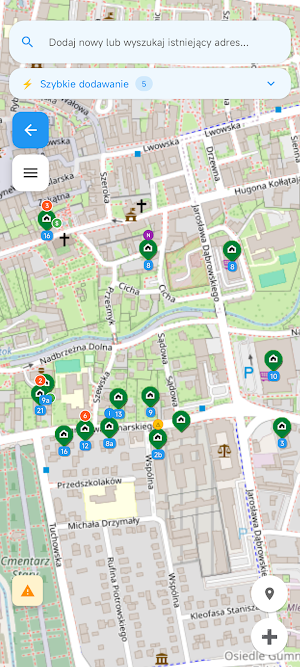
With CourierGo, you have access to an OpenStreetMap map. You can add multiple addresses to the map by searching or manually selecting a point on the map.
A convenient route system allows you to prepare a route for each day.
App features:
- Live user location that automatically refreshes, which is extremely useful when addresses are close to each other.
- Multiple shipment support: you can conveniently select the number of shipments to a given address using the "+" and "-" buttons.
- Ability to set collection fees for each address and each shipment. The total will be displayed when you click on a given address or in the delivery details in navigation mode.
- Notes: allow you to add valuable information to an address.
- Delivery Instructions: Every time you add this address, these instructions will automatically appear, useful when you want to save the gate code, etc.
- Quick Address Addition: You can enable the appropriate option in the app settings, preparing the cities, towns, and street names you serve so you can quickly enter them into the search field. This allows for quick and convenient address addition without tiring your fingers on the keyboard.
If your keyboard supports voice input, you can also enter addresses by voice.
- Built-in navigation will plot the appropriate route and show you the distance you need to travel to the address.
- You can correct the location of any address displayed in the address search engine. Simply add the address, click the delivery marker, and expand the "Correct Location" option. You'll be in the same correct location every time! Don't wait for someone to correct the address for you.
- Alternate addresses: If you know that a given delivery address can be delivered to a different location (e.g., to work), simply add the primary address to your alternative routes and search for or select that point on the map. From now on, every time you enter the primary address in the search engine, a pop-up window will appear allowing you to choose the address you want to deliver to. You can easily restore the original location in the delivery details by expanding the menu and selecting "Restore original location."
- Adding missing addresses: Sometimes the address you want to search for isn't there. So, simply click the "+" icon on the main map, select "Custom," and select the appropriate location on the map. Then, fill in the address details. You'll never have trouble reaching that address again.
You can customize the app to suit your preferences:
- Application language (available languages: Polish, German, English)
- Country where you want address search results to be downloaded (you can select all)
- Convenient display of building numbers under the delivery marker with a zoom level setting
- Quickly add addresses
- Details during navigation
- Automatically selects the nearest delivery points
- Edge markers (Experimental) - If an address is not visible at the current map zoom level, delivery icons will appear on the sides of the map, suggesting their direction.
- Map rotation, which allows you to freely rotate the map (by default, north is always up)
- Automatic map rotation in navigation mode (Experimental)
After adding an address, the app automatically downloads map graphics data around the address, ensuring you always have a detailed map display even with a poor or no internet connection.
Offline Mode: You can use the app in offline mode; synchronization will occur automatically once the internet connection is restored. An internet connection is required to select a route and to add or edit addresses.
With CourierGo, you have access to an OpenStreetMap map. You can add multiple addresses to the map by searching or manually selecting a point on the map.
A convenient route system allows you to prepare a route for each day.
App features:
- Live user location that automatically refreshes, which is extremely useful when addresses are close to each other.
- Multiple shipment support: you can conveniently select the number of shipments to a given address using the "+" and "-" buttons.
- Ability to set collection fees for each address and each shipment. The total will be displayed when you click on a given address or in the delivery details in navigation mode.
- Notes: allow you to add valuable information to an address.
- Delivery Instructions: Every time you add this address, these instructions will automatically appear, useful when you want to save the gate code, etc.
- Quick Address Addition: You can enable the appropriate option in the app settings, preparing the cities, towns, and street names you serve so you can quickly enter them into the search field. This allows for quick and convenient address addition without tiring your fingers on the keyboard.
If your keyboard supports voice input, you can also enter addresses by voice.
- Built-in navigation will plot the appropriate route and show you the distance you need to travel to the address.
- You can correct the location of any address displayed in the address search engine. Simply add the address, click the delivery marker, and expand the "Correct Location" option. You'll be in the same correct location every time! Don't wait for someone to correct the address for you.
- Alternate addresses: If you know that a given delivery address can be delivered to a different location (e.g., to work), simply add the primary address to your alternative routes and search for or select that point on the map. From now on, every time you enter the primary address in the search engine, a pop-up window will appear allowing you to choose the address you want to deliver to. You can easily restore the original location in the delivery details by expanding the menu and selecting "Restore original location."
- Adding missing addresses: Sometimes the address you want to search for isn't there. So, simply click the "+" icon on the main map, select "Custom," and select the appropriate location on the map. Then, fill in the address details. You'll never have trouble reaching that address again.
You can customize the app to suit your preferences:
- Application language (available languages: Polish, German, English)
- Country where you want address search results to be downloaded (you can select all)
- Convenient display of building numbers under the delivery marker with a zoom level setting
- Quickly add addresses
- Details during navigation
- Automatically selects the nearest delivery points
- Edge markers (Experimental) - If an address is not visible at the current map zoom level, delivery icons will appear on the sides of the map, suggesting their direction.
- Map rotation, which allows you to freely rotate the map (by default, north is always up)
- Automatic map rotation in navigation mode (Experimental)
After adding an address, the app automatically downloads map graphics data around the address, ensuring you always have a detailed map display even with a poor or no internet connection.
Offline Mode: You can use the app in offline mode; synchronization will occur automatically once the internet connection is restored. An internet connection is required to select a route and to add or edit addresses.
What’s new
Version 1.0.9.94 · Updated August 16, 2026
Poprawki optymalizacyjne
Alternatives to CourierGo Planer Tras i dostaw
Looking for apps like CourierGo Planer Tras i dostaw? Here are 6 similar Android apps on Google Play. All of them are free to download.



| App | Rating | Price | Installs | Last updated | Compare |
|---|---|---|---|---|---|
| CourierGo Planer Tras i dostaw | – | Free | 50+ | Aug 16, 2026 | |
| Voyco | – | Free | 100+ | – | Compare |
| Haulers Haven | – | Free | 10+ | – | Compare |
| GateWay | – | Free | 100+ | Jun 6, 2026 | Compare |
| My Mart Rider | – | Free | 50+ | – | Compare |
| BlueBaħar | – | Free | 1,000+ | Oct 19, 2026 | Compare |
| PlotLot | – | Free | 50+ | Aug 8, 2026 | Compare |
Similar apps on Google Play
- Voyco
- Haulers Haven
- GateWay
- My Mart Rider
- BlueBaħar
- PlotLot
- TekGo
- LibaGoo
- bizi places
- My Finds - Metal Detecting
- Advance Track System
- Oolel Maps
- Bid Mailers
- ArxSilex MapTools
- TruxSpot: Truck Parking App
- myCoMoly
- RailOne: World Railway Map
- MyBoletus
- Via
- FleetHub Driver
- Taxi Brouwer
- martin
- Andeshandbook
- San Jose Bus App
- Transporte Durango Mi Bus