

Unicorn Photo Editor
Photography In-app purchases Contains ads
Unicorn Photo Editor - add effects, filteres and make a beautiful photo!
- Rating
- 4.0
- 2.7K ratings
- Downloads
- 500K+
- on Google Play
- Price
- Free
- In-app purchases
- Updated
- Jun 30
- 2020 · v1.10.1
Screenshots
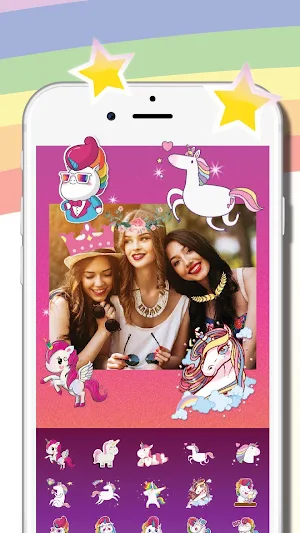
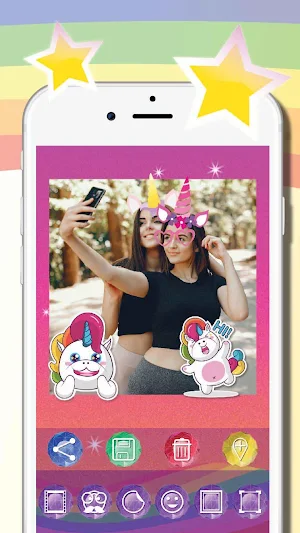
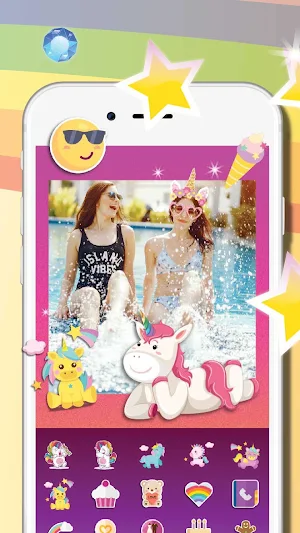
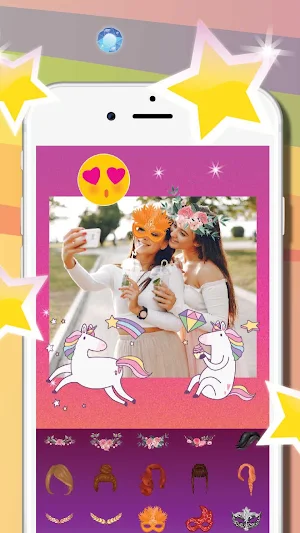


About Unicorn Photo Editor
★ Comprehensive and powerful photo editor
★★ Many effects, filters, frames and emojis
★★★ Perfect for everyone – simply & intuitive
Unicorn Photo Editor is a free, simple app to create beautiful and amazing photos with stickers, frames, and emojis. You can transform photos with just one tap of a finger! Add filters and cropp a photo. Share a picture with your friends on your favourite social network!
Unicorn Photo Editor has a very intuitive layout – it’s easy to use for each person. Use effects and filters to make your photo even more interesting. Add glasses, hairstyle, funny hats, bunny ears and more!
Features in Unicorn Photo Editor:
★ Amazing photo filters
★ Beautiful photo effects and frames
★ Emojis
★ Crop, resize and rotate your photo
★ Share a photo/picture with your friends (Facebook, Instagram, e-mail and other applications)
★ Take a phote, using this application
Why you have to use Unicorn Photo Editor?
★ It’s a very simply to use application
★ Powerful photo editor
★ App is very comprehensive
★ Using it you can quickly edit your photo and you can do it just using your phone!
★ To use this app you don’t need to be a professional
★ App contains many frames, stickers, emojis, smiles and filters
Important! If you want to delete a sticker – click twice. If you want to rotate it - tap the screen by two fingers, hold it and rotate it freely.
If you have any problems with Unicorn Photo Editor, please - contact us: [email protected].
Designed by Netigen / Freepik
★★ Many effects, filters, frames and emojis
★★★ Perfect for everyone – simply & intuitive
Unicorn Photo Editor is a free, simple app to create beautiful and amazing photos with stickers, frames, and emojis. You can transform photos with just one tap of a finger! Add filters and cropp a photo. Share a picture with your friends on your favourite social network!
Unicorn Photo Editor has a very intuitive layout – it’s easy to use for each person. Use effects and filters to make your photo even more interesting. Add glasses, hairstyle, funny hats, bunny ears and more!
Features in Unicorn Photo Editor:
★ Amazing photo filters
★ Beautiful photo effects and frames
★ Emojis
★ Crop, resize and rotate your photo
★ Share a photo/picture with your friends (Facebook, Instagram, e-mail and other applications)
★ Take a phote, using this application
Why you have to use Unicorn Photo Editor?
★ It’s a very simply to use application
★ Powerful photo editor
★ App is very comprehensive
★ Using it you can quickly edit your photo and you can do it just using your phone!
★ To use this app you don’t need to be a professional
★ App contains many frames, stickers, emojis, smiles and filters
Important! If you want to delete a sticker – click twice. If you want to rotate it - tap the screen by two fingers, hold it and rotate it freely.
If you have any problems with Unicorn Photo Editor, please - contact us: [email protected].
Designed by Netigen / Freepik
User reviews

Pleseopenplese

its. So fun

Noosrat 😀😁😃😄😊💐🌺🥀🌹🏵💮

aqamazing

Super good

I love how I can just make my own unicorn self
Frequently asked questions
What is Unicorn Photo Editor?
Unicorn Photo Editor is a free, simple app to create beautiful and amazing photos with stickers, frames, and emojis. It is a comprehensive and powerful photo editor.
What are the features of Unicorn Photo Editor?
Unicorn Photo Editor has many effects, filters, frames, and emojis. It allows you to crop, resize and rotate your photo. You can share a photo/picture with your friends on your favourite social network. The app also contains many frames, stickers, emojis, smiles and filters. You can take a photo using this application.
Why should I use Unicorn Photo Editor?
Unicorn Photo Editor is a very simple to use application. It is a powerful photo editor and is very comprehensive. Using it, you can quickly edit your photo and you can do it just using your phone! To use this app, you don’t need to be a professional.
How do I delete a sticker in the Unicorn Photo Editor?
If you want to delete a sticker in the Unicorn Photo Editor, click twice.
Alternatives to Unicorn Photo Editor
Looking for apps like Unicorn Photo Editor? Here are 6 similar Android apps on Google Play. The highest rated is Unicorn Diary (lock - PIN) (4.5/5), and all 6 are free to download.
-
Unicorn Diary (lock - PIN) 4.5
-
Unicorn Piano 4.2
-
Unicorn Calendar 4.4
-
Unicorn Alarm Clock 3.8
-
Unicorn Calculator 4.3
-
Unicorn Ringtones 4.5
| App | Rating | Price | Installs | Last updated | Compare |
|---|---|---|---|---|---|
| Unicorn Photo Editor | 4.0 / 5 | Free | 500,000+ | Jun 30, 2020 | |
| Unicorn Diary (lock - PIN) | 4.5 / 5 | Free | 10,000,000+ | Oct 30, 2025 | Compare |
| Unicorn Piano | 4.2 / 5 | Free | 1,000,000+ | Nov 14, 2024 | Compare |
| Unicorn Calendar | 4.4 / 5 | Free | 1,000,000+ | Nov 27, 2024 | Compare |
| Unicorn Alarm Clock | 3.8 / 5 | Free | 1,000,000+ | Oct 8, 2025 | Compare |
| Unicorn Calculator | 4.3 / 5 | Free | 1,000,000+ | Jan 29, 2025 | Compare |
| Unicorn Ringtones | 4.5 / 5 | Free | 100,000+ | Sep 27, 2019 | Compare |
Similar apps on Google Play
- Unicorn Diary (lock - PIN)
- Unicorn Piano
- Unicorn Calendar
- Unicorn Alarm Clock
- Unicorn Calculator
- Unicorn Photo Editor
- Unicorn Ringtones
- Unicorn School Organizer (Plan
- Unicorn Pixel - Color by Numbe
- Unicorn Stopwatch & Timer
- Unicorn Flashlight LED
- Unicorn Invitations Cards
- Unicorn To Do (habits)
- Unicorn Runner
- Unicorn Music Game
- Unicorn Lullabies, White Noise
- Unicorn Comics
- Unicorn Mirror
- Perfect Photo Editor
- Unicorn Diary Premium
- Unicorn Memory Game