

Video Converter | Trim & Crop
Video Players & Editors
Fast 4K video converter with pro cropping, precision trimming, and offline speed
- Downloads
- 55+
- on Google Play
- Price
- Free
- No in-app purchases
- Updated
- Sep 11
- 2026 · v1.1
Screenshots
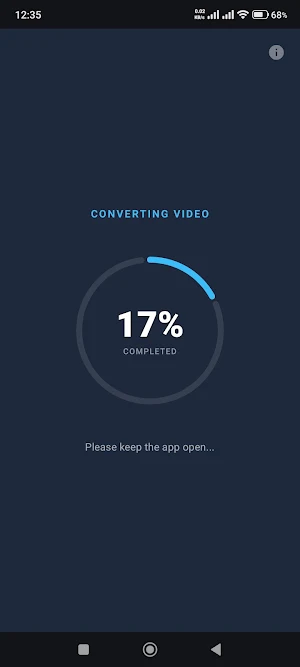
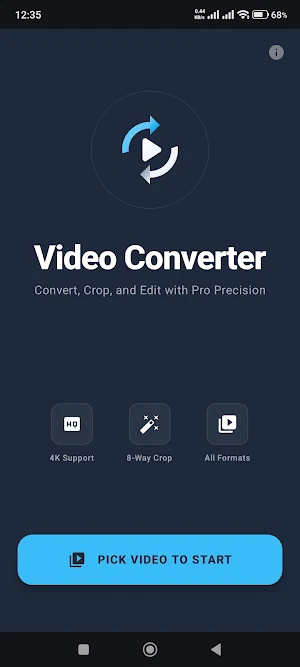
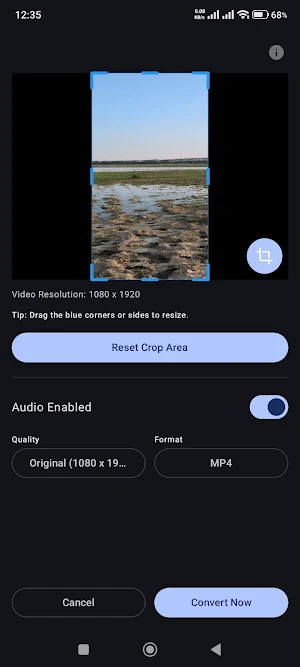
About Video Converter | Trim & Crop
Unlock Professional Video Conversion on Your Mobile Device.
Experience the most intuitive and powerful video conversion tool on Android. Designed for speed and precision, Video Converter allows you to transform your media into high-quality formats while giving you full creative control over cropping and trimming—all without your data ever leaving your device.
🚀 HIGH-PERFORMANCE ENGINE
Powered by industry-standard processing, our app handles everything from standard 480p to massive 4K and 1440p Ultra HD files with ease. Experience hardware-accelerated conversion that saves you time without sacrificing a single pixel of quality.
✂️ PRO 8-WAY PRECISION CROP
Don't settle for basic presets. Use our professional-grade 8-way interactive cropping tool to frame your video exactly how you want.
•
Grab corners or sides to resize.
•
Intuitive blue-handle interface.
•
Locked to video content—no accidental "black bars."
⏱️ ADVANCED TRIMMING
Cut out the clutter. Our high-speed trim slider features a real-time frame preview and a live "Selected Duration" timer, ensuring you cut exactly the moment you need.
🌟 KEY FEATURES:
•
Ultra HD Support: Convert and export in 4K, 1440p, 1080p, 720p, and 480p.
•
Original Resolution: Option to keep your native cropped pixels without forced scaling.
•
Audio Control: One-tap toggle to enable or disable audio for silent clips.
•
Aspect Ratio Mastery: Automatically detects and maintains vertical or horizontal orientation.
•
Instant Gallery Save: Final outputs are saved directly to your device’s "Movies" folder for instant visibility in your gallery.
•
Universal Formats: Export to MP4, MKV, MOV, and AVI.
🔒 PRIVACY FIRST
Your videos are your business. Unlike other converters, we have no servers. All processing happens 100% locally on your phone. No cloud uploads, no hidden tracking, and no data collection.
✅ CLEAN & AD-FREE FEEL
Built with modern Material 3 design, the interface is sleek, dark-themed, and professional. No cluttered menus—just pure video processing power at your fingertips.
Experience the most intuitive and powerful video conversion tool on Android. Designed for speed and precision, Video Converter allows you to transform your media into high-quality formats while giving you full creative control over cropping and trimming—all without your data ever leaving your device.
🚀 HIGH-PERFORMANCE ENGINE
Powered by industry-standard processing, our app handles everything from standard 480p to massive 4K and 1440p Ultra HD files with ease. Experience hardware-accelerated conversion that saves you time without sacrificing a single pixel of quality.
✂️ PRO 8-WAY PRECISION CROP
Don't settle for basic presets. Use our professional-grade 8-way interactive cropping tool to frame your video exactly how you want.
•
Grab corners or sides to resize.
•
Intuitive blue-handle interface.
•
Locked to video content—no accidental "black bars."
⏱️ ADVANCED TRIMMING
Cut out the clutter. Our high-speed trim slider features a real-time frame preview and a live "Selected Duration" timer, ensuring you cut exactly the moment you need.
🌟 KEY FEATURES:
•
Ultra HD Support: Convert and export in 4K, 1440p, 1080p, 720p, and 480p.
•
Original Resolution: Option to keep your native cropped pixels without forced scaling.
•
Audio Control: One-tap toggle to enable or disable audio for silent clips.
•
Aspect Ratio Mastery: Automatically detects and maintains vertical or horizontal orientation.
•
Instant Gallery Save: Final outputs are saved directly to your device’s "Movies" folder for instant visibility in your gallery.
•
Universal Formats: Export to MP4, MKV, MOV, and AVI.
🔒 PRIVACY FIRST
Your videos are your business. Unlike other converters, we have no servers. All processing happens 100% locally on your phone. No cloud uploads, no hidden tracking, and no data collection.
✅ CLEAN & AD-FREE FEEL
Built with modern Material 3 design, the interface is sleek, dark-themed, and professional. No cluttered menus—just pure video processing power at your fingertips.
What’s new
Version 1.1 · Updated September 11, 2026
V1.1 (13) Easily extract audio from any video into MP3, M4A, AAC, WAV, FLAC, or OGG files! • Full-Screen Preview: Inspect and fine-tune your video crop in full-screen mode. • Easier Crop Dragging: Drag and move the entire crop box by touching anywhere in the center. • Conversion Badges: View selected resolution & trim times on the progress screen.
Alternatives to Video Converter | Trim & Crop
Looking for apps like Video Converter | Trim & Crop? Here are 3 similar Android apps on Google Play. All of them are free to download.

| App | Rating | Price | Installs | Last updated | Compare |
|---|---|---|---|---|---|
| Video Converter | Trim & Crop | – | Free | 50+ | Sep 11, 2026 | |
| QR Scanner / Generator | – | Free | 1+ | – | Compare |
| Network File Browser | – | Free | 500+ | Oct 12, 2026 | Compare |
| AOD Clock | – | Free | 1,000+ | Oct 1, 2026 | Compare |