
Metal Detector(金属探知機)
Tools Contains ads
You can simply find metals by this application.
- Downloads
- 100+
- on Google Play
- Price
- Free
- No in-app purchases
- Updated
- Aug 11
- 2026 · v1.0.4
Screenshots


About Metal Detector(金属探知機)
This application by using a geomagnetic sensor installed in smartphone detects magnetic changes caused by metals. Therefore, since the sensor also reacts to strong electromagnetic waves and magnetism, it is not possible to detect only metals in places where these elements are strongly present. In the unlikely event that the sensor is exposed to strong electromagnetic waves or strong magnetism, the hardware geomagnetic sensor will temporarily go haywire and the sensor will need to be calibrated. In such a case, the application will automatically start the sensor calibration program. So please follow the on-screen guidance to perform the calibration operation. (If you also feel that the sensor accuracy is decreasing, please perform the calibration operation one after another.)
The metals types that can be detected by this application are mainly magnetic metals such as iron and steel. It does not react to non-magnetic metals such as copper and aluminum.
Compared to commercially available metal detectors, the detection range of this application is shorter, approximately 15 cm.
Based on the nominal geomagnetic field strength of 46μT in Japan under normal conditions, this application will notify you with sound (can be muted) and vibrator when it detects a geomagnetic field strength higher than 46μT. (The geomagnetic field strength under normal conditions varies from country to country.)
The default screen is "Radar mode". The switch button at the top of the screen allows you to switch to "Numerical mode".
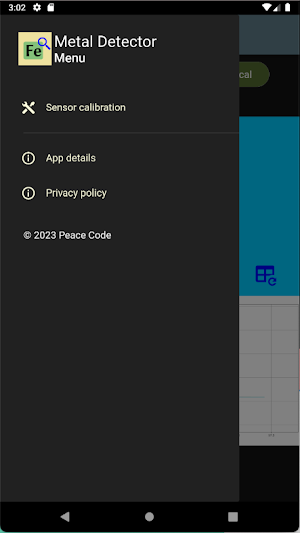
The menu button on the upper left opens the menu. The magnetometer calibration information is located in that menu.
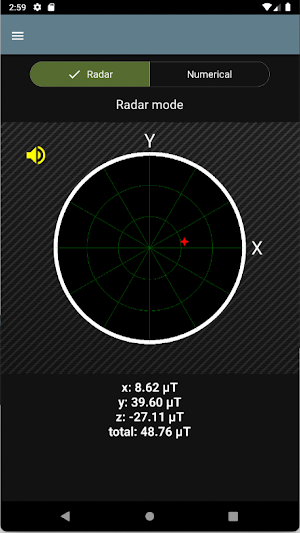
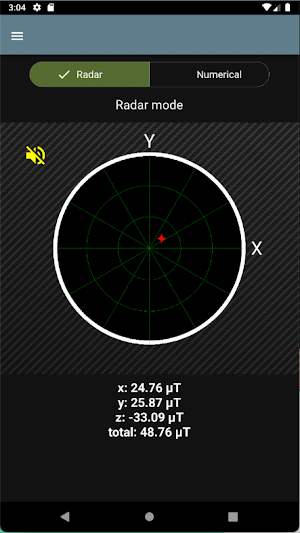
Radar mode:
The magnetic intensity of the X-axis and Y-axis components detected at any time is displayed as dots(red star) on a circular graph. (Each axis magnetic intensity is also displayed numerically at the bottom portion).
The larger the magnetic intensity, the more the point moves toward the center of the circle. This function is intended to provide a visual representation of the magnetic intensity in the X-axis and Y-axis directions and does not mean that the scale on the graph represents the actual search distance. Please use it as a rough guide when searching.
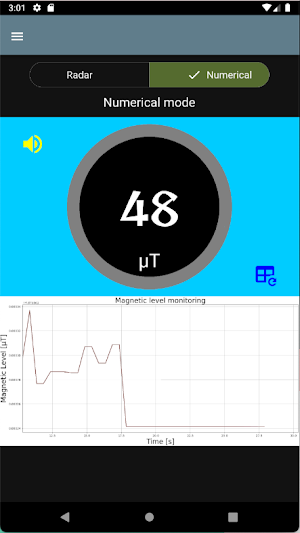
Numerical mode:
Displays the total magnetic force value on the monitor as a numerical value and a time-series graph. The higher the value, the better the metal detection.
The Y-axis of the time series graph automatically changes its maximum scale value according to the magnitude of the numerical value. To reset the scale, press button with blue graph icon.
In some countries and regions, the use of metal detectors for artifact searches without permission is prohibited.
The metals types that can be detected by this application are mainly magnetic metals such as iron and steel. It does not react to non-magnetic metals such as copper and aluminum.
Compared to commercially available metal detectors, the detection range of this application is shorter, approximately 15 cm.
Based on the nominal geomagnetic field strength of 46μT in Japan under normal conditions, this application will notify you with sound (can be muted) and vibrator when it detects a geomagnetic field strength higher than 46μT. (The geomagnetic field strength under normal conditions varies from country to country.)
The default screen is "Radar mode". The switch button at the top of the screen allows you to switch to "Numerical mode".
The menu button on the upper left opens the menu. The magnetometer calibration information is located in that menu.
Radar mode:
The magnetic intensity of the X-axis and Y-axis components detected at any time is displayed as dots(red star) on a circular graph. (Each axis magnetic intensity is also displayed numerically at the bottom portion).
The larger the magnetic intensity, the more the point moves toward the center of the circle. This function is intended to provide a visual representation of the magnetic intensity in the X-axis and Y-axis directions and does not mean that the scale on the graph represents the actual search distance. Please use it as a rough guide when searching.
Numerical mode:
Displays the total magnetic force value on the monitor as a numerical value and a time-series graph. The higher the value, the better the metal detection.
The Y-axis of the time series graph automatically changes its maximum scale value according to the magnitude of the numerical value. To reset the scale, press button with blue graph icon.
In some countries and regions, the use of metal detectors for artifact searches without permission is prohibited.
What’s new
Version 1.0.4 · Updated August 11, 2026
Supports Android 16
User reviews

Nice
Alternatives to Metal Detector(金属探知機)
Looking for apps like Metal Detector(金属探知機)? Here are 2 similar Android apps on Google Play. All of them are free to download.

| App | Rating | Price | Installs | Last updated | Compare |
|---|---|---|---|---|---|
| Metal Detector(金属探知機) | – | Free | 100+ | Aug 11, 2026 | |
| GP Checker (GPS) | – | Free | 500+ | Aug 25, 2026 | Compare |
| Compass Plus | – | Free | 100+ | Aug 27, 2026 | Compare |