
Fraction Calculator Math
Education Contains ads
Fraction calculator with detailed steps. Add, subtract, multiply & divide easily
- Downloads
- 283+
- on Google Play
- Price
- Free
- No in-app purchases
- Updated
- Mar 4
- 2026 · v1.0
Screenshots
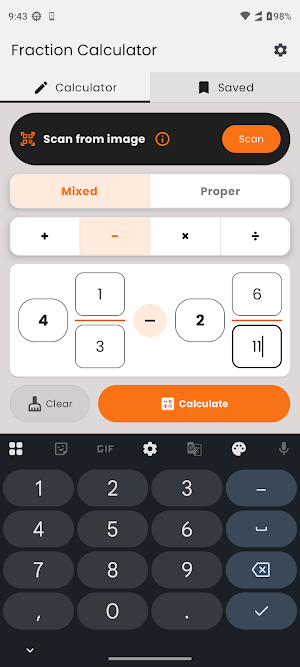
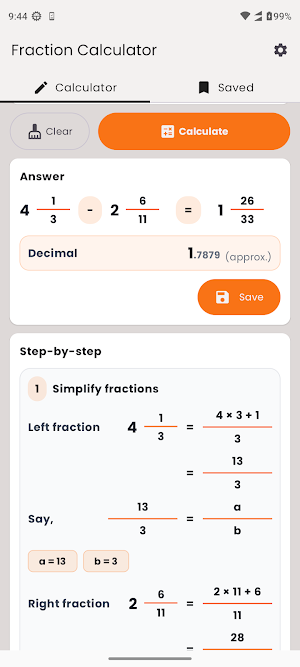
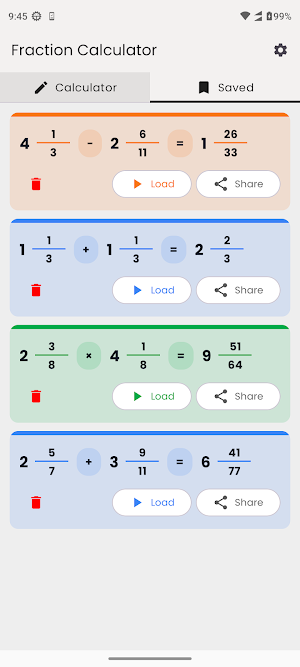


About Fraction Calculator Math
Fraction Calculator Math makes fraction problems easy with clean inputs, instant answers, and detailed step-by-step explanations.
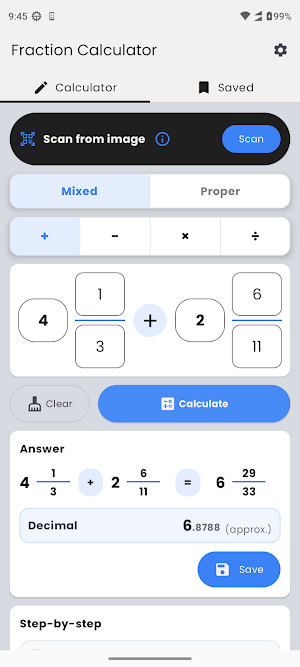
Whether you’re a student, parent, or teacher, this app helps you solve fraction operations confidently. Enter proper fractions (b/c) or mixed numbers (a b/c), choose an operation, and get the result shown clearly as a fraction (proper/mixed), and decimal.
KEY FEATURES
• Add, subtract, multiply, and divide fractions
• Proper (b/c) and Mixed (a b/c) input modes
• Smart validation: prevents invalid inputs like zero denominator
• Step-by-step solution breakdown
• Decimal output
• Save calculations and view them anytime
• Share saved results as an image
• Scan from camera/gallery to solve a fraction
HOW IT WORKS
1) Select fraction form: Mixed or Proper
2) Choose an operation: +, −, ×, ÷
3) Enter left and right fractions
4) Tap Calculate to see:
- final answer (fraction + mixed form + decimal)
- a clear, elegant step-by-step explanation
5) Tap Save to store the result, then Load/Share/Delete anytime in Saved
SCAN RESULTS (OCR)
• Crop only the fraction expression area
• Use clear symbols: + − × ÷
• Write mixed numbers with a space: 4 1/3
• Examples: “1 1/2 + 2 3/4”, “3/5 × 10/7”
Fraction Calculator Math is designed for learning and accuracy—perfect for classwork, exams, and daily practice.
Whether you’re a student, parent, or teacher, this app helps you solve fraction operations confidently. Enter proper fractions (b/c) or mixed numbers (a b/c), choose an operation, and get the result shown clearly as a fraction (proper/mixed), and decimal.
KEY FEATURES
• Add, subtract, multiply, and divide fractions
• Proper (b/c) and Mixed (a b/c) input modes
• Smart validation: prevents invalid inputs like zero denominator
• Step-by-step solution breakdown
• Decimal output
• Save calculations and view them anytime
• Share saved results as an image
• Scan from camera/gallery to solve a fraction
HOW IT WORKS
1) Select fraction form: Mixed or Proper
2) Choose an operation: +, −, ×, ÷
3) Enter left and right fractions
4) Tap Calculate to see:
- final answer (fraction + mixed form + decimal)
- a clear, elegant step-by-step explanation
5) Tap Save to store the result, then Load/Share/Delete anytime in Saved
SCAN RESULTS (OCR)
• Crop only the fraction expression area
• Use clear symbols: + − × ÷
• Write mixed numbers with a space: 4 1/3
• Examples: “1 1/2 + 2 3/4”, “3/5 × 10/7”
Fraction Calculator Math is designed for learning and accuracy—perfect for classwork, exams, and daily practice.
What’s new
Version 1.0 · Updated March 4, 2026
Initial Release.
Alternatives to Fraction Calculator Math
Looking for apps like Fraction Calculator Math? Here are 6 similar Android apps on Google Play. All of them are free to download.
-
kg lbs Converter
-
Loan Amortization Calculator
-
feet inches converter
-
Concrete Calculator Pro
-
BG Eraser: Background Remover
-
Geometry Formulas
| App | Rating | Price | Installs | Last updated | Compare |
|---|---|---|---|---|---|
| Fraction Calculator Math | – | Free | 100+ | Mar 4, 2026 | |
| kg lbs Converter | – | Free | 10,000+ | – | Compare |
| Loan Amortization Calculator | – | Free | 100+ | Jun 14, 2026 | Compare |
| feet inches converter | – | Free | 1,000+ | Mar 6, 2026 | Compare |
| Concrete Calculator Pro | – | Free | 50+ | Jun 13, 2026 | Compare |
| BG Eraser: Background Remover | – | Free | 100+ | Feb 25, 2026 | Compare |
| Geometry Formulas | – | Free | 100+ | Feb 24, 2026 | Compare |