

Aline Black: linear icon pack
Personalization In-app purchases
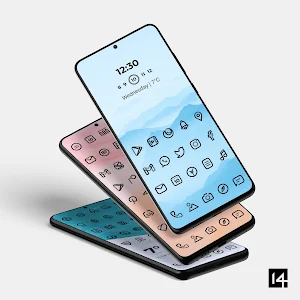
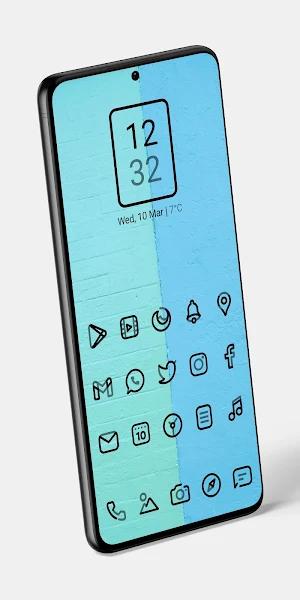
Beautiful set of black linear icons! Perfect for minimal light homescreen!
- Rating
- 4.8
- 54 ratings
- Downloads
- 3.1K+
- on Google Play
- Price
- $2.49
- In-app purchases
- Updated
- Sep 25
- 2026 · v1.1.0
Screenshots


About Aline Black: linear icon pack
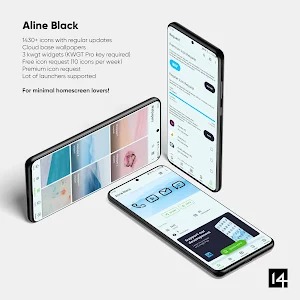
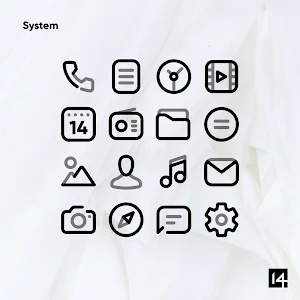
Aline Black icon pack is a set of bold linear black icons made from black and 50% transparent black lines. It goes perfectly on light walls, so be sure to check included walls. This pack is from Aline series, so be sure to check them all out on our Developer page!
Pack contains
2333 icons
30 wallpapers
3 KWGT widgets
We are updating our app at least once per month, so be sure that you will see a lot more icons in the future. If you are impatient to see your requested icons in the next release there is an option for a Premium icon request.
We recommend to set the size of icons to 80-100% in launcher settings for the best outcome.
Aline Black Features
• Resolution of icons: 256 x 256 px
• Professional highest quality design
• Dynamic calendar icon
• Masking of unthemed icons
• Folders icons (must apply them manually)
• Miscellaneous icons (must apply them manually)
• Easily apply or download wallpaper
• Tap to send icon requests
• Cloud wallpapers
• KWGT widgets
Still thinking about buying Aline Black? Don’t worry, we offer 100% refund in the first 24h from the purchase, just send us an email with your order id.
Please note that a custom launcher for Android is required - for example Nova launcher, Apex launcher, Niagara launcher, Lawnchair etc. It will not work with a lot of default launchers that comes with the phone (Google Now launcher etc.). How to apply on Samsung OneUI launcher: https://medium.com/@one4studio/applying-custom-icon-packs-in-samsung-oneui-launcher-1d9241dee093
How to send an icon request for Aline Black icon pack? Open our app and go to Request card. Check all icons you want to be themed and send request by pressing Send button. You will get a screen with options how to share request and you need to chose Gmail. When sending email, DO NOT delete generated zip file or change Subject – if you do that your request will become unusable.
How icon request works? Many of you ask when will you see icons you requested in our pack. Well, this is the case: We make icons by highest demand. We have our own software that makes a list of requested icons from all user requests. It sorts icons by the number of unique requests for certain app so the most demanded apps go to top of the list and therefore we make those icons first. Example: If 10 users requested the icon for the same app, there is a high probability that we will make that icon among the first ones, but if only 1 or 2 users requested the same app, don't expect to see that icon soon because we have a lot of requested icons already. Icons from Premium requests are added in about maximum 2 weeks from requesting.
How to set wallpaper? Open our app and find the Wallpapers card, then select wallpaper you want and Set it or Download it. New wallpapers will be added in future updates.
How to search or find an alternate icon: Long press icon to replace on homescreen → Icon options → Edit → Tap icon → Select icon pack → Press arrow on top right to open icons. Swipe to access different categories or use search bar to find alternate icon, tap to replace, done!
Supported Launchers
Action Launcher • ADW Launcher • ADW ex Launcher • Apex Launcher • Go Launcher • Google Now Launcher • Holo Launcher • Holo ICS Launcher • Lawnchair • LG Home Launcher • LineageOS Launcher • Lucid Launcher • Nova Launcher • Niagara Launcher • Pixel Launcher • Posidon Launcher • Smart Launcher • Smart pro Launcher • Solo Launcher • Square Home Launcher • TSF Launcher
Other launchers can simply apply Aline Black linear icons from your launcher settings.
Email us at: [email protected]
Twitter: www.twitter.com/One4Studio
Telegram: https://t.me/one4studio
Discord: https://discord.gg/FgKmUG77pu
Pack contains
2333 icons
30 wallpapers
3 KWGT widgets
We are updating our app at least once per month, so be sure that you will see a lot more icons in the future. If you are impatient to see your requested icons in the next release there is an option for a Premium icon request.
We recommend to set the size of icons to 80-100% in launcher settings for the best outcome.
Aline Black Features
• Resolution of icons: 256 x 256 px
• Professional highest quality design
• Dynamic calendar icon
• Masking of unthemed icons
• Folders icons (must apply them manually)
• Miscellaneous icons (must apply them manually)
• Easily apply or download wallpaper
• Tap to send icon requests
• Cloud wallpapers
• KWGT widgets
Still thinking about buying Aline Black? Don’t worry, we offer 100% refund in the first 24h from the purchase, just send us an email with your order id.
Please note that a custom launcher for Android is required - for example Nova launcher, Apex launcher, Niagara launcher, Lawnchair etc. It will not work with a lot of default launchers that comes with the phone (Google Now launcher etc.). How to apply on Samsung OneUI launcher: https://medium.com/@one4studio/applying-custom-icon-packs-in-samsung-oneui-launcher-1d9241dee093
How to send an icon request for Aline Black icon pack? Open our app and go to Request card. Check all icons you want to be themed and send request by pressing Send button. You will get a screen with options how to share request and you need to chose Gmail. When sending email, DO NOT delete generated zip file or change Subject – if you do that your request will become unusable.
How icon request works? Many of you ask when will you see icons you requested in our pack. Well, this is the case: We make icons by highest demand. We have our own software that makes a list of requested icons from all user requests. It sorts icons by the number of unique requests for certain app so the most demanded apps go to top of the list and therefore we make those icons first. Example: If 10 users requested the icon for the same app, there is a high probability that we will make that icon among the first ones, but if only 1 or 2 users requested the same app, don't expect to see that icon soon because we have a lot of requested icons already. Icons from Premium requests are added in about maximum 2 weeks from requesting.
How to set wallpaper? Open our app and find the Wallpapers card, then select wallpaper you want and Set it or Download it. New wallpapers will be added in future updates.
How to search or find an alternate icon: Long press icon to replace on homescreen → Icon options → Edit → Tap icon → Select icon pack → Press arrow on top right to open icons. Swipe to access different categories or use search bar to find alternate icon, tap to replace, done!
Supported Launchers
Action Launcher • ADW Launcher • ADW ex Launcher • Apex Launcher • Go Launcher • Google Now Launcher • Holo Launcher • Holo ICS Launcher • Lawnchair • LG Home Launcher • LineageOS Launcher • Lucid Launcher • Nova Launcher • Niagara Launcher • Pixel Launcher • Posidon Launcher • Smart Launcher • Smart pro Launcher • Solo Launcher • Square Home Launcher • TSF Launcher
Other launchers can simply apply Aline Black linear icons from your launcher settings.
Email us at: [email protected]
Twitter: www.twitter.com/One4Studio
Telegram: https://t.me/one4studio
Discord: https://discord.gg/FgKmUG77pu
What’s new
Version 1.1.0 · Updated September 25, 2026
Sep 25, 2026 - v2.1.2 5 new · 2 updated icons Sep 1, 2026 - v2.1.1 5 new icons Jul 31, 2026 - v2.1.0 4 new · 2 updated icons Jul 16, 2026 - v2.0.9 Fixed icons missing after the previous update Jul 16, 2026 - v2.0.8 5 new icons Jun 26, 2026 - v2.0.7 5 new icons May 11, 2026 - v2.0.6 10 new icons Apr 27, 2026 - v2.0.5 Bug fixes and stability improvements
User reviews

Excellent icon pack 😍

Superb

Icons are neatly designed by using black and white colour. They will make attractive homescreen as they made mine.

Gorgeous looking icon pack..black icon looks awesome in my mobile..
Love it

Very nice, clean looking linear icon pack. Aline Black is unique and will greatly complement many different themes. I'm glad to have this icon pack in my collection, and look forward to showcasing it on my phone. Dev does great work.
Alternatives to Aline Black: linear icon pack
Looking for apps like Aline Black: linear icon pack? Here are 6 similar Android apps on Google Play. The highest rated is Juno Icon Pack (4.6/5), and 5 of the 6 are free to download.
-
Juno Icon Pack 4.6
-
Aura Icon Pack 4.4
-
One4KWGT Ultimate: KWGT widget 4.2
-
One4KLWP Ultimate 4.3
-
Circons: Circle Icon Pack 4.1
-
Neuron MNML - WatchFace
| App | Rating | Price | Installs | Last updated | Compare |
|---|---|---|---|---|---|
| Aline Black: linear icon pack | 4.8 / 5 | $2.49 | 1,000+ | Sep 25, 2026 | |
| Juno Icon Pack | 4.6 / 5 | Free | 100,000+ | – | Compare |
| Aura Icon Pack | 4.4 / 5 | Free | 500,000+ | Oct 6, 2026 | Compare |
| One4KWGT Ultimate: KWGT widget | 4.2 / 5 | Free | 100,000+ | Oct 17, 2026 | Compare |
| One4KLWP Ultimate | 4.3 / 5 | Free | 50,000+ | Oct 17, 2026 | Compare |
| Circons: Circle Icon Pack | 4.1 / 5 | Free | 100,000+ | – | Compare |
| Neuron MNML - WatchFace | – | 1.49 USD | 100+ | – | Compare |
Similar apps on Google Play
- Juno Icon Pack
- Aura Icon Pack
- One4KWGT Ultimate: KWGT widget
- One4KLWP Ultimate
- Circons: Circle Icon Pack
- Neuron MNML - WatchFace
- Caelus Duotone Icon Pack
- Selene Noir: Dark Icon Pack
- Surreal Walls: Fantasy walls
- WildPapers - Wildlife Photos
- PastelWalls: Pastel wallpapers
- One4KLWP Pro: Paid KLWP walls
- Aline Orange: linear icon pack
- Aline Yellow: linear icon pack
- Aline Pink: linear icon pack
- Aline Purple: linear icon pack
- Aline Green: linear icon pack
- Aline Red: linear icon pack
- Aline Blue: linear icon pack
- Aline Black: linear icon pack
- Aline White: linear icon pack
- AlineT: bold linear icon pack
- Aline: bold linear icon pack
- Selene Icon Pack
- Vera Outline White Icon Pack
- Vera Outline Black: Icon Pack
- Vera Icon Pack: shapeless icon
- Vera Outline Icon Pack
- Athena Dark Icon Pack
- One4KWGT Reloaded: KWGT widget
- Athena Icon Pack: iOS icons
- Hera Dark: Circle Icon Pack
- Nova Dark Icon Pack
- One4KWGT Pro: KWGT Pro widgets
- Nova Icon Pack
- Hera Icon Pack: Circle Icons
- Caelus Black: linear icon pack
- Caelus: linear icon pack
- Caelus White: linear icon pack