Akimbolt: Connect to your Mac
Sync texts, calls, clipboard and notifications to your Mac. Back up your photos.
About Akimbolt: Connect to your Mac
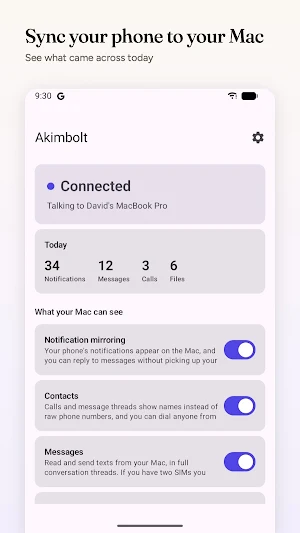
Akimbolt puts your Android phone on your Mac. Texts, calls, copy/paste, notifications and files sync straight between the two over the Wi-Fi you are already on, so you can leave the phone in your bag and keep working. It also backs up your photos to the Mac by itself.
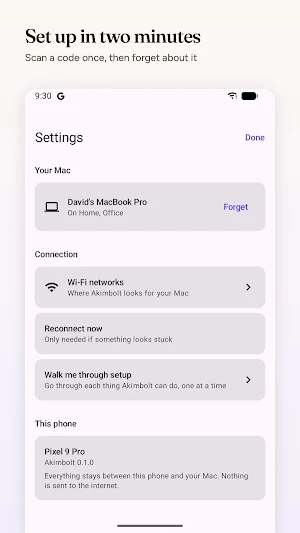
It needs the free Akimbolt app on your Mac. The two pair by scanning a QR code once, and find each other automatically after that.
WHAT IT DOES
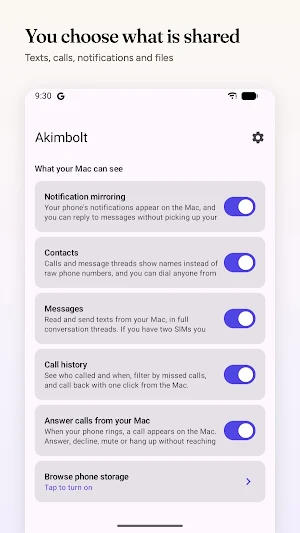
Messages: Read and send texts from your Mac, in full conversation threads with pictures. Two SIMs? Choose which one sends.
WhatsApp and Google Messages: Open them inside Akimbolt, signed in to the account on the phone they belong to, so your RCS and WhatsApp chats are on the Mac too.
Calls: When your phone rings, the buttons appear on your Mac. Answer, decline, mute or hang up without breaking your flow, and call anyone back with a click.
Notifications: Your phone's notifications arrive as proper Mac notifications. Reply to a message straight from the banner, and it clears on your phone too.
Verification codes: When a login code arrives by text, your Mac offers it for copying instead of making you squint at your phone.
Files: Browse your phone's storage from your Mac, with thumbnails so you can find the photo you are after. Drag files across in either direction, and transfers pick up where they left off if the Wi-Fi drops.
Photo backup: New photos and videos copy to your Mac on their own, into a folder you choose or straight into the Photos app. Pick the albums, decide whether videos come too, and set how far back to go. Nothing is ever deleted, on either device.
Clipboard: Copy on one device, paste on the other.
Contacts: Calls and threads show names instead of raw numbers.
Now playing: Whatever your phone is playing appears in the Mac menu bar, with play, pause and skip.
Phone status: Battery, signal and storage at a glance, plus a button to make a misplaced phone ring.
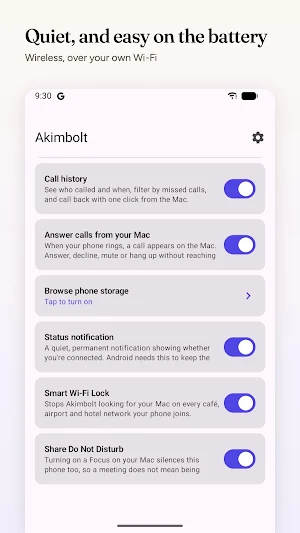
Do Not Disturb: A Focus on your Mac can silence your phone, and a phone on Do Not Disturb stops its notifications shouting from your Mac.
Several phones: Up to eight at once. Work phone and personal phone stay separate, each with its own conversations and notifications.
PRIVATE BY DESIGN
There are no servers. Your messages go from your phone to your Mac across your own network and nowhere else, because there is nowhere else for them to go.
No account. No sign-up. No cloud. No analytics, no tracking, no advertising, and no third-party code of any kind.
Pairing performs an X25519 key exchange from the QR code, and everything after that is encrypted with AES-256-GCM. Each paired Mac has its own keys, and fresh session keys are derived on every reconnection.
Turn off the Wi-Fi and the whole thing simply stops.
BATTERY
Akimbolt only looks for your Mac on networks where it has found one before, so it is not scanning in every café and airport you pass through. Once connected it holds the link open rather than polling. On an ordinary day you should not notice it.
WHAT YOU NEED
An Android phone running 8.0 or later, a Mac running macOS 14 or later with the free Akimbolt app, and both on the same Wi-Fi network.
Everything works for 14 days. After that a single purchase unlocks it for good, with no subscription and every future update included.
ABOUT PERMISSIONS
Akimbolt asks for SMS and call log access because syncing your texts and calls to your computer is what the app is for. It reads them only to send them to the Mac you have paired, and nothing is stored or uploaded. Every feature can be switched off individually in the app.
Photo and video access is requested only if you switch on photo backup, and is used to copy them to your paired Mac. Akimbolt never deletes anything.
Location permission is requested only so Akimbolt can read the name of the Wi-Fi network you are on, which Android classifies as location data. Your position is never requested, received or stored.
Full details: https://akimbolt.com/privacy-policy
Akimbolt: Connect to your Mac details
Akimbolt: Connect to your Mac is a free Productivity app for Android with 5+ installs on Google Play and a 5.0/5 average rating from 1 rating. It was released on August 12, 2026 and last updated on August 16, 2026. It's developed by Active Development. It requires Android 8.0 or later. The app offers in-app purchases.
- Category
- Productivity
- Rating
- 5.0 / 5 (1 rating)
- Installs
- 5+
- Price
- Free
- In-app purchases
- Yes
- Ads
- No ads
- Current version
- 1.1
- Requires Android
- 8.0
- Content rating
- Everyone
- Released
- August 12, 2026
- Last updated
- August 16, 2026
- Developer
- Active Development
What’s new in Akimbolt: Connect to your Mac
WhatsApp and Google Messages now open inside Akimbolt on your Mac, each signed in to the account on the phone it belongs to. Google Messages brings your RCS chats across too. This release also steadies the connection: faster reconnects when you switch networks, transfers that pick up after a Wi-Fi drop, picture messages that arrive the moment they land, and an option to keep Akimbolt connected while your phone is idle.
Version 1.1 · Updated August 16, 2026
Similar Apps

2Do - To do List & Reminders
"2Do adapts to my needs, not the other way around. 2Do gets me."- Macstories

Froling Connect
You can easily check and control your Fröling system with Connect.

Geeni
Easy, Smart, Home. Control smart bulbs, plugs, cameras and more from one app!

Arenti
Arenti App is a user-friendly app for video monitoring and smart home devices.

FastField: Field Service Forms
Field ops & mobile forms — dispatch teams, capture data & report in real time.

Blue Sky Vitamin
Health & Wellness
