

Icon Changer: Magic Icons
Tools In-app purchases Contains ads
The Icon esthetician customizes your app icon in your styles.
- Downloads
- 1K+
- on Google Play
- Price
- Free
- In-app purchases
- Updated
- Oct 31
- 2022 · v2.0.0
Screenshots


About Icon Changer: Magic Icons
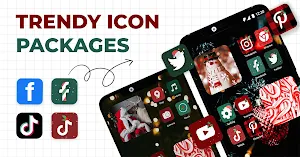
♥️♥️ Icon changer - Magic Icons to customize Homescreens with icons in your own styles. If you feel your recent Homescreen is boring then the icon esthetician is a perfect choice to customize default icons into new lively icons with various available icons or create personalized Icon symbols.
😍Let's explore the special features of Icon changer-Magic Icons!
💟Enable to customize Homescreen quickly and conveniently
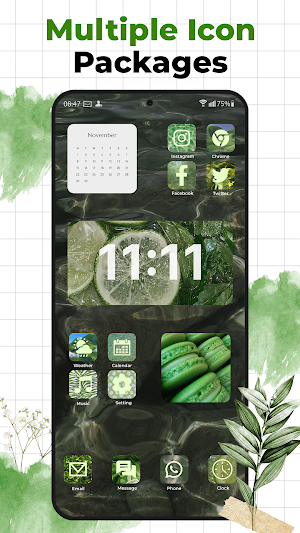
The icon changer app provides a lot of icon templates of aesthetic icons. You can freely change any symbols and replace these in a fast way.
💟Customize App Icons without watermark
If you are extremely annoyed by the change icon app on the store by watermarks then the icon changer app is a good choice to customize icons without watermarks.
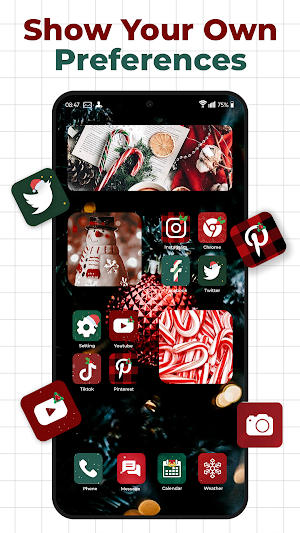
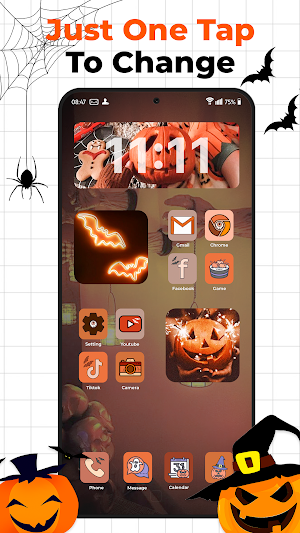
💟Change icons by available icons of various styles such as Halloween, Christmas, Cute, landscape, etc
We provide unique styles to modify the app symbols. Make your screen to become wonderful by choosing your favorite styles
💟Support changing app names quickly
If you want to have creative names for apps or secure the information on your screen then the app provides an amazing tool to perform easily
💟Change icons with your own image
With advanced editing features such as Shape, Effect, and Color. You can turn photos on your smartphone into new personalized icons.
How to use the icon changer app?
- Step 1: Access the icon changer app
- Step 2: Choose apps that you would love to change
- Step 3: Use photos or available icons to change the default icons
- Step 4: Choose a favorite name for the new app icon
- Step 5: Click "Create" to complete the icon changing
Icon Changer-Magic Icon is the easiest solution to change icons and perform your style on your smartphone. About us, we always work hard to bring the best experience and the most valuable things to our users. And, don't forget, your feedback is a big motivation to help us in improving the icon changer app, you can also leave your comments in the feedback section of the app or send them to our email: [email protected]
Have a nice day!
😍Let's explore the special features of Icon changer-Magic Icons!
💟Enable to customize Homescreen quickly and conveniently
The icon changer app provides a lot of icon templates of aesthetic icons. You can freely change any symbols and replace these in a fast way.
💟Customize App Icons without watermark
If you are extremely annoyed by the change icon app on the store by watermarks then the icon changer app is a good choice to customize icons without watermarks.
💟Change icons by available icons of various styles such as Halloween, Christmas, Cute, landscape, etc
We provide unique styles to modify the app symbols. Make your screen to become wonderful by choosing your favorite styles
💟Support changing app names quickly
If you want to have creative names for apps or secure the information on your screen then the app provides an amazing tool to perform easily
💟Change icons with your own image
With advanced editing features such as Shape, Effect, and Color. You can turn photos on your smartphone into new personalized icons.
How to use the icon changer app?
- Step 1: Access the icon changer app
- Step 2: Choose apps that you would love to change
- Step 3: Use photos or available icons to change the default icons
- Step 4: Choose a favorite name for the new app icon
- Step 5: Click "Create" to complete the icon changing
Icon Changer-Magic Icon is the easiest solution to change icons and perform your style on your smartphone. About us, we always work hard to bring the best experience and the most valuable things to our users. And, don't forget, your feedback is a big motivation to help us in improving the icon changer app, you can also leave your comments in the feedback section of the app or send them to our email: [email protected]
Have a nice day!
What’s new
Version 2.0.0 · Updated October 31, 2022
Big Update UI, Update new Icon packs
User reviews

Nice
Alternatives to Icon Changer: Magic Icons
Looking for apps like Icon Changer: Magic Icons? Here are 5 similar Android apps on Google Play. All of them are free to download.
-
Air Horn & Fart, Haircut Prank
-
Cast to TV & Screen Mirroring
-
Screen Mirroring For Smart TV
-
StoryGo: Music Video Maker
-
Chat CPT - AI Chat
| App | Rating | Price | Installs | Last updated | Compare |
|---|---|---|---|---|---|
| Icon Changer: Magic Icons | – | Free | 1,000+ | Oct 31, 2022 | |
| Air Horn & Fart, Haircut Prank | – | Free | 1,000+ | Jan 4, 2023 | Compare |
| Cast to TV & Screen Mirroring | – | Free | 1,000+ | Nov 29, 2022 | Compare |
| Screen Mirroring For Smart TV | – | Free | 10,000+ | Dec 26, 2022 | Compare |
| StoryGo: Music Video Maker | – | Free | 1,000+ | Aug 8, 2022 | Compare |
| Chat CPT - AI Chat | – | Free | 1,000+ | Mar 20, 2023 | Compare |