

OMV Companion
Tools In-app purchases
Monitor and lightly manage your OpenMediaVault home server from your phone.
- Downloads
- 565+
- on Google Play
- Price
- Free
- In-app purchases
- Updated
- Oct 9
- 2026 · v1.0.99
Screenshots


About OMV Companion
Unofficial: OMV Companion is an independent app. It is not affiliated with, endorsed by, or connected to the OpenMediaVault project or its developers.
BEFORE YOU START
Enter your server's full address including http:// or https:// — for example http://192.168.1.50 — not just the IP. Without the prefix the app cannot reach your server.
FREE TRIAL, THEN A SINGLE PURCHASE
Every feature is free for the first 14 days. After that, one purchase unlocks the full version — no subscription, no expiry, no account, no recurring charge. Nothing is deleted when the trial ends: your server details stay put and everything comes back the moment you unlock. Demo Mode needs no server and stays available at any time.
MONITOR AT A GLANCE
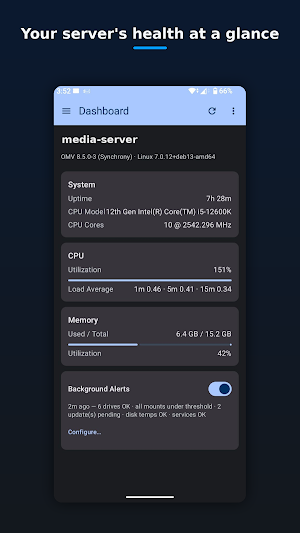
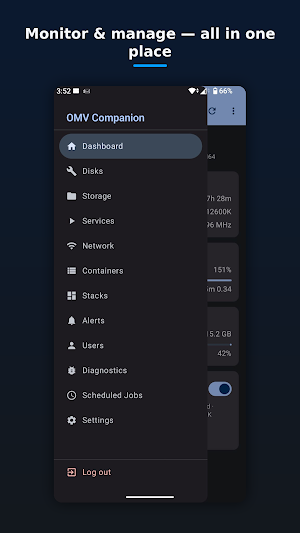
- Dashboard — hostname, OMV version, uptime, CPU, memory and load
- Disk health (S.M.A.R.T.) — per-drive status, temperature and attributes
- Storage — per-filesystem usage with thresholds
- Services, Docker containers and Compose stacks
- Network info, scheduled jobs and system diagnostics (logs + processes)
- Home-screen widget for health at a glance
SMART BACKGROUND ALERTS
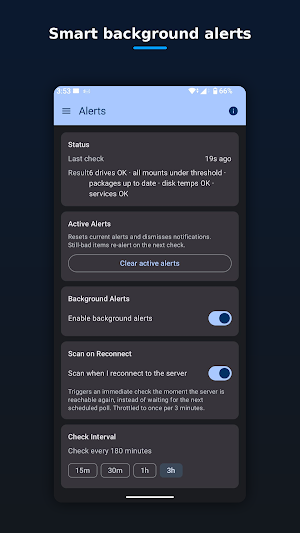
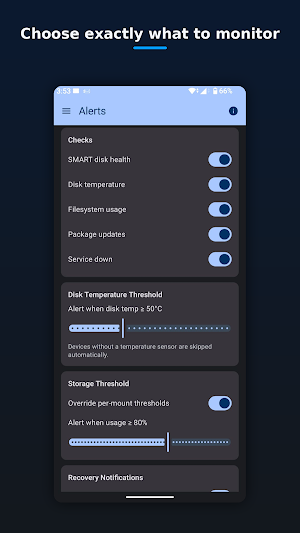
- Get notified when a drive fails a S.M.A.R.T. check, a disk runs hot, a filesystem fills up, a service unexpectedly stops, or updates are available
- Alerts only fire when your server is reachable, so you're never spammed while away from home — and the app scans the moment you reconnect to your network
- Alert history, per-check toggles, thresholds and quiet recovery notifications
LIGHT MANAGEMENT (each behind a clear confirmation)
- Restart Docker containers and Compose stacks
- Reboot the server, install available system updates
- Create and edit users and groups
BUILT FOR HOME LABS
- Works on your local network — no cloud, no account, no tracking, no ads
- Your login is stored encrypted on your device and used only to talk to your own server
- Dark / light / system themes and an optional biometric lock
OMV Companion is designed as a "monitor now, manage lightly" tool — the heavy administration still lives in the OpenMediaVault web interface.
Requires an OpenMediaVault server reachable on your network. OpenMediaVault is a trademark of its respective owner; this app is unofficial and independent.
What’s new
Version 1.0.99 · Updated October 9, 2026
- minor fixes - Scheduled Tasks - change a job's run time and turn it on or off in the app, no need to open the OMV web UI. - Container down alerts - get notified when a running Docker container stops, exits or becomes unhealthy. - Docker image updates - see which containers have a newer image. Containers other software depends on, such as databases, are flagged so one is not upgraded by accident. Needs the ImageCheck plugin; guide at hackitzlabs.net. - Dashboard - show, hide and reorder cards.
Alternatives to OMV Companion
Looking for apps like OMV Companion? Here are 4 similar Android apps on Google Play. All of them are free to download.



| App | Rating | Price | Installs | Last updated | Compare |
|---|---|---|---|---|---|
| OMV Companion | – | Free | 500+ | Oct 9, 2026 | |
| The Abundant Life Journey | – | Free | 10+ | Sep 10, 2026 | Compare |
| Korvex | – | Free | 5+ | Oct 20, 2026 | Compare |
| JustMail – Private Email | – | Free | 100+ | Oct 25, 2026 | Compare |
| JNJ Renovations | – | Free | 10+ | Nov 15, 2021 | Compare |
Compare OMV Companion with the top alternatives: ratings, updates, ASO score and keyword gaps →